
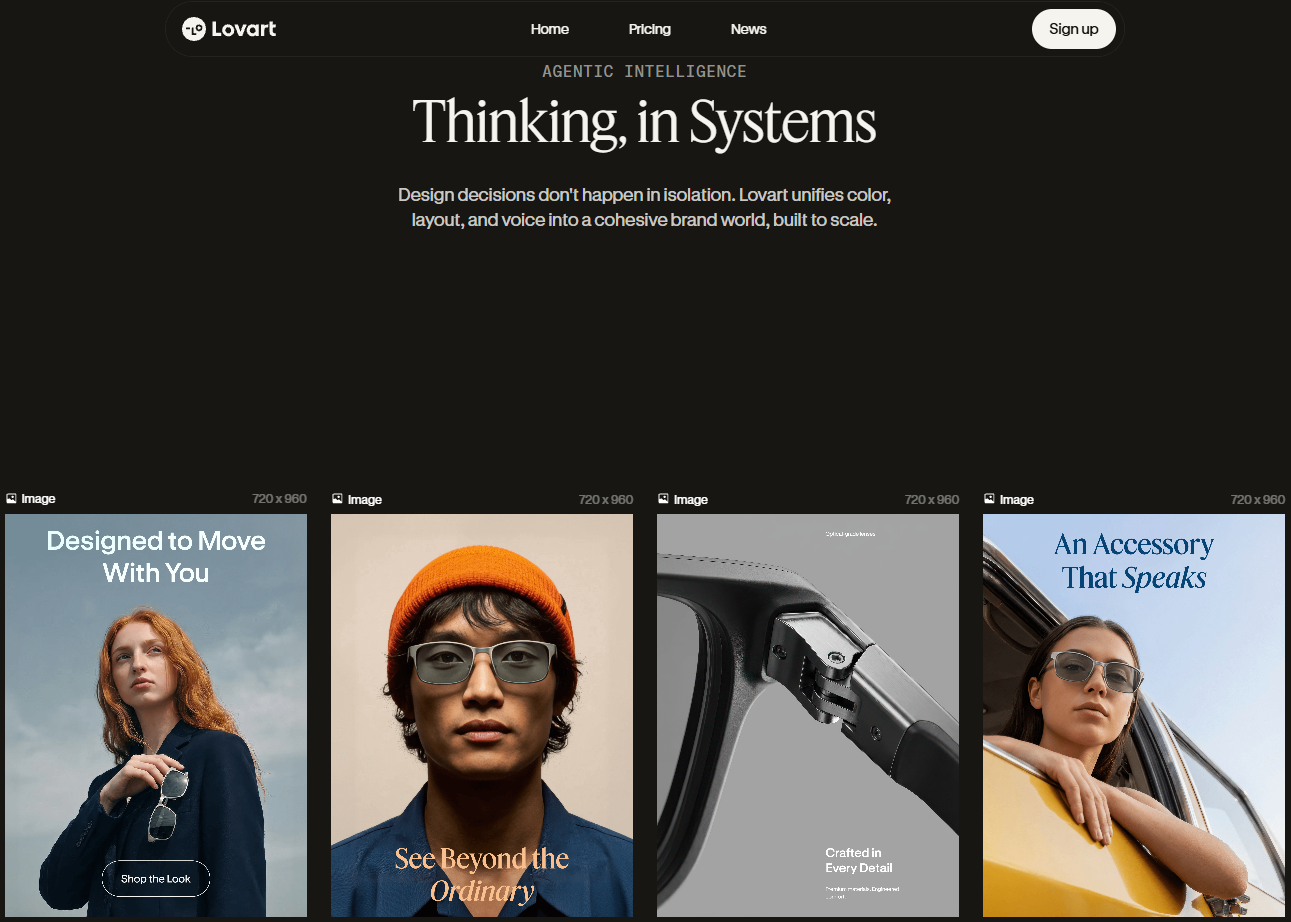
Lovart isn't just another AI image generator — it's the world's first design agent that thinks, plans, and executes like a professional creative team.
I'll never forget the moment my jaw literally dropped. It was late on a Tuesday night, and I had just uploaded a single product photo to Lovart with a simple request: "Create a 30-second commercial with storyboards, video clips, background music, and voiceover." What happened next felt like witnessing the future arrive ahead of schedule.
The AI didn't just generate a few images. It analyzed my product, researched the brand, wrote a professional script, designed a complete storyboard with consistent characters, selected the perfect LoRA models, generated matching video clips with Kling AI, composed original background music, synthesized voiceover narration, and assembled everything into a polished commercial — all from a 50-word prompt.
This wasn't the AI I had been using for the past two years. This was something fundamentally different. After spending 30 days diving deep into Lovart AI, testing every feature, pushing every boundary, and creating hundreds of designs, I'm ready to share everything I've learned. This is the comprehensive guide I wish existed when I started — the one that will show you why over 10 million professionals are abandoning their traditional design stacks for this revolutionary platform.
How I Discovered the Future of Design
Let me paint the picture of where I was before Lovart entered my life. Like many creators, I had assembled what I thought was the ultimate AI design toolkit. Midjourney for artistic generation. ChatGPT for image editing. Canva for layouts. Photoshop for refinement. Premiere for video. Each tool excelled at one thing but required constant context-switching, file transfers, and mental overhead.
My typical workflow for a simple product advertisement went something like this: Generate base images in Midjourney, download them, upload to Photoshop for text and refinement, export to Canva for layout variants, possibly run through another AI for video clips, find stock music, edit everything in Premiere. A process that should take minutes consumed hours.
When I first heard about Lovart being called "the world's first design agent," I was skeptical. Every new AI tool claims to be revolutionary. But then I saw demonstrations that made me pause. This wasn't just image generation — it was intelligent task orchestration, where the AI actually understood design thinking.
The moment I realized Lovart was different: It didn't just execute my prompt — it analyzed my request, created a strategy, selected appropriate models and LoRAs, maintained character consistency across images, and delivered a complete creative package. It was thinking like a design director, not just a image generator.
My first serious test was creating a perfume advertisement. I uploaded a product photo and typed a simple brief: "Generate all storyboard images for a 30-second commercial. I'll use these to guide filming and video generation later." What the AI delivered left me speechless.
Instead of jumping straight into image generation, Lovart first analyzed the product, identified it as a specific perfume brand, and researched its positioning. Then it developed a creative concept with keywords: "elegant, sophisticated, cinematic." It wrote a video brief to ensure visual continuity. It defined character details including appearance, clothing, personality, and emotional expression. Only after this strategic foundation did it begin generating.
And here's what really blew my mind — it automatically selected FLUX as the base model, identified appropriate human portrait and cosmetics advertising LoRAs, generated a character reference image first to maintain consistency, and then produced all storyboard frames. The entire workflow demonstrated a level of design thinking I hadn't seen in any AI tool before.
What Makes Lovart AI Different
To truly understand Lovart, you need to shift your mental model from "AI tool" to "AI colleague." Traditional image generators are like cameras — you point them at a prompt and they capture whatever that produces. Lovart is more like hiring a design team that happens to work at the speed of thought.
The platform combines a conversational interface on the right with an infinite canvas workspace on the left. Everything you generate lands on this canvas, where you can freely arrange, edit, and refine. But the magic isn't in the interface — it's in the intelligence underlying every interaction.
Multi-Model Orchestration
Lovart intelligently routes requests to GPT Image 1.5, Flux Pro, Gemini Imagen 3, Kling AI, Suno, Tripo AI, and more — selecting the optimal model for each specific task without requiring you to understand the differences.
Design Thinking Integration
Before generating anything, the AI conducts research, develops concepts, creates briefs, and plans execution. It approaches creative tasks the way experienced designers do — with strategy before execution.
Continuous Editability
Nothing is ever "final" on the canvas. Text can be edited inline. Elements can be separated and moved. Styles can be transferred. The boundary between generation and editing dissolves entirely.
Multi-Turn Refinement
Unlike tools that treat each prompt as isolated, Lovart maintains context across your entire session. Request changes, and it understands what you're referring to without re-explaining your project.
The Agent Architecture
What sets Lovart apart technically is its agentic approach. When you submit a request, you're not just triggering a model — you're activating an intelligent system that can:
- Search the web to research brands, products, and creative references
- Analyze uploaded images to understand context, style, and requirements
- Select from multiple generation models based on task requirements
- Choose appropriate LoRAs to achieve specific visual styles
- Maintain consistency across multi-image projects through character references
- Generate HTML and code when needed (like creating styled storyboard presentations)
- Orchestrate video, music, and voice synthesis for complete productions
This architecture means you can give high-level creative directions without specifying technical implementation. "Create a brand identity for a sustainable coffee shop" becomes a complete visual system without you needing to prompt separately for logos, color palettes, packaging mockups, and social media templates.
The 500-Million User Validation
In just months, Lovart has attracted over 10 million professional creators and achieved $80 million in annual recurring revenue. This isn't just hype — it represents a genuine shift in how professionals approach design work. When this many people vote with their wallets, the product is delivering real value.
The Nano Banana Pro Revolution
If Lovart is the orchestra, Nano Banana Pro is its star soloist. This AI image model, powered by the latest generation technology, represents one of the most capable image generation engines available — and Lovart offers it completely free with paid subscriptions, with no credit consumption.
I've spent considerable time comparing Nano Banana Pro against other models, and its strengths become apparent quickly. The photorealistic output rivals dedicated photography AI. The text rendering accuracy exceeds what I've achieved with any other tool. And the prompt comprehension — understanding what you actually want versus what you literally said — demonstrates remarkable sophistication.
Key Capabilities
High-Fidelity Generation
Creates photorealistic and artistically styled images with precise control over composition, lighting, and mood. Perfect for commercial work that demands professional quality.
Natural Language Editing
Edit images through conversation. "Make the lighting warmer," "Remove the background elements," "Change her dress to blue" — all execute with remarkable precision.
ChatCanvas Integration
Directly annotate, sketch, and refine rough ideas into polished images. The boundary between thinking and creating becomes beautifully blurred.
Template Acceleration
Access Lovart's template library for brochures, packaging, menus, and flyers with custom image generation that adapts to your specific needs.
Deep Search and Deep Think Modes
Two features that dramatically elevate Nano Banana Pro's capabilities are Deep Search and Deep Think modes. When enabled, the AI doesn't just process your prompt — it researches, analyzes, and strategizes before generating.
Deep Search allows the model to access web information to inform its creative decisions. Ask for "a poster in the style of current Apple marketing" and it actually researches Apple's current visual language rather than relying on potentially outdated training data.
Deep Think enables extended reasoning where the AI considers multiple approaches, evaluates tradeoffs, and develops a coherent creative strategy before execution. For complex projects, this thinking time translates directly into output quality.
Pro tip: For maximum quality on important projects, enable both Deep Search and Deep Think modes. The extra processing time is minimal compared to the improvement in creative output — it's like giving your AI colleague time to actually think instead of rushing to deliver.
Text Edit - Typography That Actually Works
If you've struggled with AI-generated text — and who hasn't? — Lovart's Text Edit feature will feel like discovering fire. This isn't just about generating text correctly (though Nano Banana Pro excels at that). It's about making any text in any image editable after the fact.
The capability sounds simple but the implications are revolutionary. Upload any poster, advertisement, or designed image, and Lovart can extract all text layers, identify their visual properties, and allow you to edit them as easily as typing in a word processor. Font style, angle, perspective, shadows, effects — everything is preserved while the actual characters change.
How Text Edit Works
Click the "Edit Text" button and Lovart scans the image, identifying every text element regardless of style, angle, or artistic treatment. Each text block appears in an editable field.
Simply type new text in any field. The AI preserves the original typography — font weight, letter spacing, rotation, perspective distortion, shadows, glow effects — while seamlessly replacing the characters.
When your new text is longer or shorter than the original, Lovart intelligently adjusts scaling and spacing to maintain visual harmony without breaking the design.
Real-World Applications
This feature has transformed how I approach multilingual content. Previously, creating Chinese, English, and Spanish versions of a promotional poster meant essentially rebuilding each version from scratch. Now I design once and simply edit the text for each language variant. The AI handles all the typographic complexity automatically.
Even more impressive is handling artistic text that would be nightmare to modify in traditional tools. Brush stroke lettering, 3D extruded headlines, text with complex shadows and reflections — all become editable. I modified a grunge-style poster where the text had ink splatter effects, and the replacement maintained every detail of the original artistic treatment.
Original text: "Summer Sale 2024"
New text: "Winter Collection 2026"

Result: Perfect preservation of:
- Gradient gold coloring
- 3D shadow depth
- Slight perspective tilt
- Decorative underline elements
- Integration with background elements
The AI understands text as visual elements within a composition, not just characters to replace.
Text Edit works on PPT slides too! Generate a presentation, then easily modify headlines, dates, statistics, or any text content without regenerating entire slides. This makes Lovart-generated presentations genuinely practical for business use.
Touch Edit - Point and Transform
If Text Edit revolutionizes typography, Touch Edit revolutionizes everything else. This feature represents Lovart's signature interaction paradigm — the ability to point at any element in an image and directly modify it through natural language commands.
The interface is beautifully intuitive. Hold Ctrl (or Cmd on Mac) and click anywhere in an image. Lovart's AI instantly identifies and segments the object under your cursor — a face, a piece of clothing, a background element, a product, literally anything. Once selected, you simply describe what you want changed, and the AI executes the transformation while preserving everything else.
The Zero-Mask Revolution
Traditional image editing requires masks — laboriously painting over areas to define what should and shouldn't be affected by your edits. Tools like Photoshop have gotten better at automatic selection, but the fundamental paradigm remains: define your selection, then apply your edit.
Touch Edit eliminates this entirely. Point. Speak. Done. The AI understands both what you're pointing at and what you want to do with it. No brushes, no masks, no selection refinement. Just intention translated directly into result.
Element Replacement
Click on a hat and say "change to a baseball cap." Click on a flower arrangement and say "replace with tropical flowers." The AI handles removal, generation, and seamless integration automatically.
Style Transformation
Select a dress and request "vintage cheongsam style." Click on hair and say "add highlights." Point to lighting and demand "warm sunset tones with dramatic rim light." Style changes apply precisely where indicated.
Spatial Adjustment
Move selected elements by simply dragging or describing desired position. "Move this vase to the left" or "position the product in the center" work as expected, with automatic background filling.
Detail Refinement
Zoom into fine details and make precise adjustments. Fix a strange hand, adjust an earring, correct a shadow — the AI's segmentation works at pixel-level precision when needed.
Practical Speed Improvements
Official testing shows dramatic efficiency gains. Tasks that previously required 90 minutes with traditional tools now complete in under 7 minutes. Batch modifications across multiple images average fewer than 3 clicks per image. These aren't marketing numbers — they reflect genuine workflow transformation.
I tested this myself on a product photography project. I had 12 images that needed background color changes, product highlighting adjustments, and shadow refinement. In Photoshop, this would have been a solid afternoon of work. With Touch Edit, I processed all 12 images in about 20 minutes, including time to review and make additional tweaks.
Touch Edit becomes even more powerful when combined with the canvas. Select multiple elements across different images, apply consistent transformations, and maintain stylistic coherence across entire projects. It's like having global styles in design software, but powered by intelligent understanding.
Element Editing - PNG to PSD Magic
This feature genuinely made me gasp when I first used it. One of the fundamental limitations of AI-generated images has always been their flatness — you get a single-layer bitmap, and everything is permanently fused together. Text, foreground, background, effects — all merged into one uneditable surface.
Lovart's Element Editing explodes this limitation entirely. With a single click, any image — AI-generated or uploaded — can be deconstructed into separate, individually editable layers. It's like the AI is performing a reverse photoshop, somehow extracting elements that were never separate to begin with.
How It Works
Select any image on your canvas and click the "Edit Elements" button. Lovart's AI analyzes the composition, identifies distinct visual elements, and separates them into individual layers. Background becomes one layer. Foreground subjects become their own layers. Text elements separate out. Decorative graphics isolate themselves.
The magic isn't just in the separation — it's in the reconstruction. When you separate a person from their background, Lovart doesn't just cut them out and leave a hole. It intelligently fills the background behind them, imagining what would have been there. The result is two complete, usable images: your subject on transparent background and your background as a complete scene.
The AI examines your image and identifies semantically meaningful elements — not just edge detection, but understanding what constitutes distinct objects, text, backgrounds, and effects.
Each element is extracted with clean edges and appropriate transparency. Complex intersections are handled intelligently — hair, glass, smoke all separate cleanly.
Background areas revealed by separation are filled using generative AI, maintaining style and context consistency. You're not left with holes — you're left with complete images.
Rearrange, resize, rotate, and reposition any layer independently. Create new compositions from existing elements. Apply different effects to different layers. Full creative control restored.
Use Cases That Changed My Workflow
Product photography benefits enormously from this feature. Generate a product scene, then separate elements to adjust composition. Move the product slightly left. Bring a background element forward. Scale a decorative item smaller. Changes that would require complete regeneration in other tools become simple drag-and-drop operations.
Marketing materials gain unprecedented flexibility. Create a poster, separate the elements, then quickly produce variants. Same text, different backgrounds. Same product, different contexts. Same layout, different color schemes. Element editing transforms single images into families of related compositions.
Export Consideration
While Lovart's Element Editing creates layer-like functionality within the platform, you can export individual elements as separate PNG files with transparency. For professional workflows requiring actual PSD files, this provides the raw materials to quickly assemble in Photoshop.
Mockup Mastery - Professional Presentations
Creating compelling mockups traditionally required either expensive 3D software, tedious Photoshop work, or settling for generic stock templates. Lovart's Mockup feature offers a third path: intelligent image placement that understands perspective, lighting, and context.
The workflow is remarkably simple. You have a design — maybe a poster you've created, a logo, or product packaging. You want to show it in context — on a billboard, a t-shirt, a phone screen, a storefront. Select your design, choose a target scene, and Lovart automatically handles perspective matching, lighting integration, and shadow casting.
What Makes It Different
Most mockup tools use pre-defined templates with placeholder regions. You drop your design into the placeholder, and basic distortion applies. The results are functional but clearly artificial — lighting doesn't quite match, reflections look wrong, the design sits on top of the surface rather than into it.
Lovart's approach uses generative AI to actually understand the mockup scene. When you place a logo on a coffee cup, the AI analyzes the cup's material properties, lighting conditions, and curvature, then generates how your logo would genuinely appear in that context. The logo doesn't just distort — it reflects the cup's glossiness, catches the scene's lighting, and wraps around the curve naturally.
Automatic Perspective
No manual corner pinning required. The AI detects surfaces and automatically applies correct perspective transformation to your designs.
Lighting Integration
Your design adopts the scene's lighting conditions. Bright areas reflect more, shadows fall correctly, the design feels present in the space.
Material Response
Placement on glass, fabric, paper, or metal all produce different visual results. The AI understands how designs interact with different surfaces.
Custom Scenes
Beyond pre-made mockup templates, you can use any image as a mockup target. Photo of your actual store? Product image from your factory? All work.
Creative Applications
I've used the Mockup feature for some unexpectedly creative purposes. One project involved creating "itasha" style car wraps — the colorful anime-decorated vehicles popular in Japanese car culture. I designed a wrap pattern, then mockup-applied it to photos of my actual car. The AI correctly handled the complex body curves, panel lines, and reflective paint surface. The result was indistinguishable from a real wrap photograph.
Brand identity presentations have become dramatically more impressive. Rather than showing flat logo variations, I now create complete environmental mockups — signage on buildings, uniforms on staff, packaging on shelves, digital displays on devices. The client sees their brand living in context, not floating in white space.
Mockup + Touch Edit + Element Editing creates a powerful combination. Generate a scene mockup, separate elements if needed, use Touch Edit to refine details, then regenerate mockup variants. The features compose together beautifully.
PPT Generation That Rivals Designers
Every professional knows the pain of PowerPoint. Whether it's year-end reports, project proposals, brand presentations, or marketing decks, creating slides that look genuinely good consumes disproportionate amounts of time. Most AI PPT tools I've tried produce results that feel exactly like what they are — algorithmically assembled templates with no creative soul.
Lovart's PPT generation operates on an entirely different level. Because it's backed by the same design intelligence that powers image generation, the resulting presentations actually demonstrate aesthetic sensibility. They're not just organized — they're designed.
Generation Quality
I tested the system with a challenging prompt: "Create a 30-Day Fat Burning and Body Shaping Plan PPT, 15 pages. Style should be like Nike advertising — strong athletic feeling, bold impactful typography, bright colors with fluorescent green and black."
The result exceeded expectations significantly. Each slide demonstrated visual impact with photography-quality fitness imagery. Typography was genuinely bold and powerful — not just big fonts, but purposeful typographic hierarchy. The color scheme maintained perfect consistency throughout. Layout varied intelligently between slides while maintaining cohesive identity.
Most importantly, the content was substantive. This wasn't a single-slide idea stretched across 15 pages. Each page advanced the narrative with appropriate information density and visual support. The AI understood that a fitness plan PPT needs structure — phases, exercises, nutrition guidance, progress tracking — and delivered all of it.
Editing and Refinement
Generated presentations aren't locked outputs. Every slide can be refined using Lovart's full editing toolkit. Select a slide and request changes — "adjust the color palette to more energetic orange tones" or "add a progress tracking graphic to this page." The AI modifies while preserving the overall design language.
Text Edit applies to PPT slides seamlessly. Change dates, update statistics, translate to different languages — all the typographic modification capabilities work exactly as they do with images. This makes generated presentations genuinely practical for real business use.
Create a 15-page PPT for "Yunnan Dali + Lijiang 7-Day Travel Guide"
Style: elegant, fresh, ethnic flair
Include: itinerary by day, accommodation recommendations,
         food spots, photography locations, budget breakdown
The AI produces slides with appropriate imagery, clear information hierarchy, and consistent regional aesthetic.
Export Options
Completed presentations export directly to PPTX or PDF format. The PPTX maintains editability in PowerPoint — text boxes are text boxes, images are images, layouts remain adjustable. For final delivery, PDF export preserves exact appearance across all viewing contexts.
This feature alone might justify Lovart for many users. The hours saved on presentation design compound dramatically over time, and the quality difference between AI-assisted and DIY presentations is immediately visible to audiences.
One-Prompt Video Creation
This is where Lovart's "design agent" positioning becomes undeniably real. The platform can accept a creative brief and deliver a complete video advertisement — not just clips to be assembled, but a finished production with storyboard, generated footage, background music, voiceover narration, and professional editing.
When I first tested this, I used a perfume product photo and a simple brief asking for "30-second advertisement storyboard images." The AI didn't just give me storyboard frames — it delivered a complete production pipeline that demonstrated genuine creative direction.
The Automated Production Pipeline
The AI analyzes your product, researches the brand (using web search), and develops a creative concept with defined visual language: "elegant, sophisticated, cinematic" for perfume, for example.
A complete video script emerges, including scene descriptions, transitions, timing, and narration text. This isn't template filling — it's contextual creative writing.
For videos featuring people, the AI creates detailed character specifications: appearance, clothing, personality, emotional expression. This ensures consistency across all generated footage.
The AI selects appropriate generation models and LoRAs. For the perfume ad, it chose FLUX as base with human portrait and cosmetics advertising LoRAs — without any technical direction from me.
Complete storyboard frames generate with maintained character consistency. The AI creates a reference character image first, then uses it to ensure the same person appears throughout.
Storyboard frames become video clips through Kling AI integration. Prompts include camera movement, character motion, and emotional beats.
Background music generates through Suno integration. Voiceover synthesizes from the script. Both match the established creative tone.
Everything combines into an edited video with proper timing, transitions, and audio mixing. You receive a complete deliverable, not raw materials.
Interactive Storyboard Presentation
Here's something that genuinely surprised me: To explain its creative vision, the AI generated an HTML webpage as a storyboard presentation. It created styled cards for each scene, included the generated images, wrote descriptions of camera angles and character actions, and assembled everything into a scrollable document that I could review before video generation.
This kind of meta-creativity — using one medium to explain work in another — demonstrates the genuine intelligence operating behind Lovart's interface. It's not just executing tasks; it's thinking about how to communicate its thinking.
Generation Time Considerations
Full video production involves significant generation time, especially for video clips. A 30-second advertisement with 8 scenes might take 15-20 minutes to fully generate. The AI maintains context throughout this extended process, which is technically impressive but requires patience. Plan accordingly for client-facing sessions.
Complete Brand Design Workflows
Individual features are impressive, but Lovart's true power emerges when they combine into complete creative workflows. Brand identity development showcases this integration beautifully — from initial concept through complete visual system.
Consider a typical brief: "Create brand identity for a sustainable coffee shop called GreenBrew." Traditional execution would involve logo explorations, color palette development, typography selection, mockup creation, guidelines documentation — weeks of designer time, multiple revision rounds, substantial budget.
In Lovart, this becomes a single extended conversation. The AI generates logo concepts, refines based on feedback, develops color systems, creates mockups showing the brand in context, produces marketing material templates, and assembles presentation decks explaining the design rationale. What would take weeks consolidates into hours.
The Workflow in Practice
I walked through this exact exercise. My prompt specified brand attributes, target audience, and aesthetic preferences. The AI produced multiple logo directions — each meaningfully different, not just variations — alongside mood boards showing how each direction would extend into broader visual systems.
After selecting a direction, I requested refinements. The AI understood what to preserve and what to evolve. Colors shifted slightly. Typography tightened. The logo simplified while retaining its character. Each round of feedback produced intelligently interpreted revisions.
Then came environmental mockups: the logo on a storefront, on coffee cups, on staff aprons, on packaging, on social media. Not generic mockup templates but contextually appropriate visualizations that showed the brand living in its intended environment.
Logo Development
Multiple conceptual directions with different design approaches. Refinement through natural conversation. Final versions in appropriate formats and colorways.
Color System
Primary and secondary palettes. Proper hex values and color relationships. Application guidance for digital and print contexts.
Application Mockups
The brand visualized across touchpoints: signage, packaging, digital, apparel, stationery. Realistic presentation that clients can immediately understand.
Guidelines Documentation
Brand book pages explaining usage, spacing, color application, and restrictions. Professional documentation that supports consistent implementation.
For agencies, Lovart transforms client presentations. Instead of showing concepts in isolation, present complete brand systems with environmental mockups. Clients see their brand living in context, dramatically improving approval rates and reducing "I can't visualize it" objections.
Model Selection and Comparison
Lovart's multi-model architecture gives you access to several leading image generation systems within one interface. Understanding their strengths helps you achieve optimal results for specific use cases.
Available Models
Nano Banana Pro
Lovart's primary workhorse. Excellent photorealism, strong text rendering, deep prompt comprehension. Free unlimited use for subscribers makes it the default choice for most work.
GPT Image 1.5
OpenAI's latest image model. Superior for complex compositional instructions, multi-element scenes, and when precise prompt following is critical.
Flux Pro
Excels at artistic styles and creative interpretations. When you want the AI to take creative liberties and produce more stylized results, Flux delivers.
Gemini Imagen 3
Google's offering brings strong performance in natural scenes and realistic lighting. Particularly good for outdoor and environmental imagery.
Selection Strategy
The good news is that Lovart's agent intelligence often selects appropriate models automatically. When you describe a task without specifying a model, the AI routes to what it considers optimal. For the perfume advertisement, it chose Flux Pro for its cinematic quality without any direction from me.
When you want specific control, model selection is explicit in settings. Some users develop preferences — "I always use GPT Image 1.5 for product photography" — while others trust the automatic routing for varied projects.
Photorealistic Work
Product photography, portraits, realistic scenes
- Primary: Nano Banana Pro
- Alternative: GPT Image 1.5
- Enable Deep Think for complex compositions
Creative/Artistic Work
Illustrations, stylized content, conceptual imagery
- Primary: Flux Pro
- Alternative: Nano Banana Pro with style guidance
- Experiment with LoRA selection
Pricing and Value Analysis
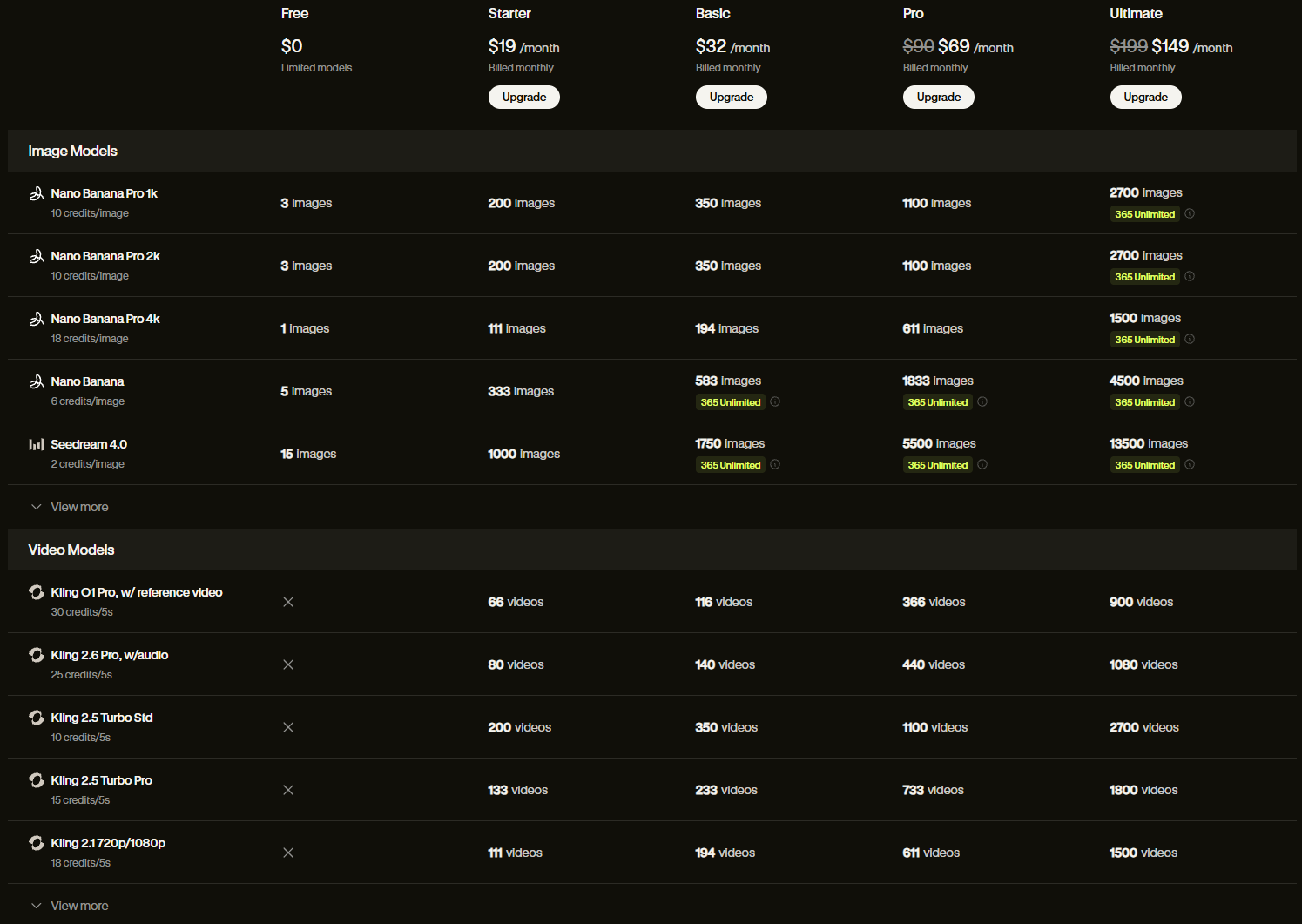
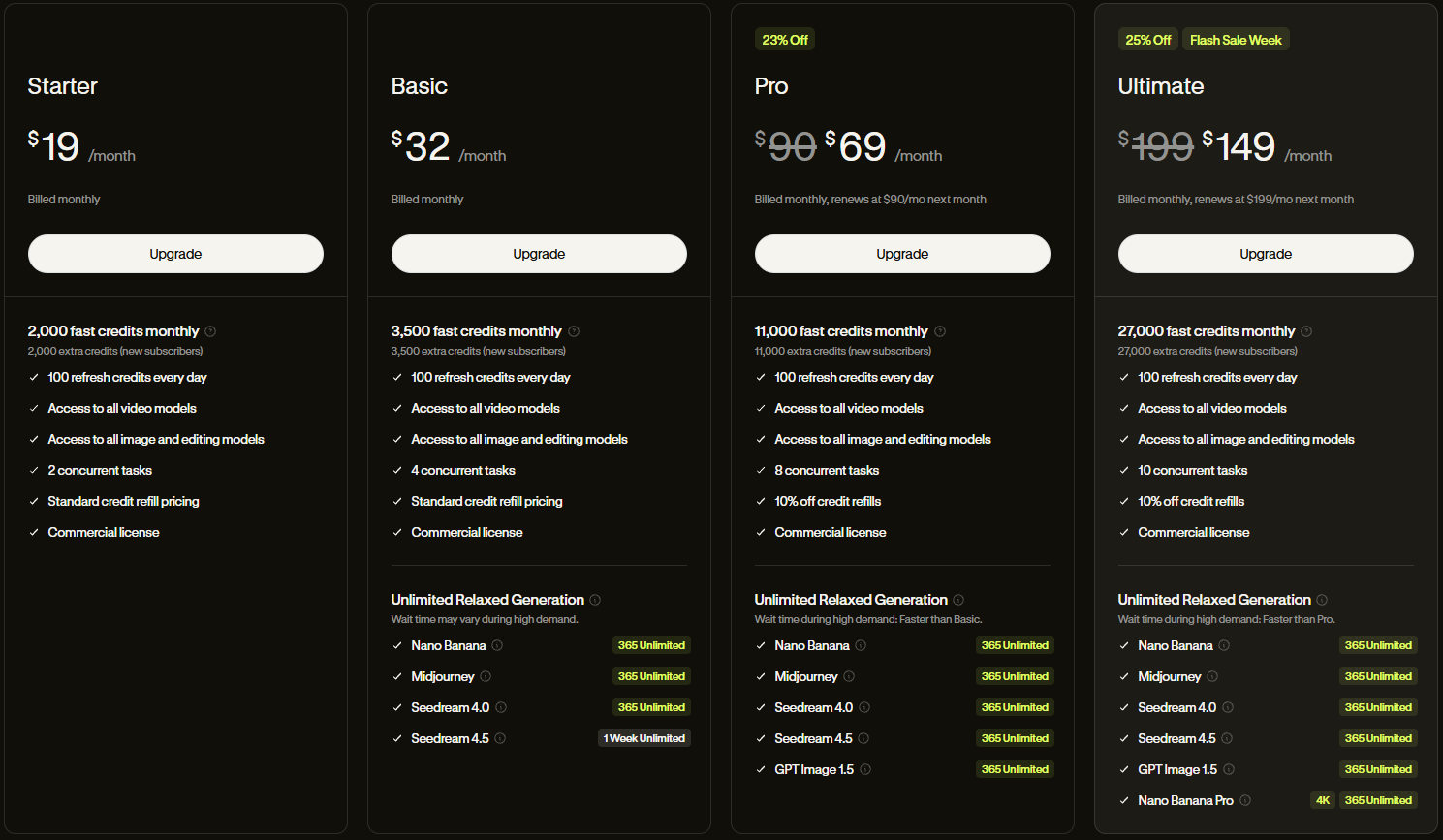
Let me break down Lovart's pricing structure honestly, because understanding the economics helps you make informed decisions about incorporating it into your workflow.
Plan Structure
Lovart operates on a credit-based system with monthly subscription tiers. Credits are consumed by generation tasks, with different operations costing different amounts. The crucial detail: Nano Banana Pro usage is unlimited and free for paid subscribers, which dramatically changes the value equation.
Free Tier
Limited credits for exploration. Enough to test core features and decide if the platform fits your needs. Not suitable for production work.
Pro Plan
Around $19-90/month depending on promotional pricing. Substantial credits plus unlimited Nano Banana Pro. The sweet spot for individual creators and freelancers.
Ultimate/Max Plan
Higher credit allocation for heavy users. Team features for collaborative workflows. Priority processing during peak times.
Current Promotions
Lovart frequently offers substantial discounts — currently up to 50% off. Annual billing provides additional savings. Check current pricing before committing.
Value Comparison
To assess Lovart's value, consider what it replaces. A typical creative stack might include Midjourney ($30/month), ChatGPT Plus ($20/month), Canva Pro ($15/month), stock assets ($30/month), and video tools ($20/month). That's over $100 monthly before any specialized software.
Lovart consolidates much of this functionality into a single subscription. Not everything — you might still want Photoshop for specific tasks or premium video editing. But for many creators, Lovart handles 80% of daily needs, representing genuine consolidation value.
The unlimited Nano Banana Pro access deserves emphasis. Other platforms charge per generation — at high volumes, costs compound quickly. Lovart's unlimited model access means you can iterate freely, experiment without financial anxiety, and generate variations without budget calculations.
Current Special Offer
As of this writing, Pro and Ultimate subscribers who purchase before certain deadlines receive 365 days of zero-credit Nano Banana Pro usage. These promotions change — verify current offers before purchasing, but they represent substantial additional value when available.
Pro Tips and Advanced Techniques
After extensive testing, I've developed workflows and techniques that maximize Lovart's capabilities. These aren't obvious from documentation but emerge from actually pushing the platform in production contexts.
Enable Deep Modes for Quality
Deep Search + Deep Think modes add processing time but significantly improve output quality. For important projects, always enable both. For rapid iteration, you might disable for speed.
Use Canvas Organization
The canvas isn't just for viewing — organize it strategically. Group related assets, create variant zones, keep reference images accessible. Spatial organization improves creative thinking.
Leverage History for Learning
Lovart's history feature preserves complete session records including prompts and settings. Review successful generations to understand what worked. Replay with modifications.
Combine Features Creatively
Text Edit + Touch Edit + Element Editing + Mockup chain together powerfully. Generate, separate elements, edit specific components, reassemble, place in mockup context. Complex workflows become manageable sequences.
Reference Image Strategy
For character consistency in multi-image projects, generate a "hero" reference image first. Use this as input for subsequent generations to maintain appearance across scenes.
Style Transfer for Brand Consistency
Establish brand visual language with strong reference images, then use style transfer to maintain consistency across varied content types. The AI captures aesthetic essence, not just colors.
Custom Size Generation
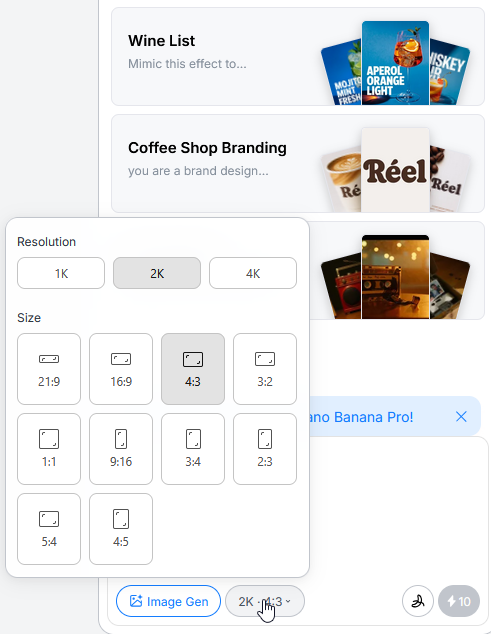
Lovart supports custom aspect ratios and dimensions beyond standard presets. For social media, this means generating platform-native sizes directly. For print, you can specify exact dimensions with appropriate resolution. No more cropping and scaling after generation.
Batch Workflow Optimization
For high-volume production, develop a batch mindset. Generate base images in sequence, then apply Touch Edit refinements across all. Use Text Edit to localize a poster series simultaneously. Element Editing lets you create component libraries that combine into multiple final compositions.
The most powerful technique I've discovered: treating Lovart as a creative collaborator rather than a tool. Describe your creative goals and constraints, then let the AI propose approaches. You'll often discover directions you wouldn't have considered, which you can then guide toward your vision.
Lovart vs Midjourney vs Others
Context matters when evaluating creative tools. Lovart occupies a different category than pure image generators like Midjourney, though their capabilities overlap. Understanding the distinctions helps you choose appropriately for different needs.
Fundamental Differences
Lovart AI
Design agent — complete creative workflows
- Multi-model orchestration
- End-to-end project capability
- Editing and refinement tools
- Video, audio, presentation generation
- Beginner-friendly interface
Midjourney
Image generator — artistic exploration
- Single (excellent) model
- Image generation focus
- Parameter-based refinement
- Images only
- Learning curve for Discord workflow
When to Choose Each
Choose Lovart when: You need production-ready deliverables. You're working on complete projects rather than individual images. You want editing capabilities integrated with generation. You need video, presentations, or brand systems. You prefer web interfaces to Discord workflows. You value unlimited generation for iteration.
Choose Midjourney when: Pure artistic exploration is the goal. You want maximum control over generation parameters. Your workflow already integrates well with Discord. You prefer Midjourney's particular aesthetic sensibility. You're doing fine art rather than commercial work.
Use both when: You have the budget and different projects benefit from each platform's strengths. Many professionals maintain multiple tools, using each where it excels.
The Integration Advantage
Lovart's fundamental advantage is integration. The value isn't just that it can generate images, edit text, create mockups, and produce videos — it's that all these capabilities exist in one continuous workspace. No exports, imports, format conversions, or tool switching. Start an idea in conversation, develop it visually, refine through editing, present in mockup, document in presentation — all without leaving the canvas.
This integration compounds in value over time. Learning one interface instead of five. Maintaining context across capabilities. Building libraries of assets that combine fluidly. The efficiency gains multiply across projects.
Final Verdict and Recommendations
After 30 days of intensive testing, creating hundreds of designs, exploring every feature, and pushing the platform to its limits, I'm ready to deliver my honest assessment of Lovart AI.
What Lovart Gets Right
The "design agent" positioning isn't marketing fluff — it accurately describes a genuinely new category of creative tool. Lovart doesn't just execute commands; it thinks about creative problems, develops strategies, and delivers complete solutions. The perfume advertisement exercise demonstrated this conclusively: the AI created a production-quality video from a simple brief, making intelligent decisions at every stage.
The editing capabilities — Text Edit, Touch Edit, Element Editing — represent genuine innovation. These aren't features you'll find combined elsewhere. The ability to point at elements and transform them through natural language, to edit any text in any image, to deconstruct and reconstruct compositions — these capabilities change what's possible without professional software expertise.
The unlimited Nano Banana Pro access eliminates the financial anxiety that constrains iteration in other platforms. You can experiment freely, generate variations abundantly, and refine without counting credits. This psychological freedom improves creative outcomes.
What Could Be Better
Documentation remains sparse in areas. Some features are more discoverable through exploration than explanation. The credit system for non-Nano Banana models could be clearer. Video generation, while impressive, requires patience for longer projects.
For users deeply invested in existing workflows — Photoshop experts, Midjourney power users — Lovart represents a different approach that may not align with established habits. The platform rewards those willing to work its way rather than forcing familiar patterns.
Who Should Use Lovart
Marketing Teams
Rapid content creation, brand consistency across materials, presentation generation. Lovart accelerates marketing workflows dramatically.
Freelance Designers
Client deliverables from concept through production. Reduce tool costs while increasing output capability. Impressive presentations.
Small Business Owners
Professional visual content without hiring designers. Social media, packaging, advertising — all achievable independently.
Content Creators
Thumbnails, graphics, video elements. High-volume generation with consistent quality. Rapid iteration on visual concepts.
The Bottom Line
Lovart represents something genuinely new in the creative AI landscape. Not just another image generator with slightly different output quality, but a fundamental rethinking of how AI can participate in design work. It's the difference between a powerful calculator and a collaborator who understands mathematics.
Is it perfect? No. Is it the right choice for everyone? No. But for creators seeking a unified platform that handles complete creative workflows with professional-quality output, Lovart delivers capabilities that simply didn't exist before.
The $80 million in annual recurring revenue and 10+ million professional users aren't accidents. They represent validation that Lovart solves real problems for real creators. My recommendation: take advantage of the free tier to explore, then evaluate the Pro plan against what you're currently spending on fragmented tools. For many creators, the consolidation alone justifies the investment.
"Lovart doesn't want you to be a slave to your tools — it wants you to be the master of your creativity. Every feature compresses mechanical labor so you can focus on what actually matters: the ideas themselves."
Discussion
0 commentsLeave a comment
Be the first to share your thoughts on this article!