
平庸的 AI 图像与令人惊叹的创作之间的区别不在于运气或昂贵的工具,而在于理解 Nano Banana Pro 的思维方式并学会说它的视觉语言。
我还记得一切改变的那一刻。那是凌晨 3 点,我的手机开始不停地嗡嗡作响。我的创意社区炸开了锅。“你看到了吗?”“谷歌刚刚发布了一些疯狂的东西。”“忘掉你对 AI 图像所知的一切吧。”我揉了揉眼睛,打开笔记本电脑,我所看到的改变了我对 AI 图像生成的所有认知。
Nano Banana Pro 来了。不是作为一个小的更新,也不是渐进式的改进,而是一次彻底的范式转变。在测试它的几分钟内,我生成的文字实际上在多种语言中都是可读的,用一个提示词就完成了漫画上色,制作出的电影海报看起来就像来自好莱坞工作室。我所在的群组被各种例子引爆了——每一个都比上一个更令人惊叹。
那天晚上,我没有睡觉。我生成了数百张图片,测试了我能想到的每一种技巧,突破了我不知道存在的界限。等到太阳升起时,我记录了八个全新的创意工作流,这在 24 小时前是不可能的。在接下来的几周里,我又发现了七个。这就是我学到的一切——这是我希望在我开始通往 AI 图像生成未来的通宵旅程时就已经存在的 Nano Banana Pro 掌握全指南。
一切改变的那个夜晚
让我带你回到那个时刻。我已经使用 AI 图像生成器一年多了——DALL-E、Midjourney、Stable Diffusion,以及最初的 Gemini 图像模型。它们确实令人印象深刻,但它们都有着同样令人沮丧的局限性。文本渲染简直是一场灾难。非拉丁文字看起来像外星象形文字。保持跨多个图像的角色一致性?想都别想。
我已经习惯了这样的工作流程:使用 AI 进行初步概念设计,然后花几个小时在 Photoshop 中修复不可避免的问题。文字必须手动添加。面部需要修饰。它很有用,但感觉这项技术永远只完成了 80%。
然后 Nano Banana Pro 发布了。
我尝试的第一件事是一张带有复杂排版的电影海报——这在以前一直是不可能的。我输入了一个提示词,要求流畅的艺术书法、风格化的标题文字和优雅的副标题排版。屏幕上出现的内容让我不由自主地倒吸一口凉气。字符完美无缺。排版优美。构图专业。我坐在那里盯着它看了整整一分钟。
我意识到 Nano Banana Pro 与众不同的那一刻:我要求它生成风格化的书法,原本预期会是一团乱码,结果却得到了看起来像出自专业设计工作室的排版。就在那时,我知道规则已经改变了。
在接下来的几个小时里,我发现了一个又一个我以前不知道可能实现的功能。我为一个黑白漫画页面上色,同时翻译了其中的文字。我仅凭一张照片就创建了建筑蓝图。我生成的游戏界面逼真到朋友问我是哪个游戏里的。每一个发现都引出另一个,直到太阳升起,我意识到我已经八个小时没有离开过桌子了。
接下来是我在那天晚上以及随后几周的密集实验中学到的所有东西。这不仅仅是一个表面的概述——这是来自将这些工具推向绝对极限并记录什么有效、什么无效以及原因的深度知识。
Nano Banana Pro 有何不同
在深入探讨技巧之前,让我解释一下 Nano Banana Pro 到底是什么,以及为什么它代表了如此巨大的飞跃。Nano Banana Pro——官方名称为 Gemini 2.0 Flash Image——是谷歌最先进的图像生成模型,建立在 Gemini 2.0 强大的推理能力基础之上。
这不仅仅是营销话术。与 Gemini 2.0 的集成意味着 Nano Banana Pro 不仅仅是基于模式匹配生成图像——它实际上理解你在要求什么。它拥有世界知识。它可以推理空间关系、文化背景和技术规范。问它关于一个著名的地标,它知道建筑风格、历史背景以及如何准确地表现它。
革命性的文本渲染
最先进的多语言文本渲染,拼写准确率大幅提高。在拉丁语、中日韩语和其他文字中,排版看起来都很专业。仅此一项就改变了 AI 图像生成的可能性。
深厚的世界知识
基于 Gemini 2.0 Flash 的推理能力,它理解语境、文化和复杂性。它知道历史典故、建筑风格、科学概念和文化细微差别——并能将其视觉化。
精准控制
对光照、摄像机角度、景深和构图的工作室级控制。专业摄影师和设计师终于可以获得符合他们愿景的结果,而无需无休止的重新生成。
多图合成
将多达 14 张参考图像组合成一个构图。保持角色一致性,混合风格,在图像之间转移元素——同时保留你想要保留的特质。
灵活输出
原生 2K 分辨率,可选 4K 输出。支持多种纵横比。生成从垂直手机壁纸到电影级 21:9 宽屏构图的所有内容。
智能编辑
使用文本命令修改现有图像,同时保留你想要保留的元素。改变季节、交换物体、调整光照——所有这些都不会出现困扰早期模型的漂移问题。
在哪里访问 Nano Banana Pro
目前,Nano Banana Pro 可以通过多个渠道访问,每个渠道都有不同的功能:
- Gemini App: 最容易访问的选项。在 Gemini 中,启用“思考 (Thinking)”模式并请求图像生成以激活 Nano Banana Pro。这为你提供了基于对话界面的完整模型功能。
- Google AI Studio: 针对想要更多控制权的开发者和高级用户。访问高级参数并与自定义工作流集成。
- Vertex AI: 企业级访问,具有用于生产应用程序的完整 API 功能。
- 第三方平台: 像 Lovart.ai 这样的服务通常提供新模型的抢先体验和免费试用期。
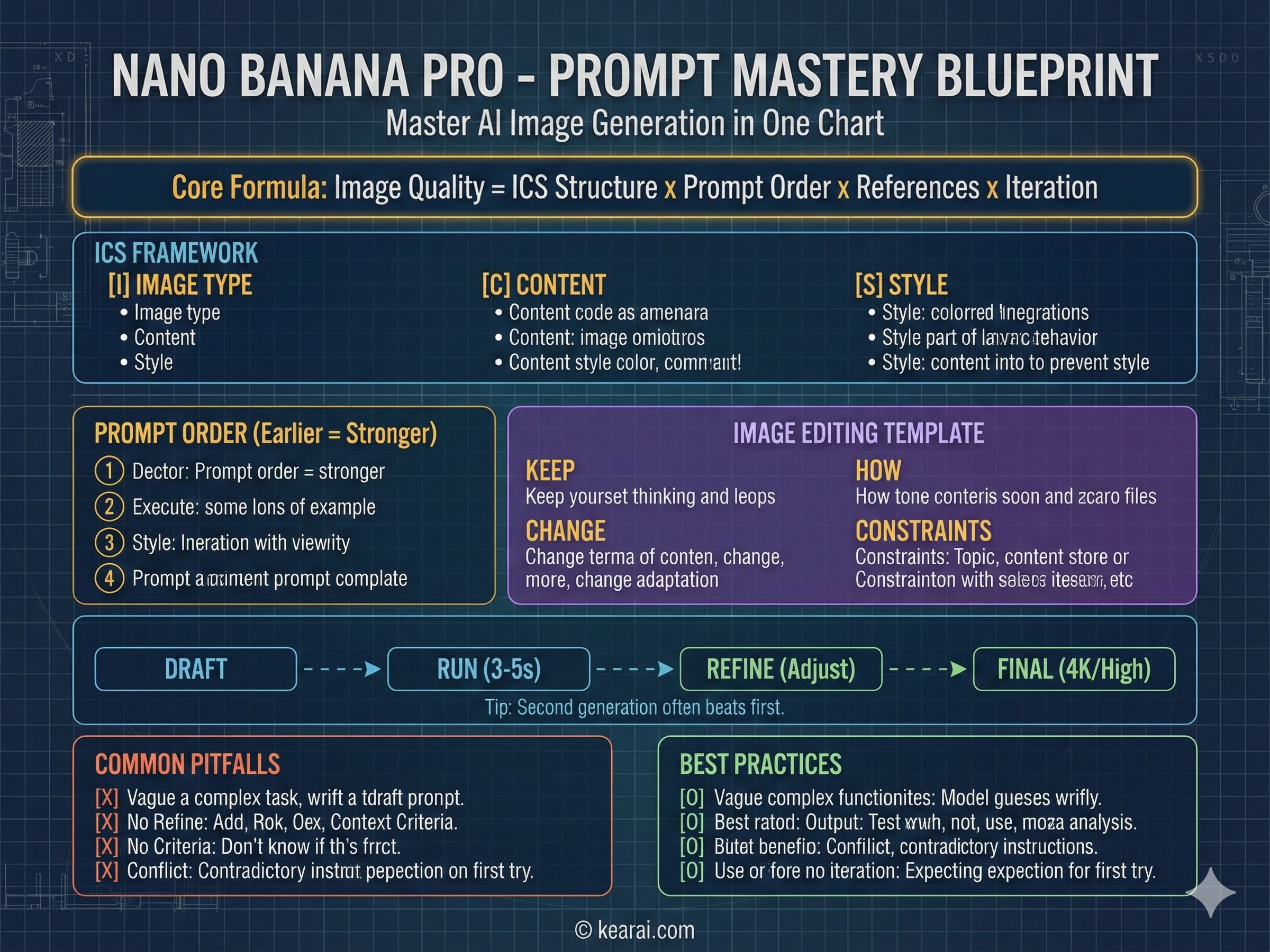
专业提示:在 Gemini 应用中,使用相同的提示词生成第二张图片通常比第一次尝试产生更好的结果。模型似乎使用第一次生成作为改进的隐式上下文。我已经将此作为我标准工作流的一部分。
三个关键突破
虽然 Nano Banana Pro 包含数十项改进,但三个具体的突破从根本上改变了 AI 图像生成的可能性。理解这些将帮助你利用该模型的真正力量。
以前的模型要么无法生成高分辨率图像,要么需要通常会引入伪影的放大处理。Nano Banana Pro 直接生成原生 4K 图像,细节和清晰度从一开始就内置其中。这不仅仅关于像素数——这关于单个睫毛、织物编织图案和微妙纹理变化层面的真实细节。对于产品摄影和商业工作,这改变了一切。
需要 9:16 的垂直海报?21:9 的电影画幅?Instagram 的完美正方形?Nano Banana Pro 可以处理任何纵横比,而不会出现困扰早期模型的构图问题。AI 懂得无论何种格式如何正确构图——主体不会被尴尬地裁剪,文字不会溢出,视觉平衡保持专业。
这是一个重大的突破。因为 Nano Banana Pro 建立在 Gemini 2.0 的推理引擎之上,它不仅仅是匹配模式——它会思考你在要求什么。要求建筑物的结构图,它会推理结构工程。要求科学插图,它会利用实际的科学知识。要求文化参考,它理解语境。这种推理能力使本指南中的大多数高级技巧成为可能。
文本渲染革命
我需要花点时间谈谈文本渲染,因为这是最让我震惊的功能。多年来,AI 图像生成器对于任何涉及简单英语单词以外的严肃工作来说基本上是无用的。复杂的排版、风格化的字体和非拉丁文字会出现乱码、重复、缺失元素或完全错误。你可以生成一张漂亮的图片,然后不得不在 Photoshop 中完全重做任何文本元素。
Nano Banana Pro 完全改变了这一点。我生成了带有复杂书法的电影海报、带有详细规格的产品包装、带有密集段落文本的信息图表——所有这些都渲染正确。排版不仅清晰易读;而且实际上很美。字体风格得到尊重。字符间距自然。这一单一功能开启了以前不可能完成的整个工作类别。
这不仅仅是风格化的文本。标准英语文本渲染也得到了极大的改善。小字保持清晰。拼写准确性非常出色。你可以在图像中包含段落文本,并实际在专业中使用结果。
改变一切的提示词框架
在使用 Nano Banana Pro 生成了数千张图像后,我开发了一种结构化的提示词方法,能够持续产生出色的结果。忘掉早期 AI 模型的旧式关键词堆砌技巧吧——“masterpiece, ultra-detailed, trending on ArtStation(杰作,超细节,ArtStation 热门)”在这里没有帮助。Nano Banana Pro 响应清晰度、结构和特异性。
我称之为 ICS 框架:Image type(图像类型), Content(内容), 和 Style(风格)。我现在写的每一个有效提示词都遵循这个结构。
IMAGE TYPE:
- [What kind of image: photograph, illustration, diagram, poster, UI mockup, etc.]
  (图像类型:照片、插图、图表、海报、UI 模型等)
- [Intended use and audience context]
  (预期用途和受众背景)

CONTENT:
- [Main subject with specific details]
  (主体及具体细节)
- [Background/environment description]
  (背景/环境描述)
- [Action or relationship between elements]
  (动作或元素间的关系)
- [Any text that should appear, in quotes]
  (任何应出现的文字,用引号括起来)

STYLE:
- [Medium: photography, watercolor, 3D render, vector, etc.]
  (媒介:摄影、水彩、3D 渲染、矢量等)
- [Reference: "Apple product photography", "vintage travel poster", etc.]
  (参考:“苹果产品摄影”、“复古旅行海报”等)
- [Technical details: camera lens, lighting, color palette]
  (技术细节:相机镜头、光照、调色板)
- [Quality and resolution requirements]
  (质量和分辨率要求)
这个框架为模型做出的每一个视觉决定提供了清晰的上下文。
层级原则
这是大多数指南不会告诉你的:提示词中信息的顺序很重要。前面提到的元素对最终结果的影响更大。我按照重要性构建我的提示词:
图像的主要焦点是什么?尽早清晰地定义这一点。“一只陶瓷咖啡杯”比“一张显示杯子的图片”要好。
正在发生什么?元素之间如何关联?“杯子放在风化的木桌上,热咖啡冒着蒸汽。”
这发生在哪里?什么围绕着主体?“晨光透过咖啡馆的窗户,投下柔和的阴影。”
应该如何渲染?什么样的相机、光照或艺术风格?“用佳能 5D Mark IV 拍摄,85mm 镜头,f/2.8,自然调色。”
有效提示词的七大原则
除了结构之外,这些原则支配着我写的每一个提示词。它们是“差不多能用”的图像和“完全符合愿景”的图像之间的区别。
结构胜于关键词
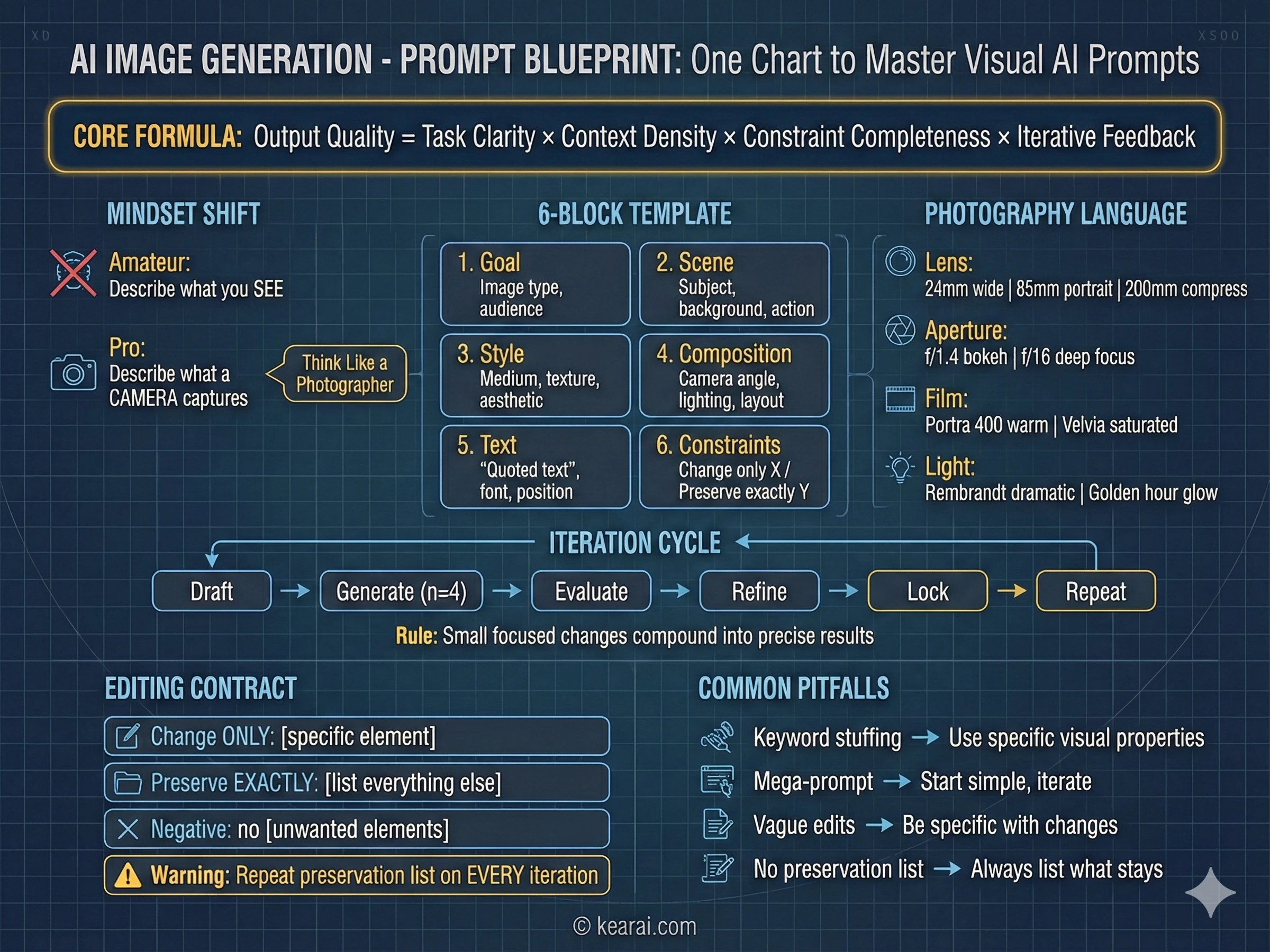
使用一致的顺序:背景 → 主体 → 细节 → 约束。对于复杂的请求,使用带标签的部分或换行符。长段落会使模型困惑;有组织的结构引导它实现你的意图。
具体胜于最高级
不要用“高质量”或“超细节”,描述实际的视觉属性。材料、纹理、形状、媒介。“可见的皮肤毛孔和微妙的雀斑”每次都胜过“高度详细的脸”。
明确的构图控制
命名你的构图(特写、广角、鸟瞰)、视角(平视、低角度、荷兰式倾斜)和光照氛围(柔和漫射、黄金时刻、高对比度轮廓光)。不要把这些留给运气。
改变与保留契约
对于编辑,明确说明什么应该改变以及什么应该保持不变。使用“change only X(仅改变 X)”和“preserve exactly Y(完全保留 Y)”。在每次迭代中重复此保留列表以防止漂移。
文本需要精确
将所需的文本放在“引号”中或全大写。指定字体风格、大小、颜色和位置。对于生僻词或品牌名称,逐个字母拼写出来。始终添加“render exactly once, no duplicates(准确渲染一次,无重复)”。
多图参考清晰度
当使用多个输入图像时,通过索引和描述引用每一个:“Image 1: the product shot, Image 2: the style reference(图1:产品拍摄,图2:风格参考)。”明确说明它们应该如何交互。
迭代而非过载
从干净的基础提示词开始,然后通过小的、单一的更改跟进进行完善。“Make the lighting warmer(让光线更暖)。”“Remove the background tree(移除背景的树)。”小步骤累积成精准的结果。
实用提示词示例
让我向你展示这个框架如何转化为不同用例的真实提示词:
A photorealistic close-up portrait of an elderly Japanese ceramicist
inspecting a tea bowl. Golden hour light streams through a window,
creating warm highlights on weathered hands. Shot on Canon 5D Mark IV
with 85mm lens at f/2.8. Shallow depth of field with bokeh background.
Natural color grading, visible skin texture and pores. 16:9 format.A kawaii-style sticker of a red panda wearing a bamboo hat.
Bold black outlines, cel-shading style, pastel color palette
with soft pinks and greens. Cute expression with sparkly eyes.
White background for easy cutout. Simple, clean design suitable
for merchandise printing.Art poster for a film noir mystery. Central imagery shows
a detective silhouette against rain-streaked windows.
Main title in bold Art Deco typography "SHADOWS OF DOUBT",
with elegant thin serif subtitle "Some secrets should stay buried" below.
Small production credits text at bottom for authenticity.
All text must be clear and legible. Cinematic quality, moody atmosphere.
High contrast lighting with deep shadows and dramatic highlights.Nano Banana Pro 提示词的关键区别:描述你想看到的,而不是你想感觉到的。“一张令人惊叹的美丽图片”对 AI 没有任何意义。“黄金时刻的逆光在鹅卵石街道上投下长长的阴影”准确地告诉了它要渲染什么。
漫画上色与翻译魔法
这项技术是我在 Nano Banana Pro 上的第一个惊人发现,它仍然是我见过的最令人印象深刻的功能之一。将黑白漫画页面上色并翻译文本的能力——所有这些都在一个提示词中完成——从根本上改变了漫画迷、出版商和内容创作者的工作流程。
我是这样发现它的。我一直很难阅读黑白漫画。没有颜色提示的密集视觉信息让我很难跟上动作。我尝试过各种上色工具,但它们都需要大量的手工工作,而且无法处理文本。
在 Nano Banana Pro 的第一个晚上,我上传了一页《鬼灭之刃》,并输入了一个简单的提示词:“把这张图片变成彩色,翻译成英文并把文字放在相应的对话气泡里,保持其他所有内容不变,然后给我图片。”
返回的结果令人震惊。颜色鲜艳且符合角色——炭治郎的绿色格纹图案渲染完美。对话气泡中的日文文本已被准确的英文翻译取代。线条艺术得以保留。它看起来就像官方的彩色发行版。
Transform this black-and-white manga panel:
1. Colorize with vibrant, anime-appropriate colors
2. Translate all Japanese text to English
3. Place translated text in the appropriate speech bubbles
4. Preserve all original character expressions and composition
5. Return as a complete, print-ready image
高级漫画技巧
但真正的魔力在于你可以走得更远。远得多。你可以将同一个漫画页面转换为完全不同的风格:
// 3D Plush Style (3D 毛绒风格)
Transform this manga into 3D plush/fuzzy texture style.
Keep the characters recognizable but render them as if they
were soft plush toys. Maintain speech bubbles and text.

// Medieval Mosaic Style (中世纪马赛克风格)
Transform this manga into medieval stone mosaic style,
like religious artwork from ancient churches. Give it a
sacred, reverent feeling while preserving the story panels.

// Bronze Relief Style (青铜浮雕风格)
Convert this manga page into bronze relief sculpture style.
Render characters and scenes as if they were embossed in
aged bronze metal, with appropriate patina and lighting.
那第一个晚上,我花了几个小时用几十种风格创作同一个漫画场景——铜版画、水彩画、像素艺术、粘土动画。每一次转换都保留了故事结构,同时完全重新构想了视觉呈现。这为同人创作、教育材料和以前根本不可行的创意项目开辟了可能性。
漫画上色专业提示:Nano Banana Pro 理解动漫角色惯例。你不需要为知名角色指定发色——它知道炭治郎有酒红发梢的黑发和绿色格纹羽织。这种内置知识使上色更快、更准确。
专业海报与视觉设计
海报设计是我真正开始理解 Nano Banana Pro 文本渲染能力的地方。以前的 AI 模型可以生成漂亮的图像,但一旦你需要文本——标题、演职员表、标语——你就得回到 Photoshop 中进行手动工作。Nano Banana Pro 完全改变了这个等式。
让我带你了解一些具体的例子,展示现在可以做到什么:
电影感海报
Create a movie poster for 'Robot Dreams' in retro mid-century animation style.

Scene: Anthropomorphic dog and boxy blue-grey robot walking hand-in-hand on a
sandy beach at sunset, facing a dilapidated amusement park pier with a large
ferris wheel and roller coaster. Deep orange sky.

Style: Flat illustration, bold outlines, warm retro color palette.

Typography: Title "ROBOT DREAMS" in huge bold letters at top center, deep orange
color. Small festival logos at top edge. White review quotes scattered around
characters.

Mood: Nostalgic, melancholic, heartwarming.
结果看起来与真正的复古电影海报无法区分。文本清晰且字距适当。插图风格贯穿始终。即使是像电影节桂冠和评论摘要这样的微妙细节也能正确渲染。
重排版海报
这就是事情变得真正令人印象深刻的地方。具有多种字体、大小和样式的复杂排版,这是以前的 AI 模型根本无法掌握的:
Art poster for the film "Dead Poets Society".
Classic artistic style with a scene depicting the iconic
standing-on-desks moment. Main title in flowing artistic
hand-brushed calligraphy style with elegant, thin brushstrokes.
English subtitle "Carpe Diem" below in refined sans-serif.
Tagline "Seize the day" as small text element.
Additional small production credits text for authenticity.
All text must be clear and legible. Premium quality, cinematic
atmosphere conveying wonder and inspiration.
从这个提示词生成的海报可以轻易地被认为是专业工作室的作品。书法有适当的笔触粗细变化。构图遵循经典设计原则。观众绝不会猜到它是 AI 生成的。
赛博朋克视觉设计
对于带有大量文本的复杂设计,Nano Banana Pro 应对挑战的能力非常出色:
Cyberpunk key visual poster with dense text elements.
Neon-lit urban environment with holographic displays showing
various text and data readouts. Main subject: a cybernetic character
with glowing implants. Multiple floating text panels with technical
specifications and warning labels.

Style: high contrast, neon colors against dark backgrounds.
Include both large display text and small detail text.
All characters must be properly formed and legible.
16:9 cinematic format.设计提示:在处理文本密集型海报时,一定要在提示词的某处指定“all text must be clear and legible(所有文本必须清晰易读)”。这似乎激活了模型中额外的质量检查,提高了文本渲染的准确性。
知识可视化与图表
因为 Nano Banana Pro 建立在 Gemini 2.0 的推理能力之上,它可以生成实际上有意义的教育图表和知识可视化。这不仅仅是渲染漂亮的图片——它是关于准确地呈现复杂信息。
我通过要求它创建著名历史建筑的结构图来测试这一点。在没有提供任何参考图像的情况下,我只是简单地问:
Generate a detailed structural diagram of a Gothic cathedral
with comprehensive explanatory text. Show the flying buttress system,
the nave and transept layout, and the multi-story elevation.
Include detailed annotations explaining the construction techniques
that have allowed these medieval structures to survive for centuries.
All text must be clear and legible.
结果令人震惊。图表准确地展示了哥特式建筑的结构工程奇迹。比例与实际建筑相符。注释提供了准确的历史和工程信息。这就是推理能力的体现——模型实际上了解建筑历史,并能将这些知识视觉化。
传统工艺文档
另一个强大的应用是记录传统工艺和技术:
Create a detailed visual guide to traditional Japanese sashiko
embroidery techniques. Show the different stitch patterns with
close-up examples. Include the traditional indigo and white color palette.
Demonstrate needle angles and thread tensions for achieving different
effects. Add comprehensive explanatory text covering the history and
regional variations of this craft. Educational infographic style
with clear layout.
技术概念图
对于科幻小说和概念工作,Nano Banana Pro 可以创建令人印象深刻的技术文档:
Detailed technical exploded view diagram of a cyberpunk prosthetic eye.
Show all internal components: optical sensors, neural interface
connections, power supply, processing unit, adjustment mechanisms.
Label each component with technical specifications. Include cross-section
view showing how it interfaces with the optic nerve. Photorealistic
rendering with technical drawing annotations. Futuristic but
scientifically plausible design.
这些技术图表中的细节水平可与专业概念艺术家制作的作品相媲美,但只需几秒钟即可生成。对于游戏设计师、科幻小说作家和概念艺术家来说,这是一个不可思议的快速原型工具。
令人惊叹的数学解题能力
这一点真的让我震惊。Nano Banana Pro 不仅能生成图像——它还能解数学题并将解题过程渲染为手写的作业纸。图像生成背后的推理引擎实际上是在进行数学逻辑运算。
我用一个涉及三角形和角度计算的几何问题进行了测试。我上传了问题的截图并提示:
Draw a sheet of scratch paper showing the complete solution
to this math problem. Show all work including diagrams,
equations, and step-by-step calculations. Make it look like
authentic student handwriting with natural variations.
Include geometric sketches where relevant.
返回的是一张看起来很逼真的手写数学页面,包括:
- 带有标记角度和边长的几何图表
- 循序渐进的代数运算
- 正确应用的定理和公式
- 圈出的最终答案
- 让它看起来真实的自然笔迹瑕疵
这就是重点——数学实际上是正确的。模型不仅仅是创造了一些看起来像解决方案的东西;它通过实际的数学推理得出了正确的答案。对于教育内容创作者、辅导服务或任何需要展示数学工作的人来说,这非常了不起。
重要提示
虽然 Nano Banana Pro 在大多数情况下都能正确解题,但对于任何重要的事情,你应该始终验证解决方案。推理能力令人印象深刻,但并非万无一失。我在复杂的多步问题上偶尔见过错误。
纸张到白板的转换
我发现的最实用的应用之一是将长篇内容——研究论文、文章、技术文档——转换为可视化的白板摘要。X(前身为 Twitter)上的研究人员强调了这一技巧,它已成为我的首选工作流之一。
基本方法很简单:提供一个文本文档(上传 PDF、粘贴文本或通过截图),并要求一个白板风格的视觉摘要:
Transform this research paper/article into a detailed whiteboard
photo showing the key concepts, relationships, and findings.
Use a natural handwritten style with:
- Boxes and containers for main concepts
- Arrows showing relationships and flow
- Bullet points for key details
- Simple diagrams where helpful
- Color coding for different themes

Make it look like an actual photographed whiteboard with
realistic lighting and perspective. Include all important
information in a scannable, hierarchical layout.
我用一篇关于 LLaMA 3 架构的长篇技术论文进行了测试。Nano Banana Pro 生成了一个白板摘要,捕捉了关键创新、架构决策、训练方法和基准测试结果——所有这些都以一种一目了然的格式呈现。
其应用是巨大的:
- 学生: 将课堂笔记或教科书章节转换为视觉学习辅助工具
- 研究人员: 为演示文稿创建论文的快速视觉摘要
- 教师: 生成板书风格的解释,而无需实际在黑板上书写
- 内容创作者: 将书面内容转化为引人入胜的视觉格式
正如一位研究人员指出的那样,这种能力本质上可以取代教师手动在白板上书写解释的需要——尽管我认为最好将其作为补充而不是替代。
游戏界面生成
Nano Banana Pro 显然在大量的游戏视频和截图中接受过训练,因为它生成令人信服的游戏界面的能力非凡。这超越了简单的模型——它理解游戏 UI 惯例、特定流派的元素,甚至是游戏设计中的区域差异。
深海探索游戏
Generate a screenshot from a deep-sea exploration game similar to Dave the Diver.

Scene: Diver encountering a massive unknown creature in the abyss.

UI elements:
- Depth indicator showing 850m
- Oxygen gauge at 40%
- Inventory slots in bottom left
- Mini-map in top right corner
- "WARNING: Unknown lifeform detected" alert

Style: Pixel art with modern lighting effects, atmospheric fog, bioluminescent creatures.
FPS 游戏截图
Generate a screenshot from a Call of Duty style first-person shooter,
but the enemy is a Shiba Inu dog (Cheems meme). Full FPS interface
with crosshairs, ammo counter, minimap, health bar, and killstreak
indicators. The Cheems should be in tactical gear. Photorealistic
graphics style with cinematic lighting. Include hit markers and
slight motion blur for action feel.
这种严肃的游戏机制与荒诞幽默的结合产生了看起来完全真实的搞笑结果。UI 元素的位置和样式非常适合该流派。
MOBA 游戏界面
真正有趣的是 Nano Banana Pro 对特定游戏文化的理解。当被要求生成《英雄联盟》或类似 MOBA 的界面,显示玩家在聊天中互动时,它会生成符合上下文的对话:
Generate a League of Legends in-game screenshot showing an intense
team fight in progress. In the chat area (bottom left), show players
having a heated argument about game strategy. Include typical MOBA UI
elements: ability bar, minimap, scoreboard, item slots. The chat should
look like authentic player behavior during a competitive match.
该模型理解不同游戏社区的文化背景并准确地表现它们——有时甚至有点太真实了。对于游戏设计师、内容创作者和任何游戏领域的人来说,这是一个极其有用的功能。
产品渲染与摄影
产品摄影是 Nano Banana Pro 的文本渲染、光照控制和构图智能结合真正闪耀的地方。能够在任何环境中放置产品同时保持品牌一致性,开启了传统摄影昂贵或不可能实现的工作流。
专辑封面示例
让我通过一个详细的例子来演示完整的功能。我从一个简单的概念开始:一个虚构的专辑封面。首先,我生成了 CD 和盒子:
Generate a CD album product shot. Album title
"MIDNIGHT ECHOES" in stylized modern typography. Album art shows
surreal, dreamlike imagery blending electronic and organic elements.
Include both the CD and jewel case. Studio lighting,
clean white background, product photography style.
这才是最有趣的地方。有了这个确定的产品,我可以把它放在任何环境中,同时保持完美的一致性:
// 90s Record Store (90年代唱片店)
Place this CD product on a wooden shelf in a 1990s record
store. Surrounded by vinyl records and old cassette tapes. Warm
tungsten lighting, neon sign reflections in the background,
dust particles floating in the air. Nostalgic atmosphere.

// Surreal Floating (超现实漂浮)
The CD is floating in mid-air surrounded by shattered glass
fragments and floating clock gears. Concept: "dreams" and
"time travel". Cinematic lighting, dramatic composition.

// CD Player Scene (CD 播放器场景)
The CD is being placed into a portable CD player. CD case
stands nearby. Late afternoon sunset light through curtains.
Wooden table surface. Cozy, contemplative mood.

// Concert Scene (音乐会场景)
Place this product in a stadium concert environment.
Crowd energy, stage lighting, massive screens in background.
The CD appears impossibly large, like a concert prop.
在每一个环境中,CD 上的文字都保持清晰易读。产品保持了其视觉识别度,同时自然地适应每一个新的光照条件和背景。对于电子商务、营销活动或品牌可视化,这是革命性的。
技术产品拍摄
对于更具技术性的产品摄影,Nano Banana Pro 可以处理关键的细节:
iPhone 17 Pro, Cosmic Orange, rear 45-degree angle emphasizing back design
and camera module.

Background: Soft gradient tech-aesthetic abstract pattern with natural flowing
movement and modern art atmosphere. Avoid pure black. Emphasize light-shadow
interplay and subtle color transitions.

Floating text elements around device: "A19 Pro Chip", "8x Optical Zoom",
"48MP Rear Camera" — modern floating layout, transparent text boxes, clean
and tech-forward aesthetic.

Overall: Dynamic, futuristic, professional product photography quality.
拼豆艺术的发现
这完全是一个意外。我在试验不同的工艺风格时,偶然发现了 Nano Banana Pro 生成拼豆(也称为融合豆或哈马豆)艺术的非凡能力。结果如此一致和可爱,它已经成为我最喜欢的审美风格之一。
3D perler bead art: a display box containing an exquisite figurine.

Style: Photorealistic rendering showing individual bead textures, glossy
finish, professional product photography lighting.

Include: Visible bead grid pattern, subtle shadows between beads, slight
imperfections for authenticity.
该模型理解拼豆具有特定的特征——圆柱形形状、珠子之间的微小缝隙、它们在连接点融合的方式。它准确地渲染这些细节,同时保持使这种工艺风格如此吸引人的可爱美感。
完美运作的变体:
- 拼豆狗: 以像素艺术遇上工艺的审美表现不同品种
- 带色卡的拼豆猫: 展示角色及其使用的珠子颜色
- 拼豆透视画: 用融合豆审美构建的完整场景
- 拼豆钥匙扣: 适合商品模型的较小设计
对于工艺图案设计师、商品创作者或任何喜欢这种可爱美学的人来说,Nano Banana Pro 是一个金矿。
城市宣传海报
Nano Banana Pro 的世界知识扩展到了地理和地标。它知道主要城市的标志性建筑,并能将它们组合成连贯的宣传材料。这对于拥有复杂建筑遗产的城市尤其令人印象深刻。
Generate a New York City promotional poster. Background features
iconic landmarks: Empire State Building, Statue of Liberty, Brooklyn
Bridge, One World Trade Center, Times Square. Landmarks should have
visual hierarchy with clear primary and secondary emphasis.
Clean line-art illustration style with a bold color scheme.

Central large typography: "NEW YORK" with smaller text "The City
That Never Sleeps" nearby. Tagline below: "Where Dreams Take Flight".
Include modern elements like yellow taxis and subway entrances to
show contemporary New York.

Clean, flowing composition with natural element arrangement.
Emphasize the blend of historic landmarks and modern energy.
Dynamic, metropolitan atmosphere.
该模型正确地识别并渲染了每个地标的显著特征——帝国大厦的装饰艺术塔尖、自由女神像的铜锈、布鲁克林大桥的哥特式塔楼。它还理解旅游营销的视觉语言,并应用适当的风格。
漫画分镜与连环画
对于从事漫画、日本漫画或故事板的创作者来说,Nano Banana Pro 生成多面板序列的能力是一个显著的省时工具。它理解叙事流程、面板构图以及如何可视化情感节拍。
Generate a 5-panel manga sequence depicting an epic battle:

Panel 1: Hero stands on a mountain peak. Villain emerges from shadows.
Tense atmosphere.

Panel 2: Their eyes meet. Battle is imminent. Close-up split composition.

Panel 3: Intense combat. Lightning flashes. Hero charges with glowing
weapon, Villain counters with dark energy.

Panel 4: Mid-air collision. Energy waves explode outward. Dynamic action pose.

Panel 5: Both warriors face each other. Hero's eyes show determination,
Villain's show complex emotion.

Style: Shonen manga action style. High contrast. Speed lines. Dramatic shadows.
该模型理解漫画的视觉词汇——速度线、冲击帧、情感特写、动态角度。它在面板之间保持角色一致性,并创造真正的叙事流程,而不仅仅是五张不相关的图像。
我已经用各种场景测试过这个:
- 情感告别场景——忧郁、凄美的基调
- 师徒关系时刻——沉思、复杂
- 生活片段场景中的原创角色
- 非动漫风格的动作序列
我注意到的主要限制:如果提示词没有指定足够的差异化,面板 1 和 2 或 4 和 5 有时会太相似。为每个面板描述添加独特的视觉元素或摄像机角度有助于避免这种情况。
4K 画质与细节处理
Nano Banana Pro 的原生 4K 输出能力不仅仅是分辨率数字——它是关于变得可能的细节水平。对于特写摄影、产品拍摄以及任何精细细节至关重要的应用,这改变了可行性。
Generate a 4K ultra-detailed macro photograph of a Monarch
butterfly resting on a yellow flower. Focus precisely on the
wing scales and texture, showing the individual scales that
create the pattern. Capture petal texture at equal detail level.

Soft diffused lighting, shallow depth of field with creamy
bokeh background. Natural color palette with slight warmth.
Scientific accuracy in butterfly anatomy. The kind of shot that
would win a nature photography competition.
当你放大生成的图像时,你可以看到单独的翅膀鳞片、花粉粒和花瓣的细胞结构。这种细节水平以前只能通过专门的微距摄影设备和大量的后期处理才能实现。
何时使用 4K
标准质量
快速生成(3-5 秒),对大多数用例来说质量极佳:
- 概念探索和头脑风暴
- 社交媒体内容
- 最终完善前的初稿
- 大批量生成需求
- 没有精细文字的简单构图
高质量 / 4K
延长生成时间(8-15 秒)以获得最大保真度:
- 最终生产图像
- 密集的文本和排版工作
- 带有小细节的复杂信息图表
- 写实肖像
- 可供打印的材料
对于头脑风暴和迭代,坚持使用默认分辨率以保持快速反馈循环。
跨图像的角色一致性
AI 图像生成历史上最难的问题之一一直是保持跨多个图像的角色一致性。你会生成一个你喜欢的角色,然后试图把他们放在不同的姿势或环境中,突然间他们看起来完全像另一个人。
Nano Banana Pro 通过其多图输入功能在这个问题上取得了重大进展。你可以提供参考图像,模型将在新的生成中保持身份。
Step 1: Establish Characters (建立角色)
"Generate a character reference sheet for Person 1: a 30-year-old Asian
woman with shoulder-length black hair, warm brown eyes, and a friendly
smile. Show front view, side profile, and three-quarter angle."

Step 2: Create Scenes (创建场景)
"Person 1 is sitting at a café table, reading a book. Morning light
through the window. Casual clothing."

Step 3: Change Context (改变语境)
"Person 1 is now at a business meeting, wearing professional attire.
Same character, different setting."

Step 4: Multiple Characters (多个角色)
"Person 1 and Person 2 (establish Person 2 first) are walking together
in a park. Autumn afternoon lighting."
这个工作流对于以下方面具有变革性:
- 时尚电商: 在多套服装中展示同一位模特,无需昂贵的拍摄
- 角色设计: 在保持身份的同时探索变体
- 漫画/日本漫画创作: 在场景中保持主角一致
- 虚拟网红内容: 在帖子中生成一致的角色
- 游戏资产创建: 处于多种姿势和表情的角色
角色一致性专业提示:当提供参考图像时,至少包含一张光线充足的正面脸部照片。模型使用这张照片来锚定身份。额外的角度有帮助,但不如主要参考那么关键。
谷歌官方场景模板
谷歌为常见用例提供了官方提示词模板。我已经广泛测试了这些,并想分享基于真实结果的增强版本。每个模板都遵循模型可靠响应的一致结构。
写实摄影模板
结构: 镜头类型 + 主体 + 动作/表情 + 环境 + 光照 + 相机参数 + 纵横比
A photorealistic [shot type] of [subject], [action or expression],
set in [environment]. The scene is illuminated by [lighting description],
creating a [mood] atmosphere. Captured with a [camera/lens details],
emphasizing [key textures and details]. The image should be in a
[aspect ratio] format.A photorealistic close-up portrait of an elderly Japanese ceramicist
inspecting a tea bowl, golden hour light streaming through a window
to the left, creating a contemplative atmosphere. Captured with an
85mm lens at f/2.8, emphasizing skin texture, weathered hands, and
the ceramic's glaze. 16:9 format.插图和贴纸模板
结构: 风格 + 主体 + 关键特征 + 调色板 + 线条风格 + 背景
A [style] sticker of a [subject], featuring [key characteristics]
and a [color palette]. The design should have [line style] and
[shading style]. The background must be [background requirement].
品牌设计模板
结构: 图像类型 + 品牌/概念 + 文本内容 + 排版 + 设计风格 + 配色方案
Create a [image type] for [brand/concept] with the text "[exact text]"
in a [font style]. The design should be [style description], with a
[color scheme]. Include [additional design elements]. The overall feel
should communicate [brand values/message].
产品摄影模板
结构: 产品描述 + 背景 + 光照设置 + 相机角度 + 关键细节 + 纵横比
A high-resolution, studio-lit product photograph of a [product description]
on a [background surface]. The lighting is a [lighting setup] to
[lighting purpose]. Camera angle is a [angle type] to showcase
[specific feature]. Ultra-realistic, with sharp focus on [key detail].
[Aspect ratio].
极简主义留白模板
结构: 主体位置 + 背景空白空间 + 光照 + 纵横比
A minimalist composition featuring a single [subject] positioned
in the [position: bottom-right/top-left/etc.] of the frame.
The background is a vast, empty [color] canvas, creating significant
negative space. Soft, subtle lighting from [direction]. [Aspect ratio].
漫画面板模板
结构: 艺术风格 + 前景角色/动作 + 背景设置 + 对话/标题 + 氛围
A single comic book panel in a [art style] style. In the foreground,
[character description and action]. In the background, [setting details].
The panel has a [dialogue/caption box] with the text "[exact text]".
The lighting creates a [mood] mood. [Aspect ratio].
高级图像编辑技巧
除了文生图,Nano Banana Pro 还擅长修改现有图像。关键是清楚地描述你的编辑,同时指定什么应该保持不变。
改变与保留契约
在编辑图像时,我使用一种专注于清晰说明什么应该和不应该改变的结构:
KEEP: [Elements that must remain unchanged] (保持:必须保持不变的元素)
- "Preserve the person's exact facial features and expression"
- "Maintain the original lighting direction and intensity"

CHANGE: [Specific modifications required] (改变:需要的具体修改)
- "Replace the background with a sunset beach scene"
- "Change the shirt color from blue to red"

HOW: [Style and quality direction] (如何:风格和质量方向)
- "Ensure natural lighting integration"
- "Match the original image's color grading"

CONSTRAINTS: [What to avoid] (约束:要避免什么)
- "Do not alter any facial features"
- "Avoid changing the shadow directions"
添加和移除元素
Using the provided image of [subject], please add [element]
to the scene. Position it [location description]. Ensure the addition
[integration description: matches lighting, fits perspective, etc.].
Keep all other elements exactly as they appear in the original.Using this image of my cat, add a small knitted wizard hat
on its head. The hat should sit naturally, matching the soft
lighting of the photo. Keep the cat's expression, pose, and
all background elements unchanged.风格转换
Transform the provided photograph of [subject] into the artistic
style of [artist/art movement]. Preserve the original composition
but render all elements with [description of stylistic elements].

Example: Transform this photograph of a modern city street at night
into Vincent van Gogh's "Starry Night" style. Preserve the composition
of buildings and cars but render everything with swirling, impasto
brushstrokes and a dramatic palette of deep blues and bright yellows.
多图合成
Create a new image combining elements from the provided images.
Take [element from Image 1] and place it with/on [element from Image 2].
The final image should be [description of desired result].

Example: Combine these images - take the rocket ship from Image 1
and place it launching from the tropical island beach in Image 2.
Final image should show a peaceful beach scene with a rocket
dramatically launching in the background, sunset lighting.
高保真身份保留
对于保持面部身份至关重要的编辑:
Using the provided images, place [element from Image 2] onto
[subject in Image 1]. Ensure the features of [subject] remain
completely unchanged — same facial structure, expression, and
proportions. The added element should integrate naturally with
[description of integration requirements].

Example: Take the woman with brown hair and blue eyes from Image 1.
Add the logo from Image 2 onto her black t-shirt. Keep her face
and features exactly unchanged. The logo should look naturally
printed on the fabric, following the folds of the shirt.
草图到现实
Transform this rough [medium: pencil/marker/digital] sketch of
[subject] into a [style description] finished image. Keep the
[specific features to preserve] from the sketch but add
[new details/materials/finishes].

Example: Transform this rough pencil sketch of a futuristic car
into a polished showroom photo of the finished concept car.
Keep the sleek lines and low profile from the sketch but add
metallic blue paint and neon rim lighting.
扼杀我成果的错误
学习不该做什么与学习该做什么同样重要。以下是直到我识别并消除它们之前一直产生糟糕结果的错误。
错误 1:关键词堆砌
我曾做的: 在每个提示词中添加质量关键词,如“masterpiece, ultra-detailed, 8K, trending on ArtStation, unreal engine”。
为什么失败: Nano Banana Pro 的训练方式与旧模型不同。这些关键词要么没有效果,要么实际上会让模型对你的实际意图产生困惑。
更好的方法: 专注于描述的特异性,而不是质量关键词。准确描述你想看到的。
错误 2:负面提示
我曾做的: 写“no blur, no artifacts, no deformed hands, no extra fingers(无模糊、无伪影、无畸形手、无多余手指)”。
为什么失败: Nano Banana Pro 不支持像扩散模型那样的负面提示。告诉它不要做什么实际上可能会引入这些元素。
更好的方法: 正面描述你想要的。与其说“无模糊”,不如说“sharp focus(清晰聚焦)”。
错误 3:模糊的风格参考
我曾做的: 写“beautiful image, stunning, amazing, gorgeous(美丽的图像、令人惊叹的、神奇的、华丽的)”。
为什么失败: 这些词不提供可操作的信息。什么使某物“美丽”是主观的。
更好的方法: 描述具体的视觉特征。“Warm color palette with golden highlights(带有金色高光的暖色调)”准确地告诉模型要渲染什么。
错误 4:忽略纵横比
我曾做的: 不指定纵横比,然后试图裁剪结果以满足我的需求。
为什么失败: 模型根据纵横比以不同的方式构图。正方形构图与电影宽镜头的平衡不同。
更好的方法: 始终提前指定你的目标纵横比。“16:9 horizontal(16:9 水平)”,“9:16 vertical(9:16 垂直)”,“1:1 square(1:1 正方形)”。
错误 5:过度复杂的提示词
我曾做的: 试图在一个巨大的提示词中指定每一个可能的细节。
为什么失败: 超过一定的复杂性后,元素开始丢失或相互冲突。
更好的方法: 从核心元素开始,生成,然后通过有针对性的后续对话进行完善。
错误 6:忘记思考模式
我曾做的: 对复杂的构图使用标准模式。
为什么失败: 标准模式不会为复杂的请求启用完整的推理能力。
更好的方法: 对于复杂的构图,激活思考模式。这允许模型在生成之前深入分析空间关系。
元课程:Nano Banana Pro 是一个对话伙伴,而不是老虎机。把它当作指导一位非常有能力的艺术家——给予清晰的指导,审查结果,协作改进。迭代方法胜过试图在一个提示词中实现完美。
开发者 API 集成
对于想要将 Nano Banana Pro 集成到应用程序中的开发者,API 可通过 Google AI Studio 和 Vertex AI 获得。以下是关键的技术细节:
基本生成请求
from google import genai
from google.genai import types

client = genai.Client()

response = client.models.generate_images(
    model='imagen-3.0-generate-002',  # Nano Banana Pro
    prompt='A photorealistic portrait of a robot barista...',
    config=types.GenerateImagesConfig(
        number_of_images=1,
        aspect_ratio='16:9',
        output_mime_type='image/jpeg'
    )
)

# Access the generated image
image_data = response.generated_images[0].image.image_bytes
图像编辑请求
response = client.models.edit_image(
    model='imagen-3.0-capability-001',
    prompt='Change the background to a sunset beach...',
    reference_images=[open('original.png', 'rb')],
    config=types.EditImageConfig(
        edit_mode='INPAINT',
        number_of_images=1,
        input_fidelity='high',  # Critical for identity preservation (对身份保留至关重要)
        output_mime_type='image/png'
    )
)
input_fidelity='high' 设置在对带有人脸或重要细节的图像进行编辑时,会显著提高身份保留效果。
关键参数
aspect_ratio: "1:1", "16:9", "9:16", "4:3", "3:4", "21:9"number_of_images: 每次请求 1-4 张图像output_mime_type: "image/jpeg" 或 "image/png"input_fidelity: "low" (更快) 或 "high" (更好的身份保留)safety_filter_level: 控制内容过滤的严格程度
速率限制和配额
请注意使用限制:
- Gemini 2.0 Flash 配额限制适用于图像生成
- 如果你达到每日限制,切换到“快速 (Fast)”模式以继续标准生成
- 企业版 Vertex AI 账户拥有更高的限制
- 对于大批量应用程序,考虑实施请求队列
终极提示词库
我已将我最成功的提示词按类别组织,以便于参考。这些都是经过多次迭代测试和完善的。
肖像摄影
Environmental portrait of a [profession] in their workspace.
Natural window light from the left creates soft shadows.
Subject positioned at one-third mark, looking slightly off-camera.
Background shows authentic tools of their trade, slightly out of focus.
Shot at 50mm f/2.0 equivalent. Warm color temperature.
Authentic, documentary photography style.
产品拍摄
Hero product shot of [product] floating against a gradient
background transitioning from [color 1] to [color 2].
Three-point lighting creating dramatic shadows and highlights.
Product at slight angle showing dimensional form.
Reflection on glossy surface below.
Key features labeled with minimal floating text callouts.
4K resolution, premium brand photography aesthetic.
插图风格
Vintage travel poster for [destination] in 1930s Art Deco style.
Bold geometric shapes, limited color palette of [3-4 colors].
Iconic landmark as central focus with stylized sun rays behind.
Large sans-serif title "[DESTINATION NAME]" at top.
Small tagline "[inviting phrase]" at bottom.
Slightly distressed texture for authenticity.
Vertical format for poster printing.
UI/UX 模型
Mobile app UI design for a [app type] application.
Modern iOS-style interface with [color scheme] accent colors.
[Screen type: home feed / profile / settings / etc.]
Include realistic content: [specific elements].
Clean typography with SF Pro or similar.
Subtle shadows and depth.
Device frame optional.
Focus on usability and visual hierarchy.
概念艺术
Concept art for a [genre: sci-fi/fantasy/etc.] [location type].
[Time of day] lighting creating [mood] atmosphere.
Key features: [list 3-5 distinctive elements].
Human figures for scale in [locations].
Painterly style with visible brushwork in backgrounds,
detailed linework for architectural elements.
Cinematic composition with strong foreground-midground-background separation.
16:9 format for game/film presentation.
信息图表
Infographic explaining [process/concept] in [number] steps.
Clean, modern design with [color scheme].
Each step numbered with icon and brief explanation text.
Visual flow from [direction: top to bottom / left to right].
Connecting arrows or lines between steps.
Title: "[Topic Title]" at top in bold.
All text must be crisp and legible.
White or light gray background.
Suitable for [platform: social media / print / presentation].
最后的想法
在 Nano Banana Pro 发布的那天晚上,我体验到了自从我第一次接触 AI 图像生成以来从未有过的感觉:对突然可能实现的事情感到真正的惊奇。随着我的探索,定义我工作流的障碍——文本渲染限制、一致性问题、缺乏推理——一个接一个地消失了。
但通过几个月的密集使用,我也学到了一些更深刻的东西:工具不如使用它的人重要。Nano Banana Pro 令人难以置信地强大,但只有当你懂得如何清楚地传达你的愿景、深思熟虑地迭代并认识到技术的潜力和局限性时,这种力量才有用。
本指南中的技巧是起点,而不是终点。真正能用 Nano Banana Pro 做出卓越作品的创作者,是那些从这些基础出发并超越它们的人——以没人想到的方式组合功能,解决没人意识到可以解决的问题,创造出令人惊讶和愉悦的视觉体验。
“当 AI 变得更强大时,唯一限制我们的是我们自己贫乏的想象力。”
我在 Nano Banana Pro 发布那晚凌晨 5 点的笔记中写下了这句话,它已成为一种指导原则。技术将不断进步。新的能力将不断涌现。但基本技能——将你脑海中的图像转化为机器可以执行的指令——无论哪个模型是当前的,都将保持价值。
所以,不懈地实验吧。突破界限。尝试看起来不可能的提示词。生成数千张图片。了解什么有效,同样重要的是,了解什么无效。建立你自己对这些系统如何思考的直觉。
视觉创作的未来是协作的——人类提供愿景、方向和判断;AI 提供执行速度和技术能力。Nano Banana Pro 是我们迄今为止拥有的最有能力的合作伙伴。问题不再是“AI 能做这个吗?”,而是“我们应该一起创造什么?”
我迫不及待地想看到你的作品。
准备好开始了吗?打开 Gemini,启用思考模式,然后尝试这个提示词:“Generate a detailed movie poster for a film that exists only in my imagination — a story about [your idea]. Make the title the visual centerpiece with beautiful typography.(为一部只存在于我想象中的电影生成详细的电影海报——一个关于[你的想法]的故事。让标题成为视觉中心,配上漂亮的排版。)”然后迭代、完善,让它成为你自己的。
讨论
0 条评论留下评论
成为第一个分享您想法的人!