

The future of programming isn't about writing more code — it's about thinking clearly and communicating precisely with AI.
I genuinely believe everyone should experience AI-powered IDE agents, especially non-programmers and those without professional coding backgrounds. These tools can transform anyone into someone who commands computers through simple conversation, like having an expert employee at your fingertips. You don't need to learn specialized knowledge or technical skills in fields you know nothing about. After testing Google Antigravity, AWS Kiro, Windsurf, and countless others, I kept coming back to one tool that stood above them all. With 17 million monthly users according to SimilarWeb, Cursor AI isn't just popular—it's revolutionary. This is the story of how a VS Code fork became the most important software in my development workflow, and why it might change everything you know about programming.
My Journey to Cursor AI
Let me take you back to where this all started. I've been testing AI coding tools obsessively for the past year, jumping between platforms, comparing outputs, measuring productivity gains. I gave every major AI IDE the same project files, the same prompts, the same challenges. The results were eye-opening.
Google Antigravity, AWS Kiro, Windsurf—they all had their moments. But when I pushed them on complex tasks, they stumbled. Some couldn't complete the work properly. Others produced code that simply wouldn't run. Cursor was different. It gave me results I could actually use. Not just functional code, but elegant solutions that made me rethink my approach.
The difference wasn't just about intelligence—it was about understanding context. Cursor didn't just process my code; it comprehended my entire project architecture.
What struck me most was how Cursor handled the nuances. When I asked it to refactor a complex module, it didn't just shuffle code around—it understood the business logic, maintained backward compatibility, and even suggested improvements I hadn't considered. That's when I knew I'd found something special.
Today, Cursor AI is my daily driver. It's not just a tool; it's become an extension of how I think about programming. And I want to share everything I've learned, every trick I've discovered, every workflow that's transformed my productivity. Whether you're a complete beginner or a seasoned developer, this guide will show you why Cursor AI deserves your attention.
What is Cursor AI?
Cursor is an AI-powered code editor that's reimagining how we write software. Founded in January 2023 by four MIT undergraduates, Cursor was built on a revolutionary idea: "Great engineering matters more than raw compute power." The team took the familiar VS Code interface and transformed it into something entirely new—an AI-first development environment.
At its core, Cursor is a fork of VS Code, which means all your favorite extensions, themes, and keybindings work seamlessly. But beneath that familiar surface lies a fundamentally different approach to coding. Cursor doesn't just suggest the next line—it understands your entire codebase, predicts your intentions, and can execute complex multi-file changes with a single natural language command.
🧠 Full Codebase Awareness
Cursor indexes and understands your entire project—dependencies, imports, patterns, conventions, and structure. Every suggestion is contextually relevant.
💬 Natural Language Coding
Describe what you want in plain English. "Create a user authentication system with email verification" becomes working code in seconds.
🔄 Multi-File Editing
Composer mode can modify dozens of files simultaneously, maintaining consistency across your entire project during refactors.
🤖 Autonomous Agent
Agent mode can plan, execute, debug, and iterate—running terminal commands and fixing errors until your feature works.
The Philosophy Behind Cursor
As Cursor's founders put it: "We're not teaching AI to write code—we're letting it become an extension of human creativity." This philosophy shapes every feature. The goal isn't to replace developers but to amplify their capabilities. Clear thinking and clear communication become your primary skills; the AI handles the mechanical translation into code.
Think about the evolution of programming languages. We went from machine code to assembly, from assembly to high-level languages like Python and JavaScript. Each step abstracted away complexity, letting developers focus on higher-level thinking. Cursor represents the next leap: from high-level languages to natural language. Someday soon, knowing how to "speak" clearly might be more important than knowing syntax.
Cursor marks the arrival of "conversational programming." Your attention shifts from "how to write code" to "what problem to solve." AI forces you to think clearly and express yourself precisely.
Why Cursor Beats the Competition
I've tested them all. GitHub Copilot, Aider, Windsurf, Replit, Bolt—each has its merits. But after months of intensive comparison, Cursor consistently came out on top. Let me break down exactly why.
Context Window
Cursor's 200,000+ token context window lets it understand entire codebases, not just individual files. It sees the forest, not just trees.
Multi-File Refactoring
Composer mode is game-changing. GitHub Copilot works file by file; Cursor updates all relevant files simultaneously.
Agentic Capabilities
Agent mode goes beyond suggestions—it executes terminal commands, debugs errors, and iterates until tasks complete.
Custom AI Models
Cursor uses fine-tuned GPT-4 Turbo models optimized for coding, plus access to Claude, Gemini, and others.
Cursor vs GitHub Copilot
GitHub Copilot is excellent for inline suggestions and autocomplete. It's fast, reliable, and integrates well with various IDEs. But Cursor operates on a different level. Where Copilot suggests lines, Cursor understands architecture. Where Copilot completes code, Cursor plans and executes entire features.
The real difference becomes apparent on complex projects. When I'm refactoring a service across multiple files, Copilot requires me to guide it file by file. Cursor's Composer mode handles the entire refactor in one operation, maintaining consistency and catching edge cases I might miss.
The Intelligence Gap
I ran the same test across all major AI IDEs: identical project files, identical prompts. Cursor consistently produced working solutions while others either failed completely or generated broken code. This isn't subjective preference—it's measurable difference in capability.
Developer Productivity Research
Studies show agent-based tools like Cursor demonstrate 18-250% performance improvement over base LLMs on repository-level tasks. Context awareness is the key differentiator—Cursor doesn't just write code; it understands your project.
Supported Models

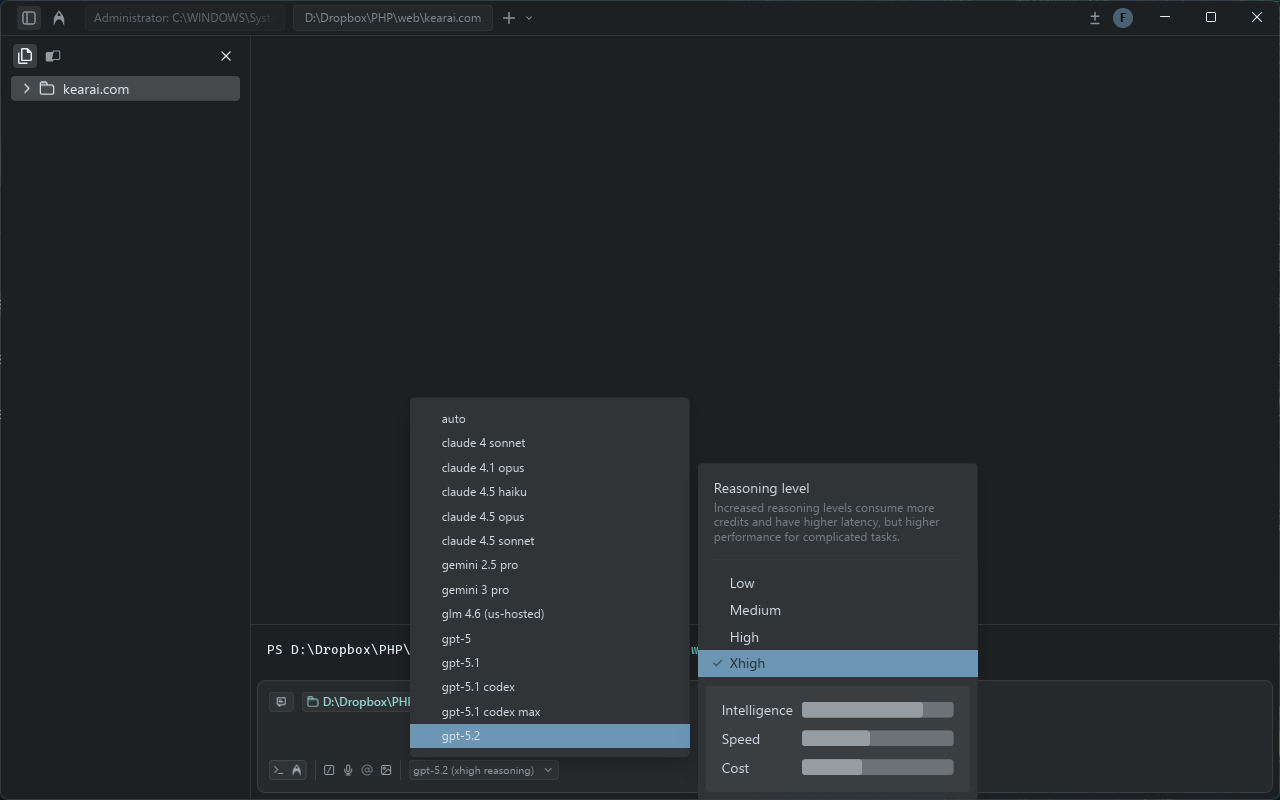
One thing that immediately impressed me about Cursor is its model diversity. Of all the AI IDEs I've tested, Cursor offers the most comprehensive model selection. Everyone can find their ideal AI partner.
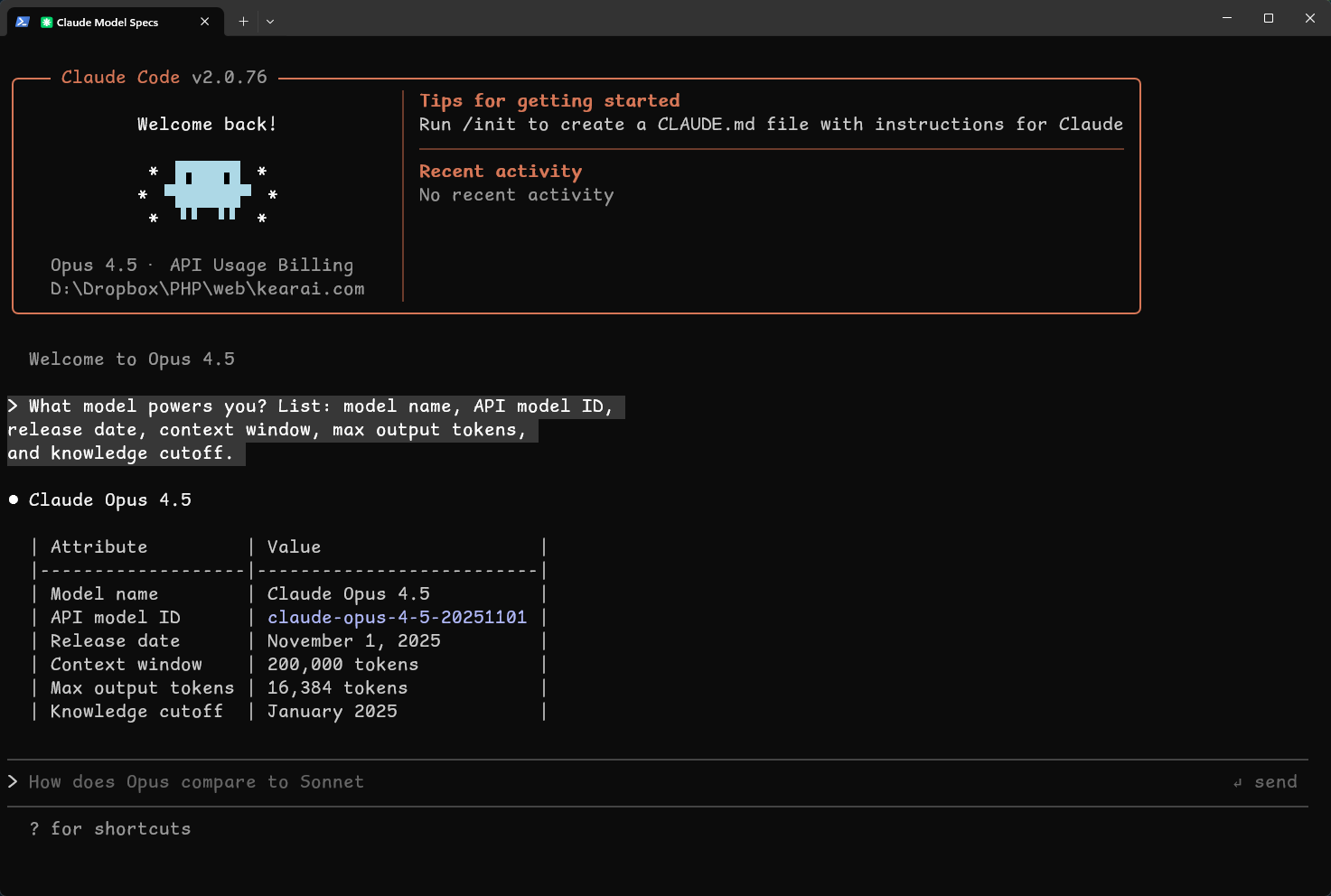
Want to verify which model you're using? Try this prompt in any AI tool:
What model powers you? List: model name, API model ID, release date,
context window, max output tokens, and knowledge cutoff.
This works on any AI platform and gives you detailed model information.

Available Models
Model Options in Cursor
- GPT-4 Turbo / GPT-4o: OpenAI's flagship models with excellent general coding ability
- GPT-5 High MAX: Latest GPT model for complex reasoning tasks
- Claude 3.5 Sonnet: Anthropic's model, exceptional at understanding context
- Claude Opus 4.5: Most powerful Claude model for sophisticated coding
- Gemini Pro / Gemini 3: Google's models with strong analytical capabilities
- Cursor Custom Models: Fine-tuned specifically for coding tasks
Pro tip: Different models excel at different tasks. Use faster models for simple completions, reserve powerful models like GPT-4 or Claude Opus for complex architectural decisions.
Core Features Deep Dive
Cursor provides different capabilities for different scenarios, scaling from simple to complex. Understanding when to use each feature is key to maximizing productivity.
The Feature Hierarchy
Tab Completion
Intelligent autocomplete that predicts your next move. Just press Tab to accept suggestions.
Inline Chat (Cmd+K)
Fast, focused changes within selected code. Perfect for quick modifications and refactors.
Ask Mode (Cmd+L)
Full chat interface for architectural discussions, explanations, and multi-step planning.
Agent Mode
Autonomous operation: plans tasks, executes commands, debugs errors, iterates to completion.
Essential Keyboard Shortcuts
Core Commands
Cmd+K
Quick inline edits on selected code — fastest for focused changes
Cmd+L
Open AI chat panel for complex queries and discussions
Cmd+I
Open Composer for multi-file editing across entire project
Tab
Accept AI suggestions inline
Cmd+→
Accept suggestions word by word for fine control
Esc
Dismiss current suggestion
Context Management
@file
Reference specific files in your prompt
@web
Enable web search for latest information
@Git
Reference Git history for code changes
Drag & Drop
Drag files directly into chat for instant context
Agent Mode Explained
Agent mode is where Cursor truly shines. Unlike simple code completion, Agent mode operates autonomously—it can determine which files to create or modify, make architectural decisions, execute terminal commands, and continue working until your feature is complete.
I once asked Cursor's Agent mode to "Build a user registration page with email confirmation." What happened next amazed me. It planned the architecture, created the necessary files, wrote the frontend and backend code, set up email templates, ran the tests, and fixed the errors it encountered—all without my intervention. The entire process felt like watching a senior developer work at superhuman speed.
How Agent Mode Works
Agent breaks down your request into discrete, executable steps.
Scans relevant files, understands project structure and patterns.
Creates files, writes code, runs commands—actual implementation.
Runs tests, catches errors, iterates until everything works.
Real-World Agent Performance
I timed myself building a Sudoku game. My prompt was simple: "Write me a Sudoku game in JavaScript." Agent mode completed the entire thing in 16 seconds. Sixteen seconds! The game was fully functional, visually styled, and included difficulty levels I hadn't even asked for. That moment crystallized what AI-assisted coding could become.
Agent mode transforms "ideas" into working code at the speed of thought. The instant feedback loop is addictive—and incredibly productive.
Agent Clarification Questions
In the latest versions, Agent mode can now ask clarifying questions while continuing to work in the background. Instead of stopping and waiting for your response, it might ask: "Should I use OAuth or API Key authentication?" while still reading configuration files and preparing the implementation. When you answer, it immediately incorporates your decision and continues.
Composer Mode Mastery
Composer mode (Cmd+I) is Cursor's most powerful feature for experienced developers. While Agent mode is autonomous, Composer gives you fine-grained control over multi-file edits with full visibility into every change.
Here's how I use it: I describe the feature I want, reference the relevant files with @-mentions, and Composer shows me diffs for every file it wants to modify. I can accept, reject, or modify each change before it's applied. It's like having a senior developer propose changes while you maintain final authority.
Composer Workflow
@auth.service.ts @user.model.ts @api.routes.ts

Add JWT refresh token functionality:
- Store refresh tokens in the user model
- Create /auth/refresh endpoint
- Update auth service to handle token rotation
- Add 7-day expiry for refresh tokens
Composer will show diffs for all three files, letting you review each change before applying.
Multi-File Refactoring Power
A developer I know used Cursor's Composer mode to migrate a 100,000-line codebase from React 16 to React 19. The project included voice recognition, video playback, and e-commerce functionality. Composer understood the architectural intent behind legacy patterns and suggested modern equivalents that maintained behavior while improving maintainability. The result? 300,000 lines of modernized code.
Composer Best Practices
Start with a clear plan. Use Ask mode (Cmd+L) first to discuss architecture, then switch to Composer for implementation. This separation of planning and execution produces better results than jumping straight into code generation.
The Magic of Tab Completion
Tab completion sounds simple, but Cursor's implementation is anything but ordinary. Powered by Supermaven's technology, Cursor's Tab feature doesn't just autocomplete—it predicts. It watches how you code, learns your patterns, and anticipates not just your next line but your next intention.
What Makes Tab Special
🔮 Predictive Editing
Tab predicts where you'll edit next, not just what you'll type. It jumps to the right location and suggests changes in context.
📦 Auto-Imports
For TypeScript and Python, Tab automatically adds required imports when you use new functions or types.
🎯 Project-Wide Context
Suggestions aren't generic—they understand your project's conventions, variable names, and patterns.
⚡ Multi-Line Predictions
Tab can suggest entire function bodies, not just single lines, dramatically speeding up implementation.
The experience is almost magical. I'll think "I need a function to validate email," and before I finish typing the function name, Tab shows me the complete implementation using my project's existing validation patterns. It's like pair programming with someone who's read every file in my codebase.
Great programming tools should predict behavior, not just respond to natural language. Tab's behavioral prediction feels like the AI is reading your mind.
MCP Integration
MCP—Model Context Protocol—is what gives Cursor eyes and hands beyond your codebase. Think of it as a universal connector that lets AI interact with external tools, databases, and services. It's transforming what's possible with AI-assisted development.
What MCP Enables
Before MCP, if you wanted AI to query your database, you'd manually copy data and paste it into your prompt. With millions of rows spread across different nodes, that's impossible. MCP changes everything. The AI can directly explore databases, call APIs, control browsers, and interact with any service that implements the protocol.
🗄️ Database Access
Query databases directly. AI can analyze your data without you copying anything.
🌐 Browser Control
Use Puppeteer to test UIs, scrape data, or automate web interactions.
🔧 Tool Integration
Connect Sentry, Linear, GitHub, Slack—AI can read errors, create issues, review PRs.
The Data Flow Revolution
MCP fundamentally changes how data flows between humans and AI. Previously, humans were the "glue" connecting isolated data sources. Now, MCP connects those sources directly to AI, letting it autonomously explore context. You're freed from being a copy-paste intermediary.
{
  "servers": {
    "puppeteer": {
      "command": "npx",
      "args": ["@anthropic-ai/mcp-server-puppeteer"]
    },
    "database": {
      "command": "npx",
      "args": ["@cursor-ai/mcp-server-postgres"],
      "env": {
        "DATABASE_URL": "$DATABASE_URL"
      }
    }
  }
}
Configure MCP servers to extend Cursor's capabilities beyond your local codebase.
Dynamic Context Discovery
Cursor recently introduced "Dynamic Context Discovery" to optimize MCP usage. Instead of loading all tool definitions upfront (which consumes tokens), Cursor now passes only tool names initially. When a task actually needs a tool, the full definition is fetched dynamically. In A/B testing, this reduced total token usage by 46.9% for MCP-heavy workflows.
MCP is becoming table stakes. Tool-based services that don't provide MCP capabilities will find themselves excluded from the AI ecosystem. The integration trend is accelerating.
Subagents Revolution
Cursor 2.4 introduced Subagents—a paradigm shift in how AI handles complex tasks. Previously, a single AI agent worked sequentially through every step. Now, the main agent can delegate subtasks to specialized subagents that work in parallel.
How Subagents Work
Think of it like a development team. The main agent acts as a tech lead, breaking down complex requests and assigning work to specialists. Each subagent has its own context (preventing information overload), its own model configuration (faster models for simpler tasks), and its own tool permissions.
Built-in Subagents
- Explore: Analyzes your entire codebase, finds relevant files, understands architecture
- Bash: Runs terminal commands, handles build processes, executes scripts
- Browser: Manages parallel web workflows, testing, and automation
Subagent Advantages
Context Isolation
Intermediate outputs stay within subagents. Main agent sees only final summaries—cleaner context, better focus.
Model Flexibility
Explore subagent uses faster models by default. 10 parallel searches in the time one main-agent search takes.
Specialized Prompts
Each subagent has optimized prompts and tool access for its specific task domain.
Cost Efficiency
Faster models cost less. Isolating token-heavy work to appropriate subagents reduces overall costs.
Custom Subagents
You can define custom subagents with specific prompts, models, and tool permissions. Even better: Cursor's subagent format is compatible with Claude Code. Subagents you define for Claude Code work seamlessly in Cursor, and vice versa.
Image Generation
Version 2.4 also added direct image generation using Google's Nano Banana Pro model. Describe a UI mockup, product illustration, or architecture diagram in text, and Cursor generates it inline. Images save automatically to your project's assets/ folder. Previously, this was only available in Google's own Antigravity IDE.
Pricing Deep Dive

Cursor offers several pricing tiers, from free to enterprise. Understanding which plan fits your usage is crucial for sustainable AI-assisted development.
Free
$0/month- Limited AI completions
- Basic features
- Community support
- Great for trying Cursor
Best for: Evaluation and light usage
Pro
$20/month- Unlimited completions
- Full Composer access
- Agent mode
- Priority support
Best for: Professional developers
Business
$40/month- Team management
- Admin controls
- Usage analytics
- Priority enterprise support
Best for: Teams and organizations
Understanding Token Economics
For API-based usage, understanding tokens is essential. When analyzing a large file (50KB+), you might consume 30,000-50,000 tokens in a single query. With context retention and follow-ups, a development session easily uses 200,000+ tokens. The Pro plan's unlimited approach removes this cognitive overhead.
Pricing Changes Note
In August 2025, Cursor moved to a more complex usage-based credit system that led to unpredictable costs for some users. If you're cost-sensitive, monitor your usage carefully and consider the Pro plan for predictable billing.
For most professional developers, the Pro plan at $20/month provides the best value. The unlimited usage removes the mental burden of token counting, letting you focus entirely on coding.
Power User Tips
After months of intensive use and learning from the community, here are the tips that have made the biggest difference in my Cursor experience.
Terminal Conversations (Cmd+K)
Never struggle with command-line syntax again. Hit Cmd+K in the terminal and describe what you want in natural language. Cursor translates it to the right command.
One-Click Commit Messages
Cursor auto-generates commit messages based on your changes. No more thinking about how to describe what you modified—just click to commit.
Project Architecture Visualization
Use Ask mode to generate Mermaid diagrams of your project structure. Perfect for understanding inherited codebases or onboarding teammates.
Notepad for Context
Use Cursor's Notepad to record key decisions and architectural context. Reference it with @ in any conversation—persistent memory across sessions.
@Git for Code Review
Reference Git diffs in your prompts. Compare branches, review changes before merge, or debug regressions by showing AI exactly what changed.
Checkpoint Rollbacks
Cursor maintains checkpoints as you work. If AI changes go wrong, roll back instantly without touching version control.
Custom Cursor Rules
Define project-specific rules in .cursorrules file. Enforce coding standards, prevent anti-patterns, guide AI to follow your conventions.
Drag-and-Drop Context
Instead of navigating to reference files, just drag them from the file explorer directly into your chat. Instant context, zero friction.
@web for Latest Info
Enable web search with @web to get current documentation, library updates, or solutions that emerged after the model's knowledge cutoff.
Generate Comments with Cmd+K
Select legacy code, hit Cmd+K, and ask for comments. Faster than Ask mode and perfect for documenting undocumented code.
Cursor Blame
Enterprise users get access to Cursor Blame—an enhanced git blame that tracks whether code was written by humans, Tab completion, or which AI model in Agent mode. Click any annotation to jump to the original conversation. Invaluable for understanding how AI-assisted code evolved.
The Art of Prompting
The quality of AI output directly correlates with prompt quality. Vague instructions lead to variable results. Specific, structured prompts converge on reliable outcomes. This is the most important skill in AI-assisted development.
The Reverse Feynman Method
I use a technique I call the "Reverse Feynman Method." Richard Feynman famously said if you can't explain something simply, you don't understand it. I flip this: I ask AI to explain back what I want, then question its assumptions. This forces clarity on both sides.
Before implementing anything, please:
1. Summarize what you think I'm asking for
2. List any assumptions you're making
3. Identify potential ambiguities or edge cases
4. Ask clarifying questions if anything is unclear

Only proceed after I confirm your understanding.
This ensures AI understands the "real requirement" before writing any code.
Structured Prompt Formula
The most effective prompt structure combines: Role + Task + Context + Examples + Constraints. Format everything in Markdown—AI processes structured content more reliably.
## Role
You are a senior TypeScript developer specializing in API design.

## Task
Create a rate limiting middleware for our Express API.

## Context
- Current stack: Express 4.x, Redis for caching
- Expected traffic: 1000 requests/minute peak
- Existing middleware pattern: see @middleware/auth.ts

## Constraints
- Must be configurable per-route
- Return proper 429 response with retry-after header
- Log rate limit events to our existing logger

## Examples
Similar implementation in Python: [link to docs]
.cursorrules File
Create a .cursorrules file in your project root to establish AI guardrails that apply to every conversation. This is underutilized but incredibly powerful.
- Always use TypeScript strict mode
- Never hardcode API credentials
- Prefer composition over inheritance
- Use functional components with hooks for React
- Include JSDoc comments for public functions
- Write unit tests for any new function
- Follow existing naming conventions in the codebase
- Avoid any as a type - prefer explicit types
These rules apply automatically to all AI interactions in the project.
AI amplifies both good and bad prompts. The few minutes spent crafting a precise prompt save hours of fixing mediocre output. Treat prompts like code—they deserve the same care.
Real-World Workflows
Let me share the workflows that have transformed my development process. These aren't theoretical—they're patterns I use daily.
The Plan-First Workflow
Never jump straight into Agent mode for complex tasks. Start with Ask mode (Cmd+L) to discuss the approach, get different solution options, understand tradeoffs. Record the chosen plan in Notepad. Then switch to Agent or Composer for implementation.
Use Ask mode to discuss what you need. Let AI ask clarifying questions.
Ask for multiple approaches with pros/cons. Don't accept the first suggestion.
Break the chosen approach into discrete steps. Save to Notepad.
Use Agent/Composer to implement one step at a time. Verify each before proceeding.
Test-Driven AI Development
Ask Cursor to write tests first, then implement code to pass them. This TDD approach works beautifully with AI—the tests serve as an unambiguous specification that AI can verify against.
Legacy Code Modernization
For inherited codebases, use this workflow:
Analyze this codebase and generate:
1. Mermaid diagram of the architecture
2. List of deprecated patterns being used
3. Security vulnerabilities
4. Suggested modernization priorities

Output as a markdown document I can share with my team.
Small Chunks, Frequent Commits
The most important workflow principle: never generate thousands of lines before validating. Implement small chunks, verify they work, commit. If AI "goes rogue," rollback is easy. If you let it build too much, untangling problems becomes a nightmare.
The 83% Rule
Research shows 83% of user complaints about AI tools stem not from AI defects but from requirement misunderstandings. Clear communication—"think clearly, speak clearly"—is the highest-leverage skill in AI-assisted development.
Community Experiences
I'm not alone in my enthusiasm for Cursor. Here's what other developers are experiencing:
"I've been a power user of other AI coding tools for over a year. I abandoned them all for Cursor. For weeks now, I've been living entirely in Cursor's Agent mode. Honestly, there's no going back."— Builder.io Engineering Blog
"The experience felt more like pair programming with a chatty engineer who explains their thought process along the way. It caught issues I missed and I had it fix them immediately."— Mike Sparr, Medium
"For the last 30 days I have had Cursor write the majority of my code while I take a product manager role. Make it follow a plan, manage context efficiently—that's the key."— MBV, Developer Blog
"An 8-year-old child used it for 45 minutes to complete a chat application. Cursor has made programming accessible to anyone who can communicate."— Community Report
The "Post-Junior" Developer
Developers describe Cursor as performing at a "post-junior" level: "There's a lot of experience and energy, but it doesn't always remember things." This matches my experience perfectly. Cursor is brilliant at execution but needs guidance on direction. Treat it like a talented but forgetful junior developer—provide clear plans, verify outputs, commit frequently.
The Interface Inversion
Many developers report a fascinating shift: Cursor started as a sidebar while they coded in the main editor. Now Cursor IS the main interface—they only peek at code when reviewing changes. The traditional relationship between developer and editor has inverted. Code becomes output, not input.
"I used to write code with AI assistance. Now I manage an AI that writes code for me. My job is describing what I want and verifying what I get."
The Future of Programming
Cursor isn't just a tool—it's a glimpse of programming's future. The implications extend far beyond productivity gains.
Blurring Role Boundaries
Cursor is dissolving the boundaries between product managers, designers, and developers. Technical barriers are flattening. Ideas are no longer constrained by implementation skills. The bar for creating software has dropped to "can you communicate clearly?"
This will reshape how teams are organized. When anyone can implement, what differentiates valuable contributors? Creativity, systems thinking, and the ability to make tradeoff decisions become the scarce skills.
The Human-AI Hybrid
Future engineers will be human-AI hybrids: human creativity combined with AI capability exceeds either alone. The best pure-AI systems still can't match what a thoughtful human directing AI can achieve. That gap will persist.
The New Value Equation
Software Value = Innovation × (Requirement Clarity × AI Understanding) × Engineering Efficiency
Clear thinking becomes multiplicative leverage. The clearer your requirements, the more effectively AI implements them.
Higher Abstraction Layers
Developers may increasingly work at pseudo-code level—describing intentions rather than implementations. AI translates high-level intent into executable code. The future development environment might allow seamless transitions between abstraction levels: edit at pseudo-code level, drill into implementation details when needed.
Achieving Flow State
Psychologist Mihaly Csikszentmihalyi identified three conditions for "flow"—that state of optimal experience where time disappears and work feels effortless. Cursor enables all three:
🎯 Clear Goals
Using AI requires thinking clearly about what you want—naturally clarifying objectives.
⚡ Immediate Feedback
Millisecond suggestions, second-scale implementations—constant positive reinforcement.
⚖️ Challenge-Skill Balance
AI handles complexity you can't, while you guide direction it can't determine—perfect balance.
Coding with Cursor can genuinely bring happiness. It's not just about productivity—it's about experiencing the joy of creation without the frustration of mechanical implementation.
Final Verdict
Most advanced AI coding experience available
Familiar interface with revolutionary capabilities
Natural language makes coding approachable
Admin controls, Blame tracking, team features
Free tier available; watch usage-based costs
If you can describe what you want, you can build it
Cursor AI isn't just another code editor. It represents a fundamental shift in how humans create software. The combination of familiar VS Code interface with revolutionary AI capabilities makes it accessible to everyone—from complete beginners to seasoned architects.
Will it replace developers? Absolutely not. But it will transform what developers do. Less typing, more thinking. Less debugging, more designing. Less memorizing syntax, more solving problems. The developers who embrace this shift will thrive; those who resist may find themselves increasingly left behind.
My journey with AI coding tools led me through every major platform. I tested them all against real projects, measured real productivity, and experienced real frustrations and breakthroughs. Cursor consistently outperformed the alternatives. Not through marketing hype, but through the daily experience of having an intelligent partner that genuinely understands my code and my intentions.
Knowledge is no longer confined to textbooks, classrooms, or accumulated experience. AI opens a vast ocean of capability to everyone, regardless of profession or age. The barriers to creation are falling. The only limit is your imagination—and your willingness to communicate clearly with an AI that's eager to help you build.
The democratization of programming has begun. Cursor AI stands at the forefront, proving that the future of software development isn't about writing more code—it's about thinking more clearly. When anyone who can describe an idea can also build it, the world will see an explosion of creativity we can barely imagine. Welcome to the era where natural language is the new programming language, and where your only limit is your imagination.

Discussion
0 commentsLeave a comment
Be the first to share your thoughts on this article!