
The future of AI coding isn't about writing faster — it's about thinking clearer.
I've spent the past month pushing AWS's Kiro IDE to its limits. I've watched it generate specifications from vague prompts, transform user stories into working code, and occasionally drive me absolutely mad with its learning curve. After years of hopping between AI coding assistants—from GitHub Copilot to Cursor to Claude Code—I thought I'd seen it all. Kiro proved me wrong. This isn't just another AI IDE. This is AWS betting that the chaotic era of "vibe coding" needs structure, discipline, and specifications. Whether they're right is the question I've been obsessing over.
Why Kiro Matters Now
Let me be direct with you: I strongly recommend that everyone—especially non-programmers and non-technical people—explore the world of AI IDE agents. These tools have fundamentally changed what's possible. Someone who knows nothing about coding, nothing about computer science, can now instruct a computer to work through a simple chat window. It's like having a professional employee who never sleeps, never complains, and actually understands what you're trying to accomplish.
You don't need years of specialized training anymore. You don't need to memorize syntax or wrestle with documentation. You need ideas. You need the ability to think clearly about what you want. That's it.
The AI coding landscape in 2025 has exploded. We have Cursor dominating mindshare with its intuitive interface. Windsurf (formerly Codeium) pushing the boundaries of agent-native development. Claude Code bringing terminal-first workflows to the masses. GitHub Copilot evolving with new agentic capabilities. And then AWS, the cloud infrastructure giant, quietly launches Kiro—and suddenly the conversation shifts.
Kiro isn't trying to be the fastest code completer. It's trying to make you a better software engineer by forcing you to think before you code.
According to SimilarWeb data, Kiro.dev is now attracting over one million monthly visitors. That's not just curiosity—that's genuine developer interest in a tool that promises to fix what's broken about AI-assisted development.
What Is Kiro
Kiro is an agentic AI IDE developed by AWS, built on Code OSS—the open-source foundation of Visual Studio Code. This means your existing VS Code settings, extensions, and muscle memory transfer directly. You're not learning a completely new tool; you're gaining superpowers on familiar ground.
But here's what makes Kiro fundamentally different from every other AI coding tool: it's spec-driven. While Cursor and Windsurf focus on making code completion faster and more intelligent, Kiro asks a different question entirely—what if AI could help you plan before you code?
Kiro Key Facts
- Developer: Amazon Web Services (AWS)
- Type: Standalone Agentic IDE (VS Code fork)
- AI Models: Claude Sonnet 4.0 and 3.7 (via Anthropic)
- AWS Account Required: No
- Login Options: Google, GitHub, AWS Builder ID, AWS IAM Identity Center
- Languages: Python, JavaScript, TypeScript, Go, Rust, PHP, Java, C#, and many more
- Platforms: Windows, macOS, Linux
Interestingly, Kiro is positioned as "slightly separated from the rest of core AWS," according to Nathan Peck, AWS developer advocate. The goal is for Kiro to have a unique identity that appeals to developers across all platforms—not just those already invested in the AWS ecosystem. You can use Kiro without an AWS account, logging in via Google or GitHub.
This strategic positioning matters. AWS CEO Matt Garman describes Kiro as "an agentic IDE that gets developers from prototype to production with the structure that production-ready code requires." It's not trying to replace your quick prototype tools—it's trying to ensure those prototypes actually make it to production.
The Spec-Driven Revolution
Here's the problem Kiro is trying to solve: vibe coding. You know it. I know it. We've all done it. You open an AI chat, describe roughly what you want, iterate through prompts until something works, and ship it. It's fast. It feels like magic. And it creates technical debt that haunts you for months.
Vibe coding produces code that's often verbose, stylistically inconsistent, and lacks adherence to established architectural patterns. The AI makes assumptions you never agreed to. Requirements stay fuzzy because nobody wrote them down. Six months later, when you need to modify the feature, you have no idea why certain decisions were made.
Research referenced by AWS shows that addressing issues during development is 5-7 times more costly than resolving them during planning. Kiro operationalizes this insight.
Kiro's spec-driven approach generates three interconnected files that form the foundation of every feature:
Captures user stories and acceptance criteria using structured EARS notation. This isn't your typical requirements document—it uses formal syntax that eliminates ambiguity and makes requirements testable.
Documents technical architecture, data flow diagrams, TypeScript interfaces, database schemas, and API endpoints. This is your blueprint—the AI analyzes your codebase and creates a design that accounts for existing patterns.
Provides a detailed implementation plan with discrete, trackable tasks and sub-tasks. Each task links back to specific requirements, creating an audit trail that satisfies even enterprise compliance needs.
Type "Add a review system for products" and Kiro doesn't just generate code. It generates user stories for viewing, creating, filtering, and rating reviews. Each user story includes acceptance criteria covering edge cases developers typically handle during implementation. Only after you've reviewed and approved these specifications does actual coding begin.
This might sound slower. It is—at first. But the payoff comes in reduced iteration cycles, clearer team communication, and code that actually does what you intended. The specifications become a single source of truth that both humans and AI agents can reference throughout the project lifecycle.
EARS Syntax Explained
EARS—Easy Approach to Requirements Syntax—is the secret sauce behind Kiro's specification system. Developed by Alistair Mavin and colleagues at Rolls-Royce while analyzing airworthiness regulations for jet engine control systems, EARS provides a structured format for writing clear, unambiguous, testable requirements.
EARS isn't just clever auto-formalization. It's actually an extension of temporal logic, which itself is an extension of first-order logic. This gives Kiro genuine power to verify processes, control model behavior, and connect design to implementation.
WHEN [condition/event] THE SYSTEM SHALL [expected behavior]The basic pattern ensures every requirement is clear about trigger conditions and expected outcomes.
WHEN a user submits a form with invalid data
THE SYSTEM SHALL display validation errors next to the relevant fields

WHEN a user successfully creates a review
THE SYSTEM SHALL display a confirmation message and add the review to the product page
Concrete examples from actual Kiro-generated specifications.
EARS syntax includes several patterns for different requirement types:
Event-Driven
WHEN [event] THE SYSTEM SHALL [response]. Used for reactive behavior triggered by specific actions or conditions.
State-Driven
WHILE [state] THE SYSTEM SHALL [behavior]. Used for continuous behavior that persists as long as a condition is true.
Optional Feature
WHERE [feature enabled] THE SYSTEM SHALL [behavior]. Used for configurable functionality that may not always be active.
Unwanted Behavior
IF [unwanted condition] THE SYSTEM SHALL [response]. Used for error handling and edge case management.
The structured format makes it easy to understand what's expected, reducing misinterpretations between product and engineering teams. It also makes requirements directly testable—every EARS statement can be converted into a test case, ensuring nothing falls through the cracks.
Vibe Mode vs Spec Mode
Kiro operates in two distinct modes, each serving different development needs:
Vibe Mode
Equivalent to Cursor's Chat mode. Quick, conversational AI assistance for ad-hoc tasks, prototyping, and exploration. When you just need to knock out a utility function or debug a quick issue, Vibe mode is your friend. No specifications, no ceremonies—just you and the AI having a conversation about code.
Spec Mode
Kiro's core differentiator. Activates the full spec-driven workflow with requirements, design documents, and task lists. Use this when building features that need to survive contact with production, when working with teams, or when you want documentation that stays synchronized with your code.
You can transition between modes naturally. Start a vibe conversation to explore ideas, then say "Generate spec" when you're ready to formalize. Kiro will ask if you want to start a spec session and proceed with generating requirements based on your conversation context.
Smart developers use Vibe mode for discovery and Spec mode for implementation. The magic is knowing when to switch.
There's also Autopilot Mode—toggle it in the bottom-right corner and Kiro transforms into a development accelerator. In Autopilot, Kiro implements complete code without waiting for your approval at each step, slashing development time by eliminating back-and-forth approvals. Use it for foundational components and boilerplate. Switch to supervised mode for critical business logic where you want to review every change.
Agent Hooks and Automation
Hooks are Kiro's second major innovation—event-driven automations that trigger AI agents in the background based on file changes. They act like an experienced developer catching things you miss or completing boilerplate tasks while you work.
When you save a file, create a new component, or modify an API endpoint, hooks can automatically:
Automatically update README files and API documentation when endpoints change, ensuring docs stay synchronized with code.
Create unit tests and integration tests whenever new functions are added, maintaining test coverage without manual effort.
Run credential leak scans before commits, catching secrets that might accidentally make it into version control.
Validate that new React components follow Single Responsibility Principle, ensuring architectural consistency across the codebase.
Use Figma MCP integration to analyze updated HTML/CSS and verify they follow established design patterns from your design files.
Once a hook is committed to Git, it enforces standards across your entire team. Everyone benefits from the same quality checks, code standards, and security validation. This solves the common problem where documentation drifts from reality, coding standards vary by developer, and institutional knowledge walks out the door when senior engineers leave.
# .kiro/hooks/validate-react-components.md
Trigger: On file save in src/components/**/*.tsx

Validate that the component follows the Single Responsibility Principle.
If violations are found, suggest refactoring into smaller components.
Update the component's documentation in the adjacent README if it exists.
Hooks use natural language prompts, making them accessible to the entire team.
Kiro also supports Agent Steering—persistent project knowledge stored in markdown files under .kiro/steering/. This gives the AI context about your tech stack, file structure, and coding patterns that survives across sessions. Combined with Model Context Protocol (MCP) support, you can connect to external documentation, databases, APIs, and more.
The Models Behind Kiro
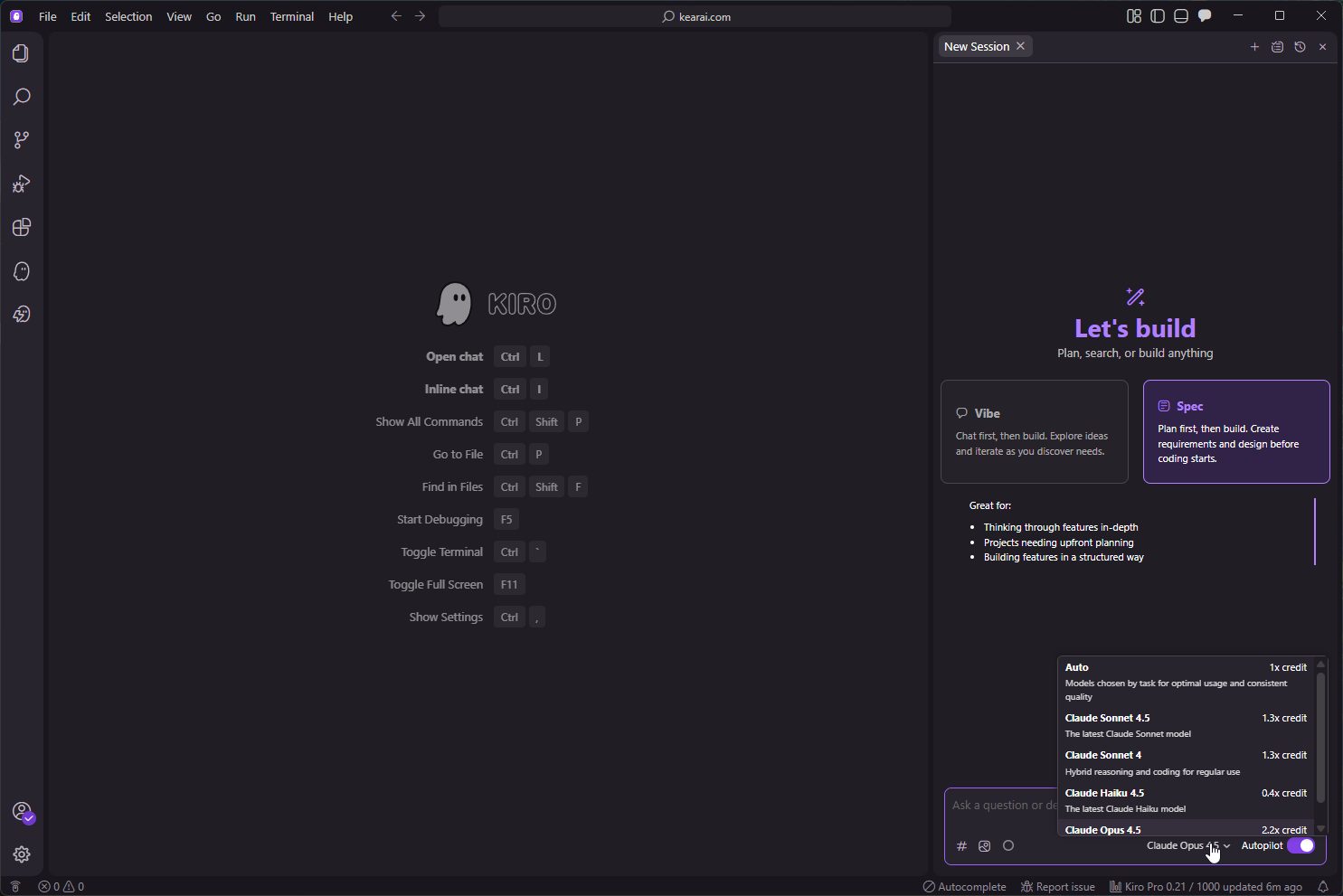
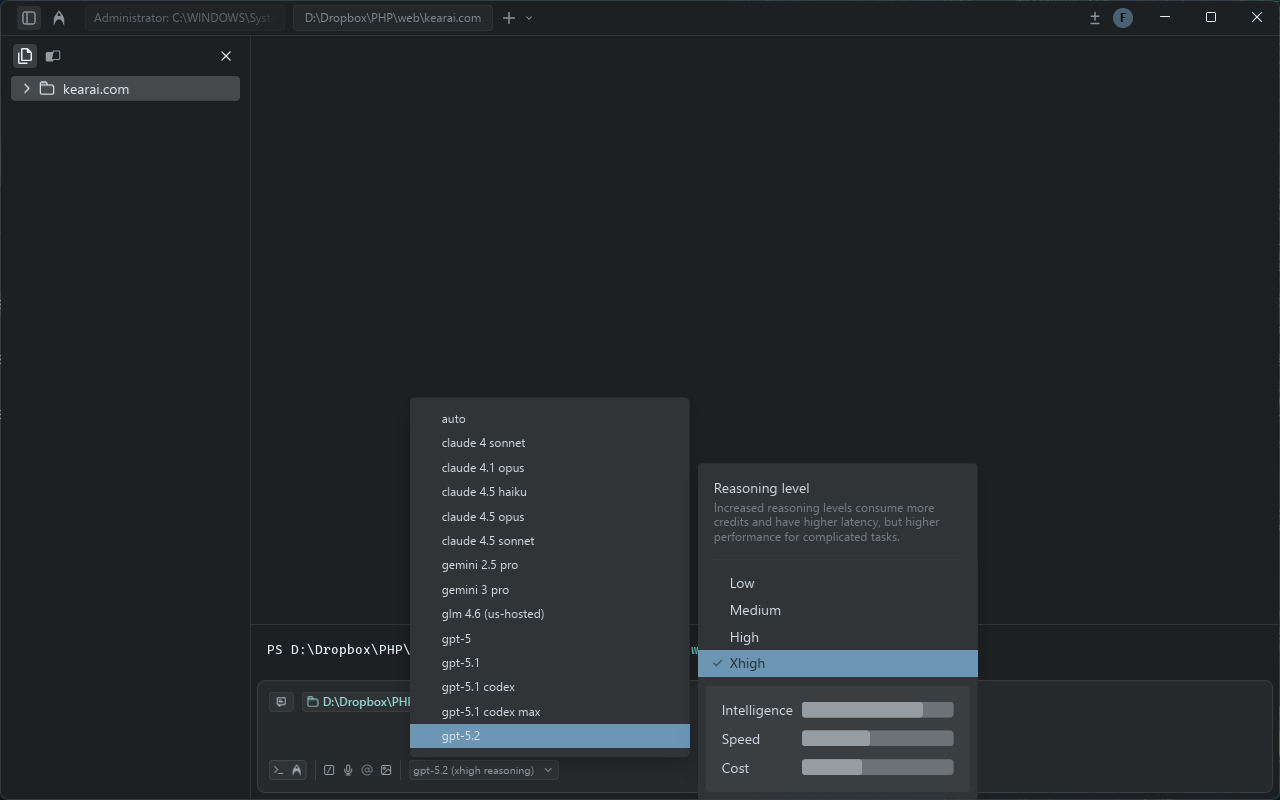
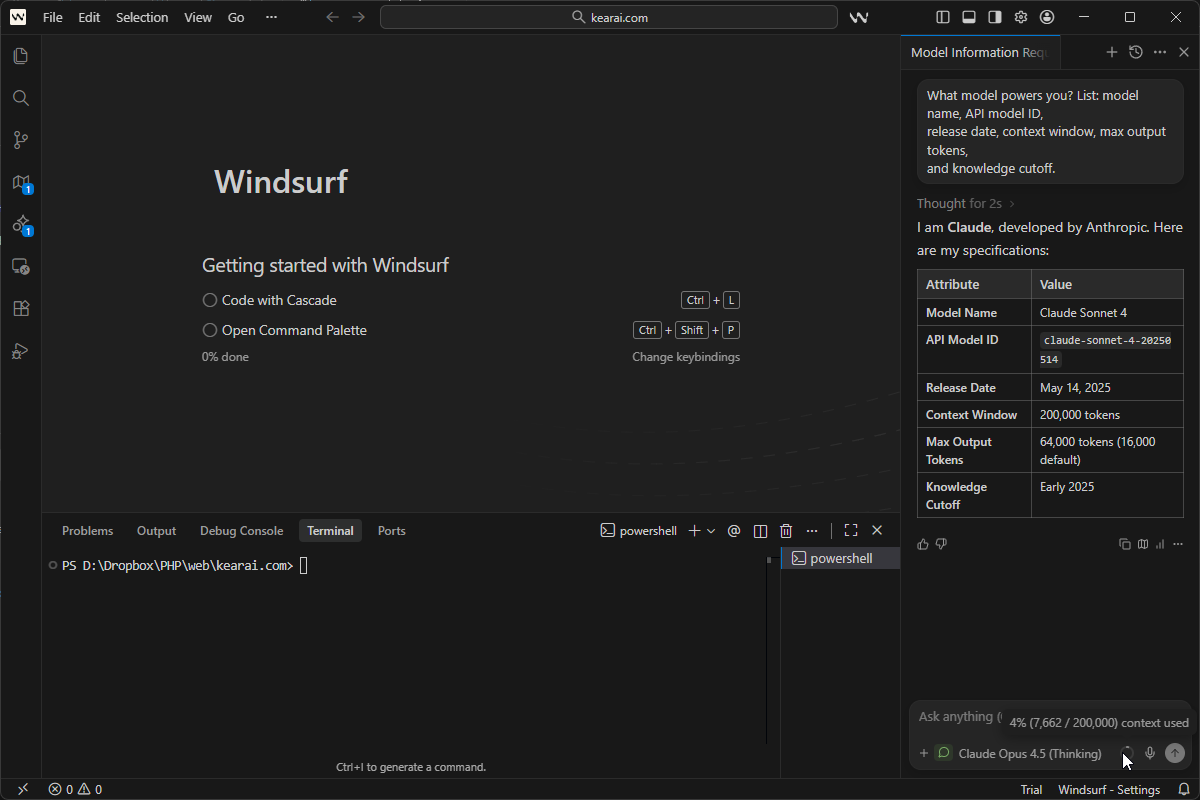
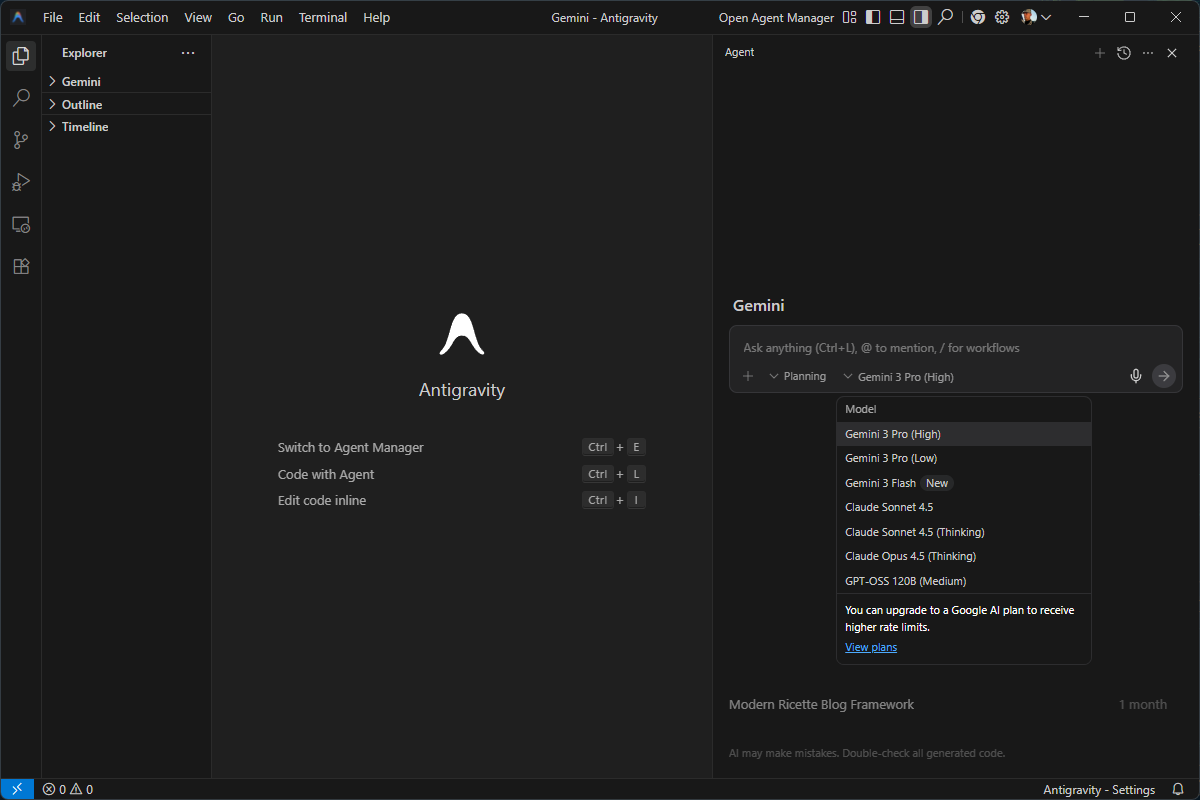
During my testing, I used this prompt to verify exactly what was powering Kiro:
What model powers you? List: model name, API model ID,
release date, context window, max output tokens,
and knowledge cutoff.
This prompt works on any AI platform to reveal underlying model specifications.
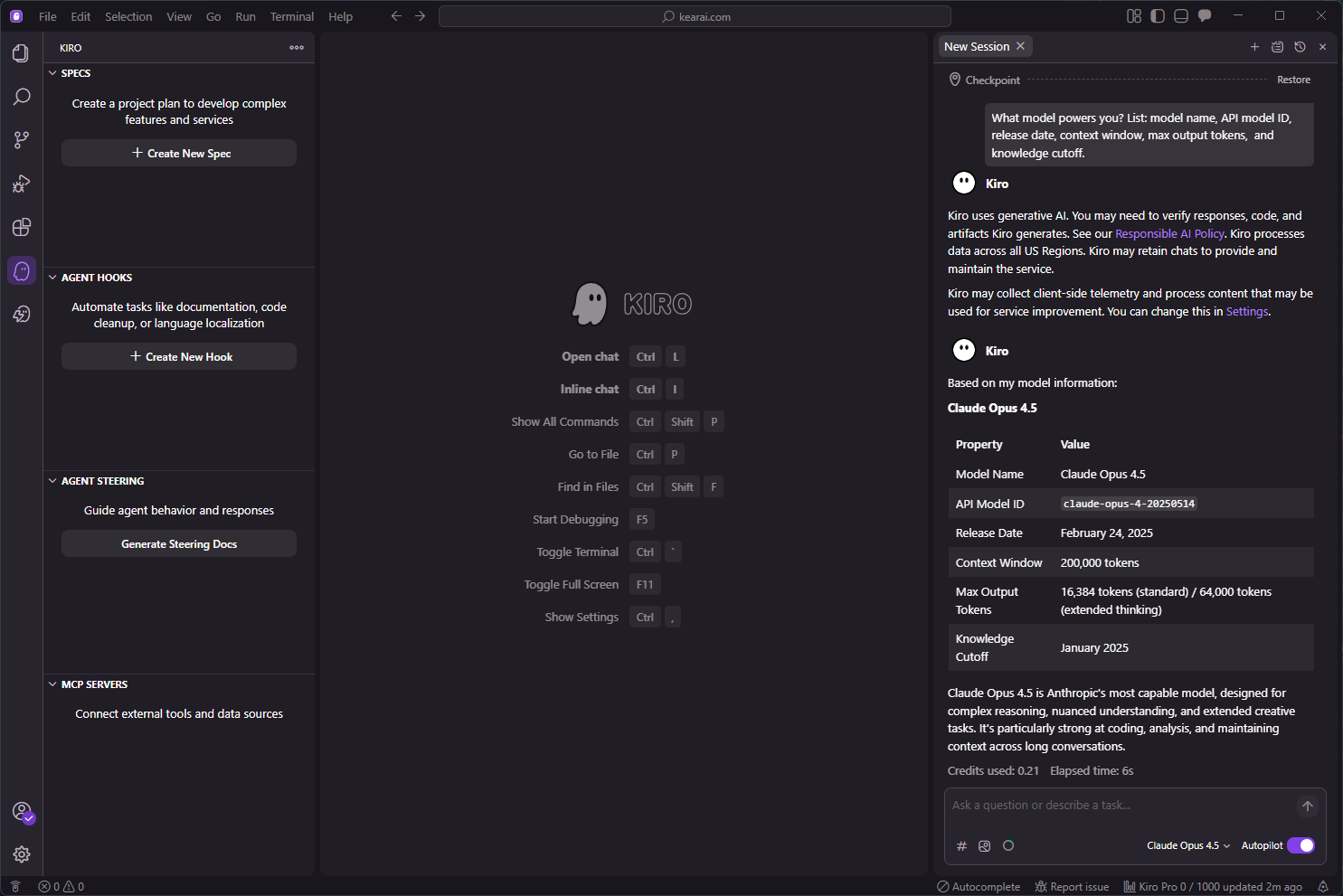
Here's what I discovered about Kiro's model situation—and this is important for setting expectations:
Model Reality Check
Kiro currently uses Claude family models, primarily Claude Sonnet 4.0 with Sonnet 3.7 as a fallback during high traffic. While the model names sound current, they appear to be optimized versions without the extended thinking capabilities (like Claude's thinking mode) available in direct Anthropic subscriptions.
This means you're getting solid Claude performance, but not necessarily the most advanced reasoning capabilities. For simple to moderate complexity tasks, this is fine. For deep architectural reasoning, you might notice the difference.
Kiro has introduced "Auto"—an agent that uses a mix of different frontier models combined with specialized models, intent detection, caching, and optimization techniques. The goal is better balance of quality, latency, and cost. When using Auto, certain tasks that consume X credits via direct Sonnet 4 cost less because the system intelligently routes to the most appropriate model.
For those who want direct control, you can explicitly select Sonnet 4 for your prompts, though this consumes credits at a higher rate (approximately 1.3x compared to Auto).
Pricing and Credits
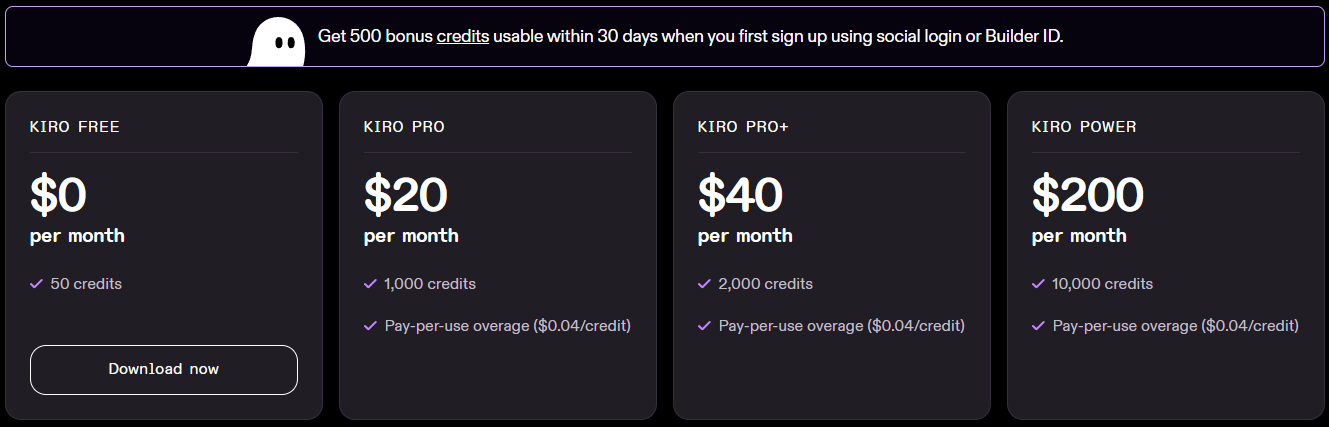
Kiro's pricing has been... contentious. The community feedback has been loud, and AWS has responded with multiple adjustments. Here's the current state:
Current Pricing Tiers
- Free: 50 credits/month — Basic exploration and light usage
- Pro ($20/month): 1,000 credits — For regular individual developers
- Pro+ ($40/month): 2,500 credits — Enhanced capacity for power users
- Power ($200/month): 10,000 credits — Enterprise-level usage
New users receive a 500 bonus credits welcome package usable within 30 days, regardless of which plan they choose—including the free tier. This gives you time to genuinely experience Kiro's capabilities before committing.
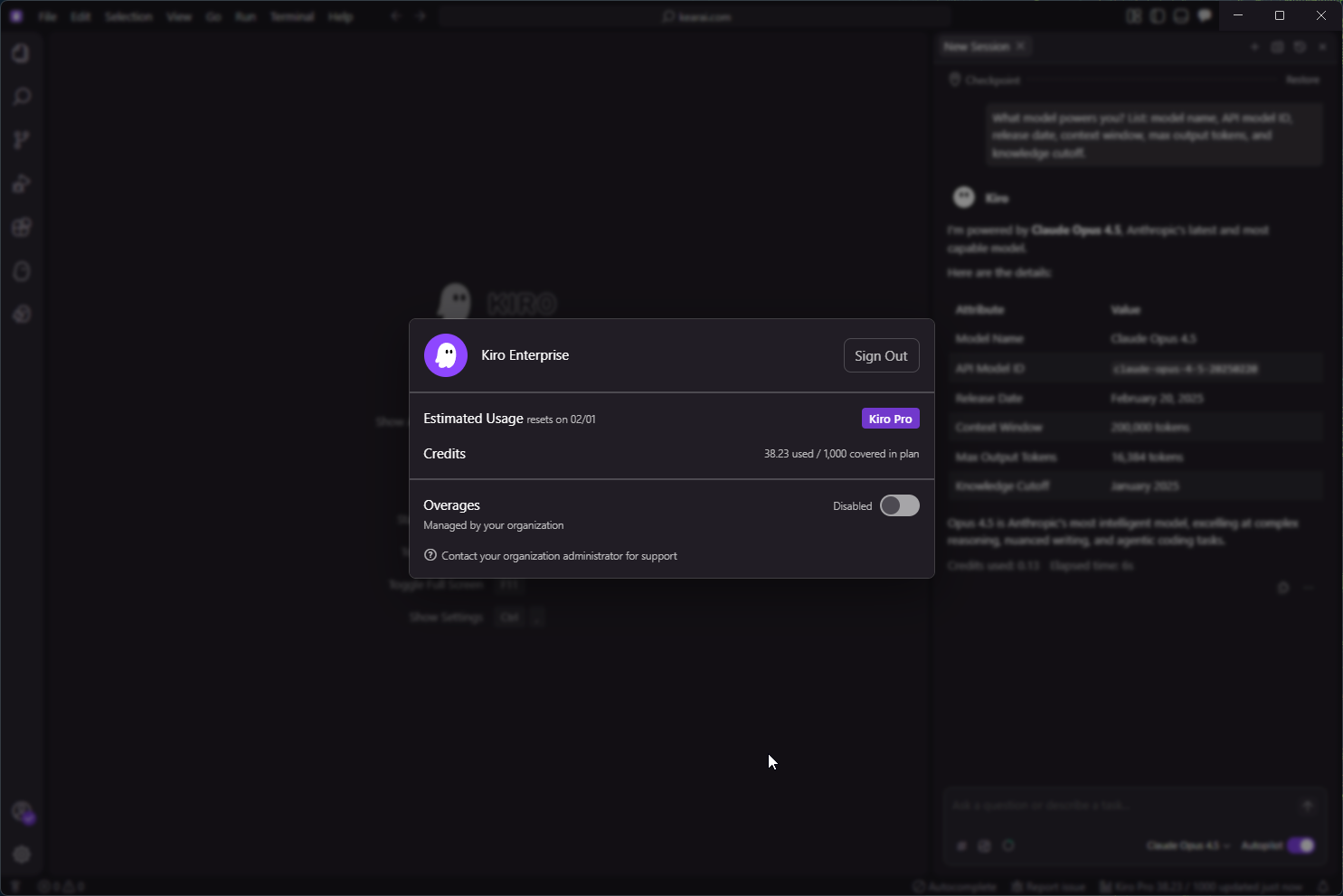
Understanding Credit Consumption
Here's where things get nuanced. Credits aren't simply "one prompt = one credit." A credit is a unit of work in response to user prompts:
- Simple prompts can consume less than 1 credit
- Complex prompts, especially spec task execution, typically cost more than 1 credit
- Different models consume credits at different rates
- Credits are metered to the second decimal point (minimum 0.01 credits)
In my testing, a simple model verification question cost only 0.1 credits—remarkably efficient. But creating a full project spec can consume 15-25 interactions, and complex multi-file implementations will burn through credits quickly.
One user reported that light coding requires about 3,000 spec requests per month, translating to roughly $550/month on overage pricing. Full-time professional usage could hit $1,950/month.
Overage and Billing
On paid plans, you can enable overage to continue working past your monthly limits. Additional credits cost $0.04 each, billed at month-end. Overage is disabled by default and must be explicitly enabled in Settings—a sensible safeguard against surprise bills.
AWS also offers the Kiro Startup Credits Program—up to one year of Pro+ access at no cost for qualifying startups. If you're building a company and fit the criteria, this is significant value.
My Honest Experience
Let me share my personal experience with Kiro, unfiltered. I came into this excited—AWS entering the AI IDE space with a genuinely novel approach? Count me in.
The spec-driven workflow is genuinely impressive when it works. Watching Kiro transform a vague feature request into structured user stories with EARS acceptance criteria, then generate a technical design document analyzing my existing codebase, then break that into sequenced implementation tasks—it felt like having a senior engineer onboard who actually documents their work.
The Frustrations I Encountered
Kiro couldn't satisfy my professional workflow requirements. The models, while named correctly, felt like older, cheaper versions without extended thinking capabilities. When I described complex requirements, Kiro often didn't fully grasp what I needed. It liked to take shortcuts—generating abbreviated, simplified code rather than complete implementations.
I ended up deleting everything Kiro generated for one project. That's not a great sign.
The community echoes similar frustrations. One developer reported spending 310+ hours and $620 in AI credits on a project that should have taken 20-30 hours, achieving only 50% success—two out of four modules working. Tasks frequently get stuck, fail, and require multiple manual retries. Failed tasks lose context, forcing restarts from scratch while burning through usage limits.
Common issues I encountered and others report:
- High traffic errors: "The model you've selected is experiencing high volume of traffic. Try changing the model." Better on paid plans, but still occurs.
- Debugging loops: The AI sometimes falls into circular patterns, applying the same incorrect fix repeatedly.
- Feature overkill: Kiro tends to generate "industrial, military-grade" solutions when simpler code would suffice—20 files and 1,500 lines for what could be 200 lines.
- Context loss: Correctly implemented logic sometimes gets mixed with code from completely different earlier tasks.
- Credit consumption bugs: Early pricing rollout had metering issues causing unexpected usage spikes (AWS has acknowledged and addressed this).
On the positive side, Kiro's credits are generous for simple queries. When the spec workflow works well, it genuinely produces higher-quality, more maintainable code than vibe coding alone. The documentation that emerges is legitimately useful for team collaboration.
My conclusion from hands-on testing: Kiro is too young. The agent intelligence level is still developing. It needs more iteration before it's ready for professional workflows. But the foundation is solid, and the philosophy is sound. AWS has responded well to community feedback, refunding users affected by pricing bugs and extending free access periods.
Kiro vs Cursor vs Windsurf
Let's cut through the marketing and compare these tools on what actually matters:
Kiro
Strength: Spec-driven development, documentation generation, enterprise compliance, team alignment
Weakness: Younger product, occasional stability issues, limited model selection
Price: $20-200/month + overages
Best for: Teams needing structure, enterprise environments, long-term projects
Cursor
Strength: Deep codebase indexing, multi-model flexibility, mature feature set, precise control
Weakness: Steeper learning curve, can feel overwhelming with options
Price: $20/month (effectively unlimited)
Best for: Power users, professional developers, production-quality code
Windsurf
Strength: Clean UI, Cascade agents, automatic context handling, beginner-friendly
Weakness: Sometimes lower code quality, complex pricing with "flow credits"
Price: $15/month
Best for: Beginners, rapid prototyping, those who want minimal friction
GitHub Copilot
Strength: GitHub integration, organization-wide settings, real-time feedback, rapid iteration
Weakness: Less autonomous, limited context compared to competitors
Price: $10-19/month
Best for: GitHub-centric workflows, enterprise standardization
Performance Benchmarks
Based on testing across common development scenarios:
Kiro:    45 min (includes full docs/tests)
Cursor:  65 min (manual architecture)
Windsurf: 70 min (good multi-file handling)
Copilot: 85 min (limited context)
Kiro's spec-driven approach wins on complex, well-defined tasks.
The standout metric is Kiro's consistency—while competitors might be faster for simple completions, Kiro maintains high accuracy across complex, multi-file operations. The spec-driven approach particularly shines in database design and API architecture, areas where traditional AI assistants struggle.
Kiro leads for enterprise-readiness with specifications, documentation, and audit trails. Cursor excels at granular, model-aware coding. Windsurf wins on intuitive experience for beginners.
Who Should Use Kiro
Perfect For: Teams and Enterprises
If you work with multiple developers, need compliance documentation, or want consistent coding standards across projects, Kiro's spec-driven approach creates genuine value. The specifications become shared context that survives team changes and project handoffs.
Perfect For: Non-Programmers with Ideas
If you have ideas but lack technical expertise, Kiro's structured approach helps translate vision into working software without requiring you to learn to code. The spec workflow guides you through proper software engineering practices naturally.
Perfect For: Startups Building Foundations
If you're laying groundwork that will need to scale, the upfront investment in specifications pays dividends. Kiro turns overlooked docs into robust assets, making growth smoother and future scaling more effective.
Consider Carefully: Solo Power Users
If you move fast, know what you want, and don't need documentation for others, Kiro's overhead might slow you down more than it helps. Cursor or Windsurf may serve you better for individual productivity.
Not Ideal For: Production-Critical Systems (Yet)
If you need absolute reliability and can't tolerate occasional failures or debugging loops, wait for Kiro to mature further. The foundation is solid, but the execution isn't consistent enough for mission-critical work.
Pro Tips and Best Practices
After extensive testing and research across the community, here are the strategies that maximize Kiro's value:
Never jump straight into coding for any feature that matters. Use Kiro's spec workflow to clarify requirements first, even if it feels slower. The saved iteration cycles more than compensate.
Set up your .kiro/steering/ files immediately when starting a project. Include tech stack, coding conventions, preferred patterns. This dramatically improves Kiro's contextual understanding.
Use Autopilot for foundational components, boilerplate, and well-understood patterns. Switch to Supervised mode for critical business logic where you need to review every change.
Break down complex features into small, manageable tasks in your tasks.md. Kiro performs better on focused work than sprawling implementations. Execute one task at a time for best results.
The Context7 and AWS Labs MCP servers provide incredible value for AWS-related tasks. Connect to documentation, databases, and APIs to give Kiro richer context.
Automate git commits, documentation updates, and code quality checks. The upfront investment in hooks pays back every day as your project grows.
Don't accept spec output blindly. The AI makes assumptions—make sure they align with your actual requirements before proceeding to design and implementation.
Let Auto route your prompts to appropriate models rather than always selecting Sonnet 4. You'll save credits without significant quality loss for most tasks.
Final Verdict
Specs solve real coordination problems
Overhead may outweigh benefits
Structured guidance compensates for expertise gaps
Let the product mature further
My recommendation? Don't subscribe to Kiro yet if you're expecting it to replace your primary development workflow. The agent capabilities are still too young, the reliability isn't quite there, and the learning curve for spec-driven development is real.
But keep watching. AWS has created something genuinely different with the spec-driven approach. The philosophy—that AI coding should force clarity of thought rather than just speed of typing—is profound. When Kiro matures, it could change how we think about AI-assisted development entirely.
Try the free tier. Experience the spec workflow on a small project. See if the structure resonates with how you want to work. And if you're building a team or a company where documentation and consistency matter more than raw speed, Kiro might already be exactly what you need.
The emergence of AI hasn't made knowledge obsolete—it's made curiosity more powerful than ever. We're no longer limited by textbooks or years of specialized training. With the right tools and willingness to think clearly, ordinary people can build extraordinary things. The best AI tools don't replace human judgment—they amplify our ability to make informed decisions. Only by collaborating with different AI systems can we find the ones that truly fit our working style. I hope to share this journey with friends around the world. Together, let's welcome this new era. Together, let's grow.

Discussion
0 commentsLeave a comment
Be the first to share your thoughts on this article!