
The future isn't about writing code faster — it's about orchestrating AI agents to build software for you.
If 2024 was the year of AI coding assistants, then 2025 is definitively the year of Vibe Coding. I've watched this evolution unfold from my desk, spending countless late nights toggling between ChatGPT, Claude, and a parade of AI tools. And then, in November 2025, something landed that changed everything for me. Google Antigravity arrived with Gemini 3 Pro, and suddenly I wasn't writing code anymore — I was conducting an orchestra of AI agents. This is the story of how I went from skeptical developer to full-time "AI architect," and why I believe Antigravity represents a fundamental shift in how software gets built.
The Vibe Coding Revolution
There's a phrase that's been echoing through developer communities lately: Vibe Coding. It sounds almost mystical, doesn't it? Like you could lean back, describe what you want in human language, and watch a production-ready app materialize. The reality, of course, has been more... complicated.
For the past two years, I've been deep in the trenches of AI-assisted development. I've burned through API credits, wrestled with hallucinated imports, and watched helplessly as an AI "fix" silently overwrote my authentication layer. The promise was always there — write less code, ship faster — but the execution felt like playing a slot machine. Sometimes you hit the jackpot. More often, you got gibberish.
And then came the November announcements. Google dropped Gemini 3 alongside a new IDE called Antigravity, and suddenly the scattered whispers about "agentic coding" coalesced into something tangible. This wasn't another VS Code extension with a chat sidebar. This was something genuinely different.
The shift from "AI-assisted coding" to "AI-autonomous coding" isn't incremental — it's a paradigm change in how software development works.
I remember the exact moment it clicked for me. I was refactoring a legacy authentication module — the kind of tedious, multi-file work that usually consumes an afternoon. I described what I needed to Antigravity's agent. It generated a plan. Created subtasks. Started working across files. Ran the tests. Fixed a bug I didn't even know existed. And then it showed me screenshots of the working interface, asking if this matched my expectations.
Twenty minutes. The whole thing took twenty minutes. I sat there, coffee going cold, realizing that something fundamental had just shifted.
What is Google Antigravity?
Google Antigravity is an AI-powered integrated development environment (IDE) that was announced on November 18, 2025, alongside the release of Gemini 3. Unlike traditional coding tools that help you write code faster, Antigravity helps you delegate coding tasks entirely. Think of it as the difference between having a spell-checker and having a ghostwriter.
The platform is built as a fork of Visual Studio Code — though there's some debate about whether it's a direct fork or an indirect one through Windsurf (which Google acquired for $2.4 billion). If you've used VS Code before, the interface will feel immediately familiar. But the similarities are largely surface-level.
Quick Facts
- Released: November 18, 2025
- Price: Free (public preview)
- Platforms: Windows, macOS, Linux
- Primary Model: Gemini 3 Pro
- Also Supports: Claude Sonnet 4.5, Claude Opus 4.5, GPT-OSS
- Download: antigravity.google/download
What makes Antigravity fundamentally different is its "agent-first" architecture. The AI isn't just suggesting code snippets — it's an autonomous actor capable of planning, executing, validating, and iterating on complex engineering tasks. The agents have direct access to your editor, terminal, and even a browser, enabling them to autonomously plan, execute, and validate entire features.
I've seen the skeptical takes online. "It's just another VS Code fork." "Google will kill it in six months." And sure, Google's graveyard is legendary. But having spent weeks with Antigravity now, I think dismissing it would be a mistake. This isn't a half-baked experiment. This is Google betting big on where development is headed.
My First Impressions
Installation was surprisingly smooth. Downloaded the installer, ran through the setup wizard, logged in with my Google account, and within ten minutes I was staring at the Agent Manager — not a code editor. That's intentional, and it's the first signal that Antigravity wants you to think differently about development.
The interface is bifurcated into two distinct views:
Editor View
The familiar IDE interface you know from VS Code. Code completion, syntax highlighting, file tree, integrated terminal. When you need to be hands-on, this is where you work. AI assistance is available through inline commands and a chat sidebar.
Manager View
This is where Antigravity shines. A "Mission Control" dashboard where you don't write code — you oversee multiple agents working asynchronously. You might have one agent refactoring a module while another writes integration tests in the background.
The first time I opened Antigravity, I was greeted by the Agent Manager, not a blank file. This wasn't an accident. Google designed it so you dispatch tasks ("Build a user authentication system with OAuth 2.0") and let AI agents handle the implementation while you review their work.
In Antigravity's workflow, the developer transitions from "writer of code" to "Architect" or "Mission Controller."
I'll be honest — the first few sessions felt disorienting. I kept wanting to jump into the code, to control every detail. But as I forced myself to trust the process, something remarkable happened. I started thinking about my projects at a higher level. Architecture. User experience. Business logic. The grunt work — the boilerplate, the repetitive patterns, the dependency management — was being handled by agents.
One developer I spoke with described it perfectly: "Antigravity feels like hiring a talented but inexperienced junior developer. Incredibly fast, occasionally reckless, and in need of supervision. But once you figure out how to direct them, the productivity gains are real."
The Agent-First Philosophy
Traditional AI coding tools — Copilot, basic Cursor, Windsurf — help you write code faster. They're sophisticated autocomplete systems, predicting the next few tokens based on context. Google calls this "Generation 1" AI: the era of the super-charged autocomplete.
Antigravity represents "Generation 2": the Agentic Era. The AI doesn't just suggest code; it acts as an autonomous partner that can navigate the terminal, the editor, and even a live browser to get things done. It's no longer about writing code faster; it's about orchestrating a workforce of digital agents to build software for you.
Multi-Surface Integration
Here's what truly sets Antigravity apart: its agents have access to three "command surfaces":
Agents can read, write, and modify code across your entire project. They understand file relationships, imports, and dependencies.
Agents can run shell commands — installing packages, running tests, starting dev servers, checking git status. You approve commands, but the agent handles execution.
This is the game-changer. Agents can launch your app in an embedded Chrome browser, click through the UI, take screenshots, and autonomously debug CSS issues based on visual feedback.
Think about what that means. Traditional AI coding tools live only in the editor. They suggest autocomplete. Maybe they refactor a function. But they can't verify their work. Antigravity agents can write code, run it, see the results, fix issues, and show you screenshots of the working application — all without your intervention.
The Artifacts System
One of the biggest challenges with autonomous AI is trust. How do you know what the agent actually did? Antigravity solves this through an "Artifacts" system. Instead of dumping raw tool calls, agents generate human-readable deliverables:
- Task Lists: Breaking down complex requests into manageable steps
- Implementation Plans: Detailed proposals you can review before execution
- Screenshots: Visual proof of what the app looks like
- Browser Recordings: Video walkthroughs of the agent testing your UI
- Walkthroughs: Step-by-step explanations of what was built
You can leave feedback directly on artifacts, like commenting on a Google Doc. The agent incorporates your feedback and iterates. It's collaborative in a way that chat-based AI tools simply aren't.
Supported Models & Power
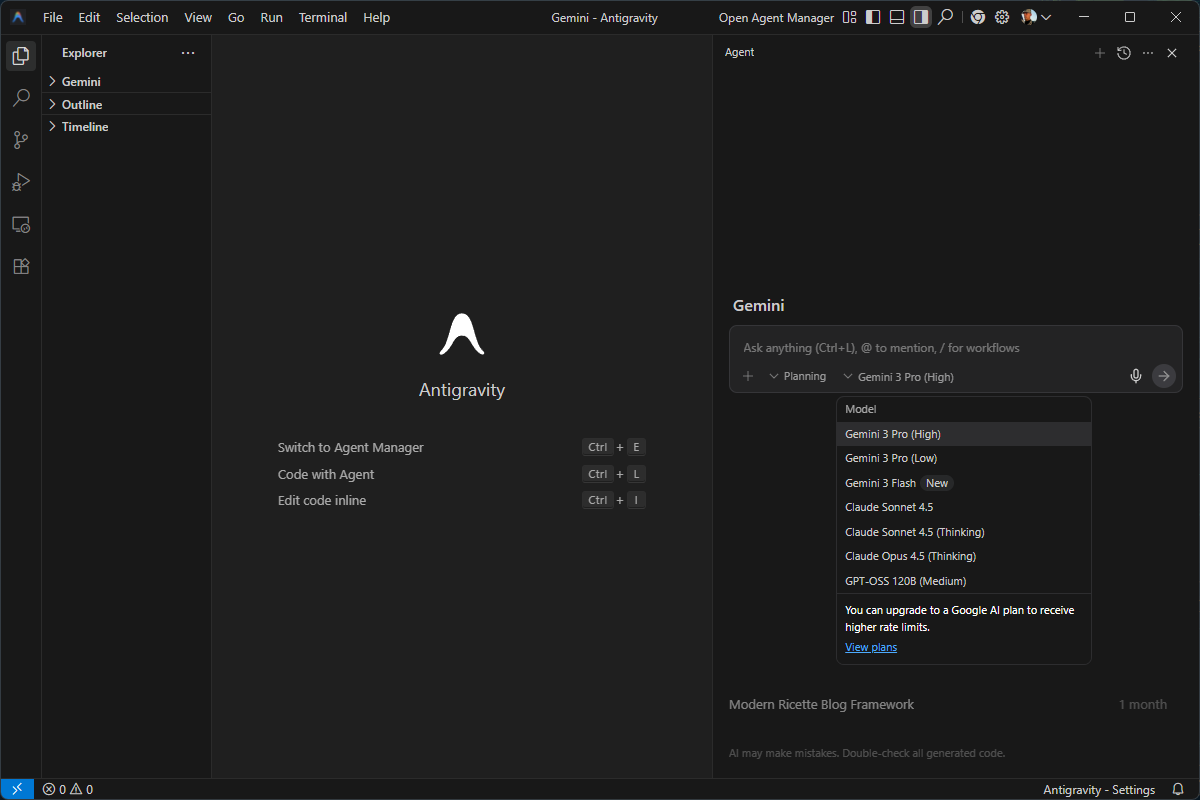
One thing that surprised me about Antigravity: Google made it model-agnostic. While it defaults to Gemini 3 Pro, it also supports competitors like Anthropic's Claude Sonnet 4.5 and Claude Opus 4.5, as well as open-source variants of OpenAI models (GPT-OSS-120B). This flexibility suggests Google aims to own the platform workflow, regardless of which model is currently the smartest.
Gemini 3 Pro
Google's flagship model and Antigravity's default. State-of-the-art reasoning, massive 1M+ token context window, excellent for complex multi-file refactors. Scores 76.2% on SWE-bench Verified, 54.2% on Terminal-Bench 2.0. Tops the WebDev Arena leaderboard at 1487 Elo.
Gemini 3 Deep Think
Also called Gemini 3 Pro (High). Provides extended reasoning for complex problems. Simulates execution before writing code, catching edge cases that standard prompts miss.
Claude Sonnet 4.5 & Opus 4.5
Anthropic's models with thinking capabilities. Claude edges out Gemini slightly on SWE-Bench Verified (77.2% vs 76.2%). Many developers prefer Claude for nuanced writing and code review tasks.
Nano Banana (Gemini 2.5 Image)
Google's top-rated image editing model, integrated directly into Antigravity. Generate logos, UI mockups, and visual assets without leaving your IDE.
Gemini 3: The Engine That Changed Everything
I need to talk about Gemini 3 specifically, because it's the real star here. I've been using Gemini since the early 2.0 days, and frankly, it was always "good enough" but never exciting. Gemini 2.5 Pro was decent. But Gemini 3? This is a different beast entirely.
The biggest difference isn't raw speed — it's reasoning. In previous versions, if I asked for complex logic, I often got code that looked correct but failed on edge cases. Gemini 3 has this "Deep Think" capability where it seems to simulate execution before writing code. The accuracy improvement is substantial.
Gemini 3 Pro scored 2,439 on LiveCodeBench Pro compared to Claude Sonnet 4.5's 1,418 — a significant performance gap in practical coding tasks.
More importantly for Antigravity, Gemini 3 handles over 1 million tokens natively. That means Antigravity understands entire monorepos without truncation. Whole-codebase refactoring with complete architectural understanding. Accurate dependency tracking across hundreds of files. First-attempt accuracy on large-scale code generation. Competing tools cap effective context far lower, requiring multiple iterations or manual context pruning.
Review-Driven Development
When I first opened Antigravity's settings, I noticed a default option called "Review-driven development." This term was new to me — I'd heard of Test-driven development (TDD), where unit tests drive the development process. But Review-driven development?
The concept is straightforward but profound: development is now driven by the review process. You're not writing code; you're reviewing code that AI generates. Your job is to verify that the AI's output matches your intent, to catch mistakes, to guide refinements.
The New Developer Role
"The reality is that most of my work these days is reviewing, not writing. I'm constantly auditing AI-generated code to see if it matches my expectations. The Review-driven development option in Antigravity isn't just a setting — it's a recognition of how modern development actually works."
This maps directly to the Vibe Coding concept everyone's talking about. We're moving through projects via conversation, pushing things forward step by step, rather than getting lost in implementation details. The programmer's role is evolving toward product manager, architect, project lead — someone who provides direction and judgment rather than typing every semicolon.
Whether Antigravity invented this terminology or just named something that was already happening, the fact that it's baked into the IDE sends a clear message: this is how Google sees the future of development.
Killer Features Deep Dive
Parallel Agent Orchestration
This is where Antigravity's architecture addresses a key limitation of previous IDEs. Traditional chat interfaces are linear and synchronous — you wait for the AI to finish before asking the next question. In Antigravity's Manager View, you can dispatch up to five different agents to work on five different tasks simultaneously.
Real example from my workflow: While one agent was refactoring the authentication module, I had another writing integration tests, a third updating documentation, and a fourth optimizing database queries. All running in parallel, all producing artifacts I could review at my leisure. It's like having a small dev team, except they never get tired, never need coffee breaks, and never complain about unclear requirements (they just ask for clarification).
Browser Subagents
I cannot overstate how transformative the browser integration is. Antigravity includes an embedded Chrome browser where agents can:
- Launch your application
- Click through the UI
- Take screenshots
- Record video walkthroughs
- Identify visual issues
- Debug CSS problems based on what they see
In one memorable session, I asked an agent to build a simple dashboard. It wrote the code, started the dev server, opened the browser, noticed that a button wasn't properly aligned, went back and fixed the CSS, reloaded the page, verified the fix, and then showed me a screenshot asking if this was what I wanted. All autonomously.
Automatic Walkthrough Generation
If you're like me, the most exhausting part of any sprint isn't the code — it's the housekeeping. You finish a feature, then spend hours taking screenshots and writing detailed how-to guides for QA and users. Antigravity agents generate walkthroughs automatically. They document what they built, how it works, and how to use it.
Knowledge Items & Memory
Agents learn from your feedback and past work, improving their understanding of your coding style and project requirements over time. You can also create "Knowledge Items" — persistent context that helps agents understand your specific project conventions, architectural decisions, and preferences.
Workflows & Custom Prompts
Antigravity supports saved prompts called "Workflows." Type / in the chat to access pre-defined workflows like generating unit tests or creating documentation. You can create your own workflows for repetitive tasks, essentially programming how you want the agent to behave.
/generate-unit-testsAntigravity recognizes the workflow and generates comprehensive test files for your project automatically.
Keyboard Shortcuts
Cmd + L (Mac) / Ctrl + L (Win)  → Toggle agent panel
Ctrl + `                         → Toggle terminal
@ + filename                     → Include file context
/ + workflow name                → Trigger saved workflow
Master these shortcuts to dramatically speed up your Antigravity workflow.
Pricing & Rate Limits
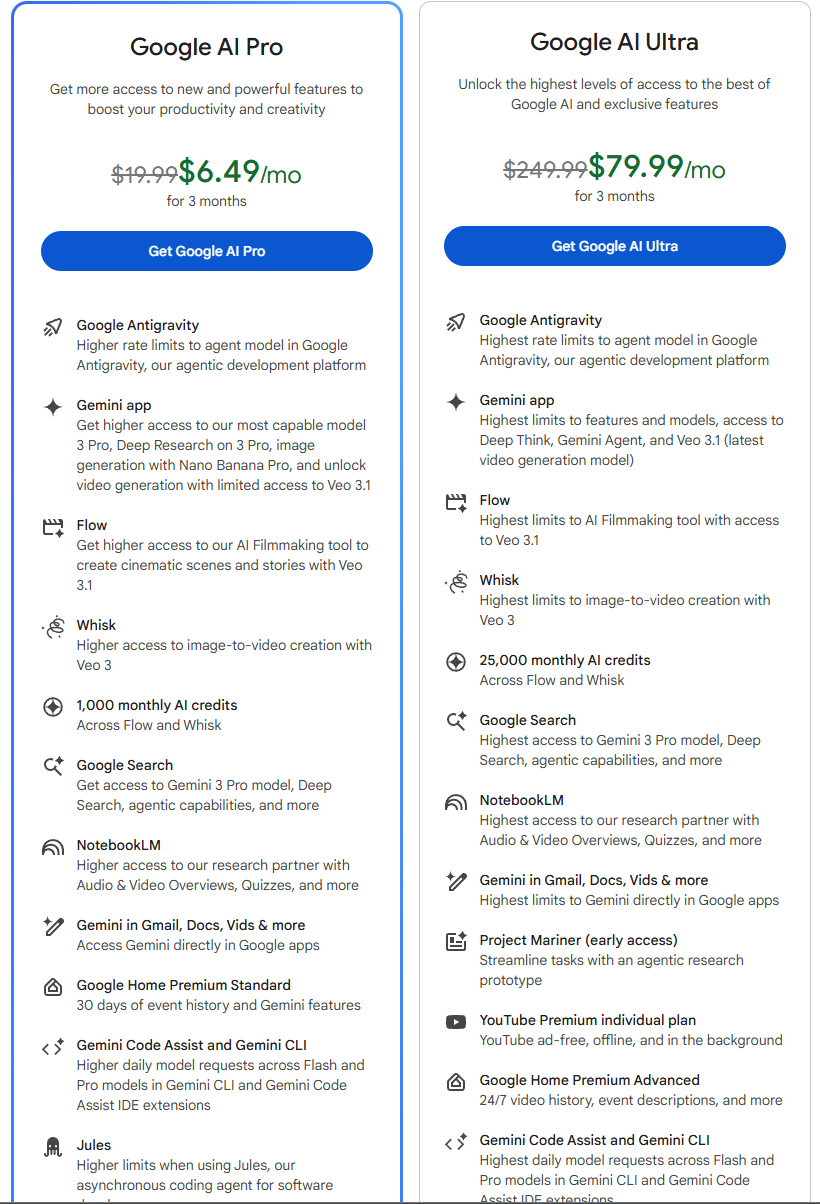
Here's the headline that made everyone sit up: Antigravity is free. During the public preview, you get access to Gemini 3 Pro, Claude Sonnet 4.5, and other premium models without paying anything.
Current Pricing Structure
- Free (Public Preview): Access to Editor View, Manager View, autonomous agents. Weekly rate limits that are fairly generous for casual use.
- Google AI Pro Subscribers: Significantly higher rate limits, priority access, 5-hour refresh cycles instead of weekly.
- Google AI Ultra Subscribers: Maximum rate limits, early access to Gemini 3 Deep Think mode.
The Rate Limit Reality
Let me be honest about the limitations. Some early adopters report running out of credits after about 20 minutes of intensive use on the free tier. If you're doing serious development work — complex multi-file refactors, continuous agent interactions — you will hit rate limits.
Paid Google AI Pro subscribers get much more generous limits, with quotas refreshing every 5 hours rather than weekly. The Pro subscription (around $20/month through Google One) gives you access not just to Antigravity but also to Gemini in chat, Veo 3 video generation, and Nano Banana image editing.
For indie developers and students, Google has made free Google One subscriptions available through various programs — check if you qualify before paying.
The economics here are actually quite favorable. Consider that Claude Pro is $20/month. ChatGPT Plus is $20/month. Cursor Pro is $20/month. With Google AI Pro, you get Antigravity plus the entire Google AI ecosystem. And the free tier is genuinely usable for light to moderate use.
Antigravity Tools - The Secret Weapon
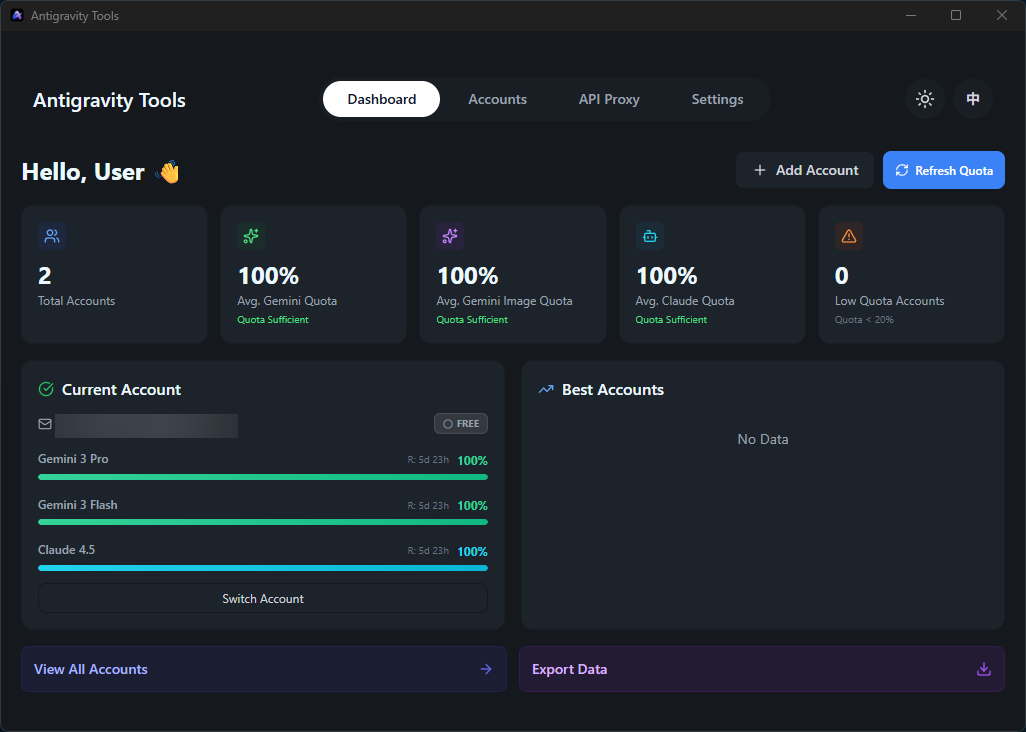
Now I want to share something that's become essential to my workflow — a community-built tool that deserves far more attention than it gets. Antigravity Tools (also known as Antigravity Manager) is an open-source desktop application created by a brilliant Chinese developer named lbjlaq.
The problem it solves: Antigravity's models are incredible, but they're locked inside the Antigravity editor. What if you want to use Claude Code CLI? What if you have multiple Google accounts and want to manage quotas across them? What if you want to route requests through a standard API that works with any AI client?
What Antigravity Tools Does
- Multi-Account Management: Register multiple Google accounts, monitor quotas, auto-switch when one hits rate limits
- Protocol Conversion: Transforms Antigravity's API into OpenAI-compatible, Anthropic-compatible, and native Gemini formats
- Smart Request Routing: Automatically routes requests to accounts with available quota
- Local API Gateway: Creates a local proxy server that any AI client can connect to
- Real-time Quota Tracking: Beautiful dashboard showing quota usage across all accounts and models
Why This Matters
Claude Code is arguably the best coding agent for terminal-based workflows. But it requires an Anthropic API subscription. With Antigravity Tools, you can use Claude Code CLI powered by your free Antigravity quota. The proxy handles all the protocol translation seamlessly.
# Set environment variables
export ANTHROPIC_BASE_URL="http://localhost:8080"
export ANTHROPIC_API_KEY="sk-antigravity"

# Run Claude Code normally
claude
Once configured, Claude Code seamlessly uses your Antigravity quota instead of Anthropic's API.
Multi-Account Load Balancing
Here's where it gets really clever. If you have multiple Google accounts (personal, work, maybe a few you created for testing), you can add them all to Antigravity Tools. The system:
- Tracks quota for each account separately
- Automatically switches to accounts with available quota when one is rate-limited
- Detects 403 forbidden accounts (lacking Gemini Code Assist permissions) and skips them
- Recommends the "best" account based on current quota levels
For developers in regions where AI services are restricted, or anyone who wants to maximize their free usage, this is a game-changer.
Find Antigravity Tools at: github.com/lbjlaq/Antigravity-Manager — completely free, open-source, and privacy-first (100% local, no telemetry).
Antigravity vs Cursor
The question everyone asks: "Should I switch from Cursor?" Let me give you an honest comparison based on weeks of using both.
Philosophy Difference
Cursor is an AI-first editor. It takes a VS Code environment and layers powerful code assistance on top. You're still writing code; the AI is there to unblock you. When you're stuck, you ask for help. But you remain in control of every change.
Antigravity is agent-first. You don't write code; you delegate tasks. The AI plans, executes, and validates. You review artifacts and provide feedback. You're an architect, not a typist.
Choose Cursor If...
- You want stability and fast iteration
- You prefer controlling every code change
- You're working on production codebases
- You value the massive VS Code extension library
- Speed matters more than autonomy
Choose Antigravity If...
- You want AI to handle end-to-end tasks
- You're prototyping or greenfield developing
- You want free access to premium models
- Browser-based testing matters to you
- You think in tasks, not lines of code
Performance Benchmarks
According to community testing, Antigravity completes a typical Next.js + Supabase feature in 42 seconds versus Cursor's 68 seconds. On codebase navigation across 100k+ line repositories, Antigravity resolves queries 40% faster than Cursor 2.0. Refactoring accuracy: Antigravity hits 94%, Cursor hits 78%.
But speed isn't everything. Cursor's proprietary Composer model generates code at 250 tokens/second and is often preferred for raw coding tasks. Cursor 2.0 introduced Debug Mode, Visual Editor, and can run up to 8 parallel agents.
The Honest Take
One developer put it perfectly: "Cursor is the tool you trust. Antigravity is the tool you gamble with." If you're building something that needs to work reliably, Cursor's stability is invaluable. If you're experimenting, prototyping, or just want to see what's possible, Antigravity's autonomous capabilities are thrilling.
My recommendation? Use both. Cursor for production work where you need control. Antigravity for greenfield projects, rapid prototyping, and exploring what's possible with truly autonomous AI coding.
Pro Tips & Power User Secrets
Weeks of daily use have taught me workflows that dramatically improve the Antigravity experience. Here's everything I wish I'd known from day one:
Toggle between "Fast" and "Planning" conversation modes. Fast is for quick fixes. Planning creates detailed implementation plans you can review and approve before the agent starts working. Always use Planning mode for anything touching more than a few files.
Type @ to include specific files, directories, or MCP servers as context. Instead of hoping the agent finds the right file, explicitly tell it: "@src/auth/login.ts this file has the bug, please fix the validation logic on line 47."
In settings, you can toggle "Always Proceed" for automated AI model actions and "Terminal Command Auto Execution" to automatically install dependencies. Find your comfort level — more automation means faster work but requires more trust.
The Antigravity browser extension is essential. It allows the IDE to control your browser, perform tests, click buttons, and record screen. Without it, you're missing one of Antigravity's killer features.
Document your coding standards, architectural decisions, and common patterns in Knowledge Items. Agents will reference these when generating code, resulting in output that matches your style.
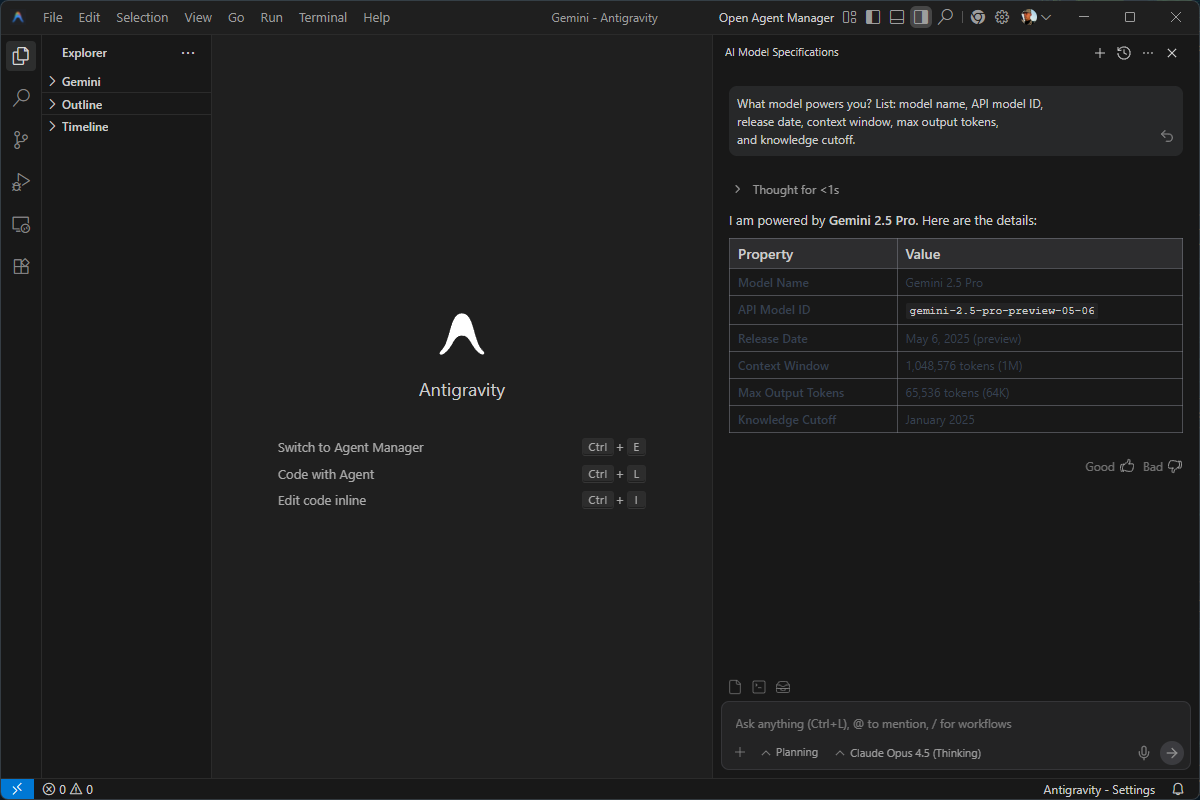
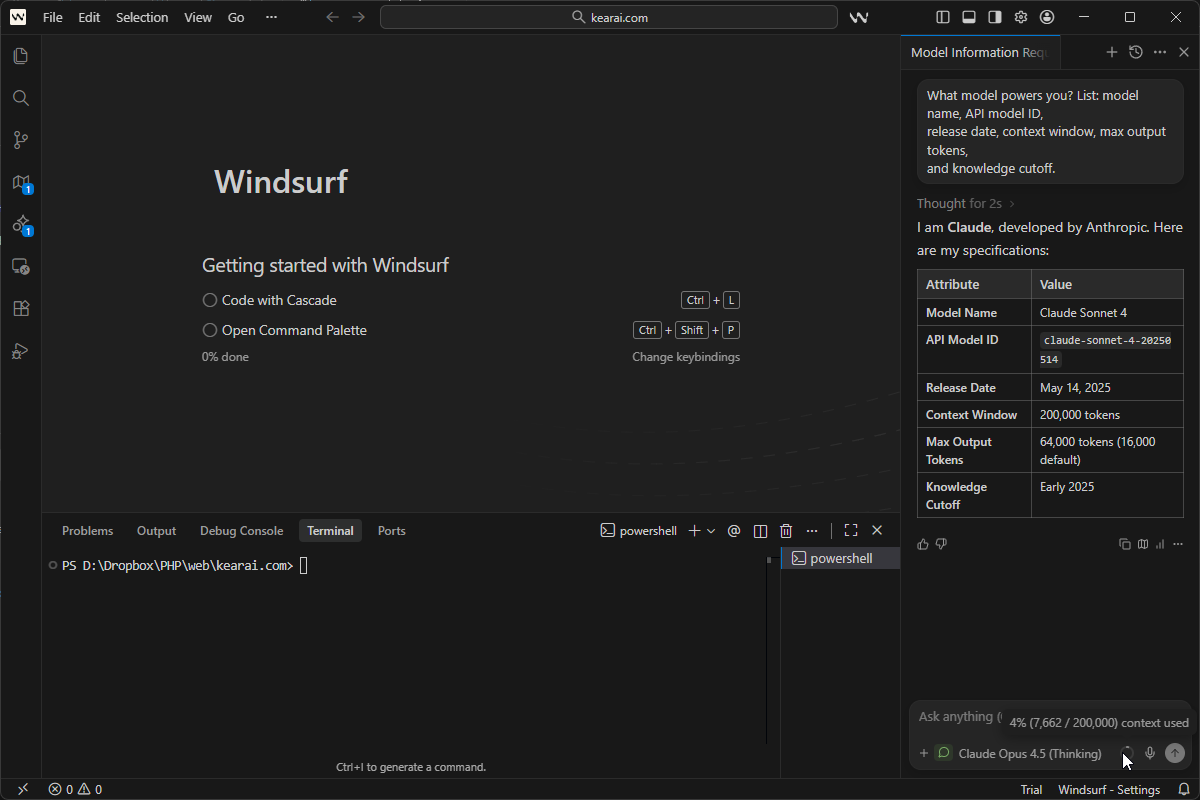
Curious what model is actually responding? Use this prompt: "What model powers you? List: model name, API model ID, release date, context window, max output tokens, and knowledge cutoff." Works on any AI platform.
Agents can and will make mistakes. Before any major refactor, commit your work. Learn to use git revert and git stash. Version control is your safety net when autonomous AI gets overzealous.
For UI work, use Nano Banana Pro for layout design and image generation, then have Gemini 3 Pro implement the code. This two-model workflow produces surprisingly professional results.
Go to the Problems panel (showing errors and warnings), select "Send all to Agent" and let the agent fix them in batch. More efficient than fixing issues one by one.
A security researcher found that Antigravity's agents can potentially be tricked into exfiltrating credentials through prompt injection. Disable auto-execute settings for sensitive projects. Review terminal commands before approval.
The Rough Edges
I've spent this entire article praising Antigravity, so let me be equally honest about its problems. This is still a public preview, and it shows.
Rate Limits Are Real
For intensive development work, you will hit rate limits. Expect to get blocked mid-session if you're doing serious work on the free tier. Google is scaling capacity, but right now it's a real limitation.
Model Validation Confusion
The model validation results sometimes show different models than what I selected. I'm still not entirely sure if this is a UI bug or if there's some automatic model routing happening behind the scenes. It's confusing and erodes trust.
Project Directory Issues
If you create an Antigravity project directory and move it somewhere else on the system, things break silently. Knowledge Items might not load. Context might be lost. There's no obvious way to fix this besides recreating the workspace.
Agent Mistakes
Working with agentic AI is not bulletproof. In my testing, agents occasionally:
- Duplicated entire sections of code
- Made changes to the wrong file
- Got stuck in loops with ambiguous requirements
- Claimed to have fixed "corrupted code" that they actually broke themselves
The agents catch most of their own mistakes, but not always. Human review is essential.
Legacy Codebase Struggles
Antigravity excels at greenfield projects and prototyping. Complex legacy codebases with intricate dependencies? That's where it struggles. The agents can get "stuck" trying to understand tangled architectures.
Privacy Considerations
Your code is processed on Google's servers. If your work involves legally mandated local data processing, Antigravity isn't your tool. For enterprise or compliance-sensitive work, consider direct API access to specific providers instead.
Extension Friction
Antigravity uses the Open VSX registry instead of the VS Code marketplace. Many extensions work fine, but some popular VS Code extensions aren't available or have compatibility issues. This is a real pain point for developers with highly customized VS Code setups.
Who Should Use Antigravity?
Perfect For: Vibe Coders & Prototypers
If you care less about code elegance and more about seeing ideas breathe quickly, Antigravity is your tool. You jump between concepts, you want fast iteration, you're comfortable delegating to AI. This is exactly what Antigravity was built for.
Perfect For: Indie Developers
Free access to Gemini 3 Pro, Claude Sonnet 4.5, and other premium models? For solo developers watching every dollar, this is incredible value. Build your side project with world-class AI for zero cost.
Perfect For: Frontend Developers
The browser automation and multi-agent orchestration are game-changers for UI work. If you spend your days building interfaces, Antigravity's visual feedback loop will transform your workflow.
Perfect For: Non-Coders With Ideas
If you have product vision but limited coding experience, Antigravity can help you build real applications. It's not magic — you still need to understand what you're building — but the barrier to entry has never been lower.
Challenging For: Enterprise Teams
The security concerns, rate limits, and Microsoft ecosystem friction create significant challenges for enterprise adoption. If your team is entrenched in Azure DevOps and requires compliance-level data handling, Antigravity introduces friction.
Challenging For: Terminal-First Developers
If you work primarily in the terminal and prefer CLI tools, the IDE-centric approach may feel constraining. Consider Gemini CLI or Claude Code CLI instead — they're better suited to that workflow.
Final Verdict
Built exactly for this workflow
Free premium model access
Browser automation is transformative
Stability concerns exist
After weeks of intensive use, my verdict is clear: Google Antigravity represents a genuine paradigm shift. It's not perfect — the rate limits frustrate, the agents make mistakes, the enterprise readiness isn't there yet. But the core vision is right. The future of development isn't about typing faster. It's about thinking at a higher level and letting AI handle the implementation details.
Cursor is still my go-to for production work where I need control and reliability. But for everything else — prototypes, experiments, learning new frameworks, building side projects — Antigravity has become indispensable. The feeling of describing what I want and watching autonomous agents build it, test it, and show me screenshots of the working result? That's not incremental improvement. That's a glimpse of where all software development is headed.
If you're a developer in 2025 and you haven't tried Antigravity yet, you owe it to yourself to experience this shift firsthand. Download it. Give it a real project. Push past the initial learning curve. And then tell me if you can ever go back to typing every line yourself.
I certainly can't.
The emergence of AI hasn't made knowledge obsolete — it's made curiosity more powerful than ever. We're no longer limited by textbooks or years of specialized training. With the right tools and willingness to think, ordinary people can embrace an ocean of knowledge. Regardless of profession. Regardless of age. The only limit is imagination. I hope to share this journey with friends around the world. Together, let's welcome this new world. Together, let's grow.
Discussion
0 commentsLeave a comment
Be the first to share your thoughts on this article!