
The terminal isn't dying — it's becoming the command center for the AI age.
My first AI tool wasn't ChatGPT or Claude's website — it was Poe. I spent nearly three years there, paying $20 monthly, copying and pasting code between browser tabs until my hands ached and my patience wore thin. Then one day in October 2025, I realized something had to change. The web interface was killing my productivity. Every context switch, every paste operation, every manual file save — they all added up to hours of wasted time. That's when I discovered agentic AI tools. I tried Claude Code first. Then Cursor. And finally, almost by accident, I found Warp. What happened next changed everything about how I work.
My Journey to Warp
Let me take you back to late 2025. I was frustrated. Genuinely frustrated. After years of using Poe AI for development work, I hit a wall. The constant copying and pasting between the browser and my code editor was driving me insane. Web-based AI felt like using a typewriter in an age of voice recognition.
So I started exploring agentic AI tools — the ones that could actually touch your files, run your commands, and work alongside you rather than just chatting at you through a browser window.
My first stop was Claude Code. The interface felt raw, almost primitive. Even with VS Code plugins, the experience never quite clicked for me. And the API costs? They were eating through my budget faster than I could justify.
Then I tried Cursor. Everyone was raving about it. "The future of coding!" they said. But something about the workflow didn't match how my brain worked. The IDE-centric approach felt like wearing shoes two sizes too small — functional, but never quite comfortable.
Then I stumbled across Warp on an AI news site. At first, I thought it was just another fancy terminal. Black background, white text, cursor blinking — nothing special. But within thirty minutes of actual use, I realized this was different. Fundamentally different. Warp got me pleasantly surprised.
For those keeping up with the AI coding space, you know how overwhelming it can be. New tools pop up constantly, existing tools get significant upgrades all the time. Ideally, you'd try them all, but experimenting during working hours is a challenge. I was fortunate to have some free time between projects to give several tools a proper spin. And Warp emerged as the clear winner for my workflow.
Warp isn't trying to replace your IDE — it's creating an entirely new category: the Agentic Development Environment.
What Is Warp and Why It Matters
First, let's clear up a misconception. When you first open Warp, it looks like a terminal emulator. Clean, modern, maybe prettier than your default Terminal.app — but still just a terminal, right?
Wrong.
Warp is what happens when you take a terminal, inject it with AI, and reimagine the entire concept of command-line interaction. Traditional terminals are "execute command" windows. Warp is an "understand intent and execute intelligently" environment.
The company was founded by Zach Lloyd, who previously worked at Google Docs. That collaboration DNA runs deep — Warp was originally designed around multiplayer terminal workflows before pivoting hard into AI when the technology matured. The irony? The fastest route to team productivity turned out to be making each individual developer far more capable.
The Core Philosophy
Here's what makes Warp fundamentally different from Cursor or Claude Code:
🎯 Terminal-Native
Built from the ground up in Rust as a terminal, not bolted onto an existing editor. Everything AI does flows through the same interface you use for git, docker, and deployment.
🤖 Agent-First Design
The AI isn't a chatbot sidebar — it's woven into the terminal's fabric. Type natural language directly into the command line, and Warp decides whether to interpret it as a command or a request for the AI.
👀 Human-in-the-Loop
Unlike "fire and forget" coding agents, Warp emphasizes real-time oversight. Watch the agent work. Steer it mid-execution. Review changes as they happen, not after a 10-minute blackbox operation.
🌐 Cross-Platform
Available on macOS, Linux, and Windows. A standalone app — no editor dependency, no plugin conflicts, no VS Code fork drama.
According to SimilarWeb, Warp currently gets about 1 million monthly visitors. That's tiny compared to ChatGPT or even Cursor. But here's the thing — the people who know about Warp tend to become evangelists. The tool is genuinely good; it just hasn't broken into mainstream awareness yet.
Agent Mode Deep Dive
If Warp has a killer feature, it's Agent Mode. This is the functionality that made me abandon my old workflow entirely.
The Problem Agent Mode Solves
Traditional terminals have a brutal learning curve because they demand you speak the computer's language. Want to undo your last git commit but keep the changes? You need to know git reset --soft HEAD~1. Want to find and kill the process hogging port 8080? You need lsof -ti :8080 | xargs kill -9. These commands aren't intuitive — they're incantations you either memorize or Google every single time.
Agent Mode flips this relationship. Instead of translating your intent into computer syntax, you express your intent in plain English (or any language), and Warp translates it into executable commands. The gap between "what I want" and "how to get it" collapses.
Three Ways to Activate Agent Mode
Just type natural language directly into the terminal. Warp's local classifier determines whether you're typing a command or a request. If it detects a question or task, it routes to the AI. No special syntax required.
Press CMD+I (macOS) or CTRL+I (Linux/Windows) to force Agent Mode. The input box turns blue, signaling that everything you type will be interpreted as a natural language request.
Click the AI spark icon in the toolbar to open a dedicated Agent Mode panel. Ideal for complex, multi-step tasks you want to track separately from your main terminal workflow.
The Three Superpowers
🧠 Semantic Understanding
Agent Mode doesn't just pattern-match keywords. It understands context and intent. "Find all processes using port 8080 and kill them" gets translated to the correct two-step command sequence. "Show me the last 3 commits that touched Lua files" becomes git log -3 --name-only -- '*.lua'.
🔄 Self-Correction
When a command fails, Agent Mode reads the error output and adjusts. Typo in a filename? It'll suggest the correct one. Permission denied? It'll ask if you want to retry with sudo. This feedback loop turns frustrating debugging sessions into smooth recoveries.
📚 Tool Integration
Agent Mode learns from documentation. Any CLI tool with a --help command or public docs can be integrated. Git, Docker, Kubernetes, cloud CLIs (aws, gcloud, az) — it adapts to your stack without requiring custom plugins.
Natural language detection happens locally — nothing leaves your terminal until you explicitly hit Enter. Your unfinished thoughts stay private.
The Agent Personality: Fast, Intelligent, Obedient
I found the Warp agent remarkably impressive in daily use. Three words sum it up: fast, intelligent, and obedient. It responds quickly, understands context deeply, and follows your lead without fighting you.
The permission model strikes a perfect balance. It asks for confirmation before running commands and verifies changes to files. You're never surprised by sudden modifications. But it doesn't become annoying with excessive prompts — it knows when to ask and when to proceed.
Step-by-Step Execution with Explanations
Unlike some agents that do heavy upfront planning and then execute everything at once, Warp works step by step. After each command, it explains the output, proposes the next step, and asks for confirmation. This incremental approach is actually perfect for terminal workflows where you want to understand what's happening.
I particularly appreciate how it detects when a new topic has started and proposes a fresh conversation, keeping context clean. No more confusion from stale context polluting new queries. After completing a task, it provides a clear summary with just the right amount of detail — not overwhelming, not too sparse.
Switching between regular shell commands and natural language queries is remarkably intuitive — the terminal finally speaks human.
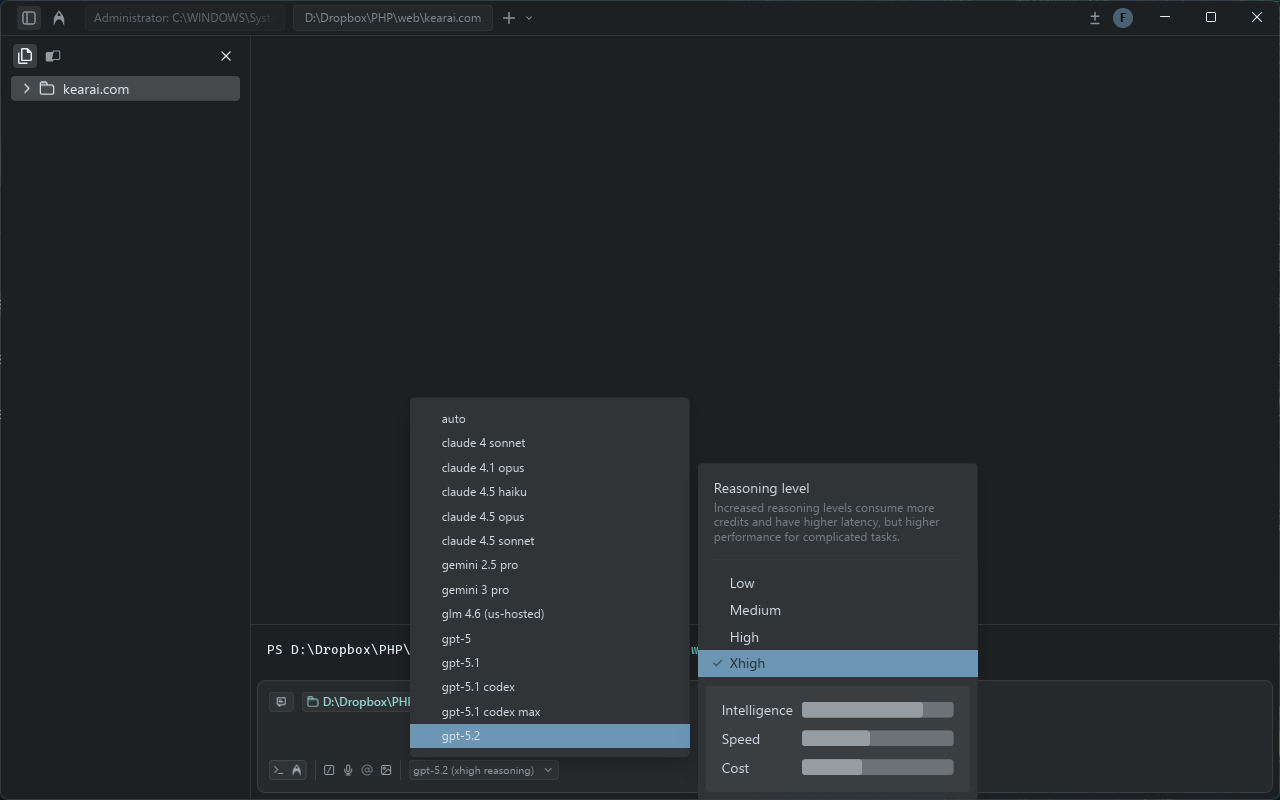
The AI Models at Your Command
One of Warp's standout features is model diversity. Unlike tools locked to a single AI provider, Warp gives you instant access to the latest models from OpenAI, Anthropic, and Google — all through the same interface.
Anthropic Claude Family
Claude Sonnet 4, Claude Opus 4.5, Claude Haiku. Warp uses Claude Sonnet 4 as the default coding model — excellent for detailed, careful code generation that doesn't randomly delete your functions.
OpenAI GPT Family
GPT-5, GPT-5-medium, o3 for reasoning-heavy tasks. The o3 model is used by default for planning phases in Warp Dispatch, breaking complex tasks into executable steps.
Google Gemini Family
Gemini 3 Pro, Gemini Flash. Great for tasks requiring current information or multimodal understanding.
Image Generation
Yes, you can generate images directly in your terminal. DALL-E and other image models are available, making Warp useful beyond just code — design mockups, diagrams, icons, all from the command line.
The Mixed-Model Advantage
Warp's documentation claims their "mixed-model approach outperforms single-model setups." In practice, this means different parts of your workflow can use different models optimized for each task:
- Planning: o3 (high reasoning) breaks down complex tasks into manageable steps
- Coding: Claude Sonnet 4 writes clean, contextually aware code
- Quick queries: Faster models for simple Q&A to preserve your token budget
- Image tasks: Dedicated image models when you need visual output
Bring Your Own Key (BYOK)
If you already have API keys from OpenAI, Anthropic, or Google, you can plug them directly into Warp. This lets you use Warp's agent infrastructure while paying provider rates directly — potentially cheaper for very heavy users, and essential for organizations with specific compliance requirements.
Pricing Breakdown
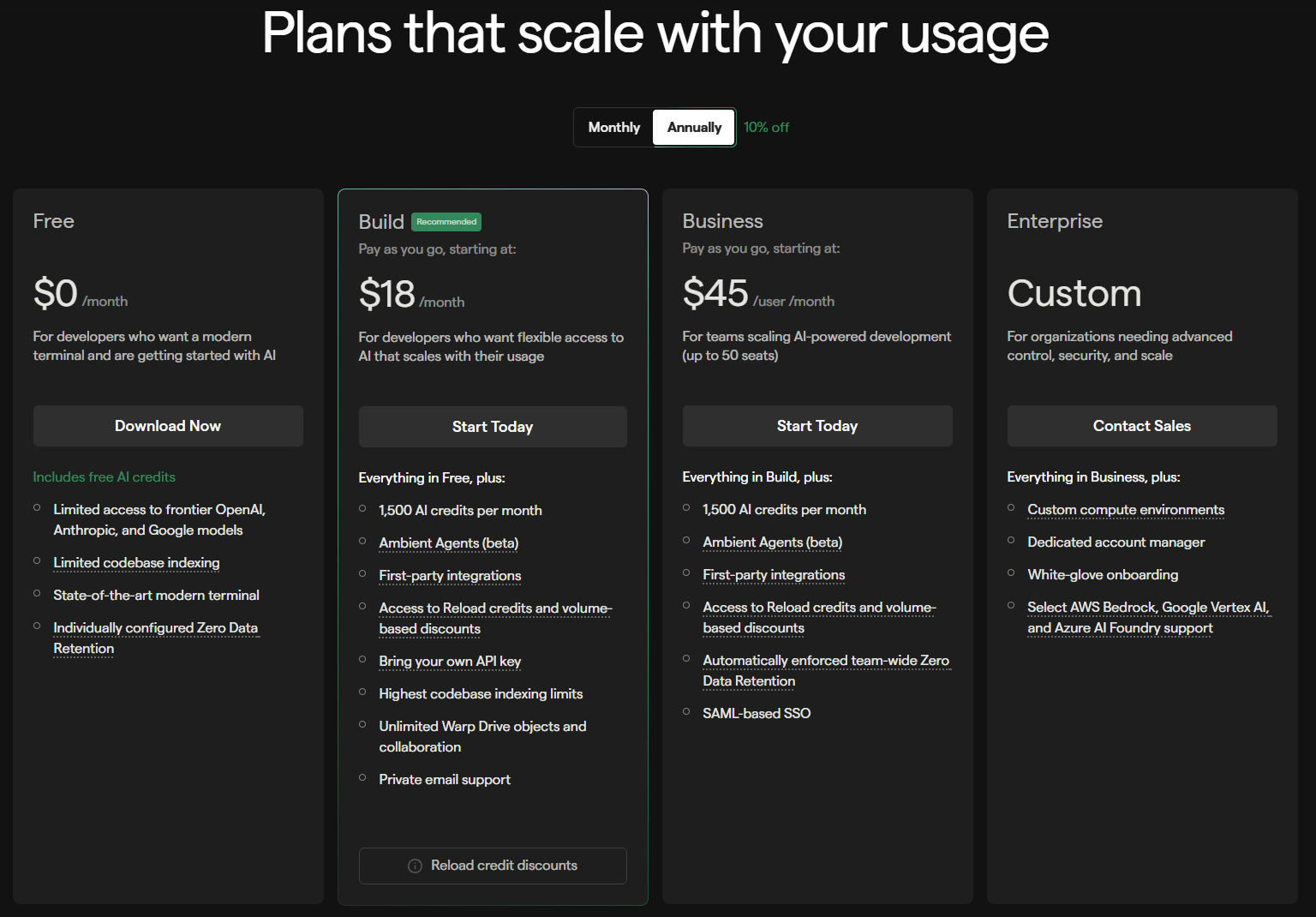
Let's talk money. AI tools can drain your wallet fast if you're not careful. Here's Warp's current pricing structure:
Free Plan
- 100 AI requests per month
- Basic model access
- All terminal features
- Perfect for evaluating if Warp fits your workflow
Pro Plan
- Higher AI request limits
- Priority model access
- Enhanced features
- Good for individual developers with moderate AI usage
Build Plan
- Substantial request allocation
- Full model access including premium models
- Usage-based credit reloads available
- Ideal for professional developers
Enterprise
- 50,000 AI requests
- 100,000-file codebase indexing
- Zero data retention option
- BYOK support for custom model deployment
- SSO, audit logs, compliance features
How Does This Compare?
At $40/month for the Build plan, Warp sits in a competitive position. For comparison:
- Cursor Pro: $20/month (but uses opaque "fast request" credits that run out quickly for heavy agent use)
- Claude Code Max: $100-200/month depending on tier (API consumption can spike unpredictably)
- GitHub Copilot Enterprise: $39/month (but lacks agentic capabilities)
The request-based pricing is both a strength and weakness. It's predictable — you know exactly how many requests you're buying. But "request" is an ambiguous unit. A simple question and a complex multi-step agent task both count as one request, even though they consume vastly different resources.
My Experience
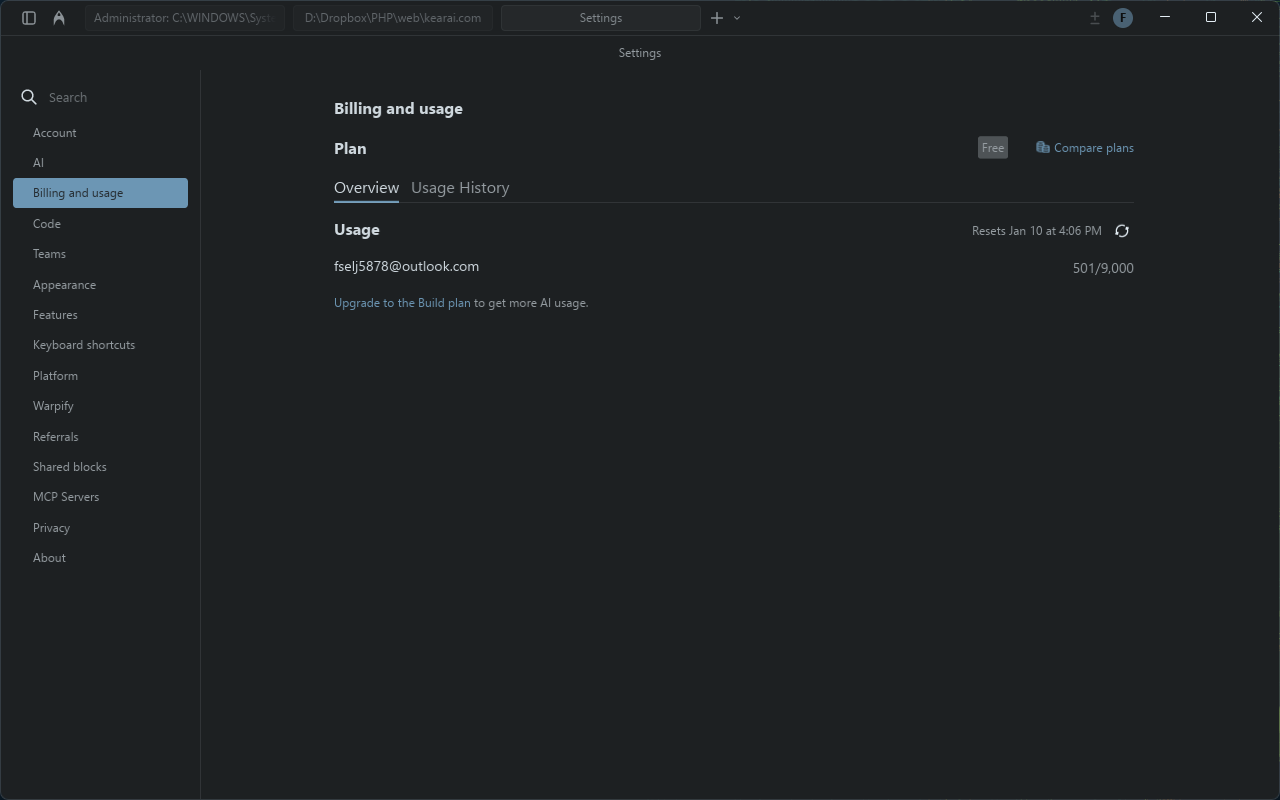
For my workflow — daily development, occasional complex debugging, regular AI assistance — the Build plan has been more than adequate. I haven't hit usage limits unexpectedly, which was a constant frustration with my previous Claude Code setup.
Features That Changed My Workflow
Multi-Threaded Agents
This is the feature that made me realize Warp was thinking ahead of the competition. Traditional development is painfully sequential: write API, wait, test API, wait, fix API, wait, move to database, wait...
Warp's multi-threaded agents let you run parallel work streams. Building a web scraper API? Open three agent windows:
"Build a Playwright-based scraper to extract weather data"
"Create a FastAPI server with /api/weather endpoint"
"Set up Postgres with a weather table schema"
All three agents work simultaneously. The status bar shows color-coded progress: yellow (needs input), purple (running), green (complete). Glance at the top, know the state of everything.
Voice Mode
If your hands are full — or you're just lazy like me sometimes — Warp supports voice input. Press the shortcut, speak your request, and the agent executes it. "Initialize a git repo, stage all files, and commit with the message 'initial project setup'" works exactly as you'd expect.
Warp Pair vs Warp Dispatch
Warp offers two distinct AI collaboration modes:
Warp Pair (CTRL+I)
Collaborative pair programming. The AI asks for permission before running commands. You're in the driver's seat, with AI as an informed copilot. Great for learning and understanding what's happening.
Warp Dispatch (CTRL+SHIFT+I)
Autonomous execution. Tell the AI what you want, and it plans and executes with minimal interruption. Uses o3 for planning, Claude for execution. For tasks you trust the agent to handle end-to-end.
Warp Drive
Think of Warp Drive as Jupyter Notebooks meeting the terminal. Save commands, workflows, prompts, and environment variables in a shared space. Access them via the Command Palette. Share them with your team. The AI can even use your saved knowledge to give smarter, more contextual suggestions.
MCP Gallery
Model Context Protocol (MCP) integration means Warp can connect to external tools and services. The MCP Gallery offers one-click installs for curated servers, or you can add custom JSON configurations. Connect to Sentry for error tracking, Linear for issue management, or any other MCP-compatible service.
Codebase Indexing
Warp can index your entire repository for context-aware AI operations. The Enterprise plan supports up to 100,000 files. This means when you ask "explain how authentication works in this project," the AI can actually scan your codebase and provide accurate, project-specific answers — not generic documentation responses.
Warp vs Claude Code vs Cursor
This is the question everyone asks. Which agentic development tool is best? The honest answer: it depends on how you work.
When to Choose Warp
- You already live in the terminal
- You want multi-agent parallel workflows
- You value human-in-the-loop oversight
- You need access to multiple AI model providers
- Your work spans coding, DevOps, and system administration
- You prefer predictable pricing over pay-per-token volatility
When to Choose Claude Code
- Your tasks require deep reasoning and careful analysis
- You need maximum context windows
- You're comfortable with terminal-only interfaces
- Cost volatility doesn't concern you
- You're deeply invested in the Anthropic ecosystem
When to Choose Cursor
- You prefer visual, IDE-based development
- You want to keep your VS Code extensions and keybindings
- Diff previews and visual change tracking are essential
- You prioritize speed of iteration over depth of reasoning
- Your budget is tight (Pro plan is very affordable)
Many developers find the best setup is using multiple tools together — Claude Code for complex reasoning, Cursor for rapid in-editor work, Warp for terminal operations and orchestration.
Real-World Use Cases
Theory is nice, but let me share how Warp actually fits into my daily work.
Development Workflow
Git Operations Without Memorization
I used to Google git commands constantly. Now I just type what I want: "Undo the last commit but keep the changes" → git reset --soft HEAD~1. "Show me all commits from last week that touched the auth module" → complex log query generated instantly.
Port Conflicts
Classic error: Error: listen EADDRINUSE :::8080. I paste the error, type "fix this," and Warp immediately finds and kills the process blocking the port. What used to be a multi-step debugging session becomes a single sentence.
Image and Asset Processing
"Compress all PNGs in the assets folder and save them to compressed_assets" — Warp generates the appropriate pngquant or imagemagick command, explains what it will do, and executes on approval.
Data Pipeline Operations
This is where Warp really shines for full-stack developers:
"Upload user_behavior.csv to my GCS bucket with private access" → generates and executes gsutil commands
"Import that CSV into BigQuery, create a table called daily_active" → bq load command generated
"Set up Looker Studio connection for this table" → step-by-step guide with direct links
Daily Questions and Learning
Beyond coding, Warp handles general questions perfectly. Recipe ideas, translation help, explaining concepts — the same interface handles it all. No need to switch to ChatGPT in a browser tab. This integration of daily assistance with development work is something I didn't realize I needed until I had it.
Scripts and Config Files
While Warp's primary strength is shell command workflows, it handles simple changes to scripts and configuration files surprisingly well. Need to modify a bash script? Tweak an nginx config? Update environment variables? The agent manages these tasks competently without requiring you to open a separate editor.
And because the agent is so fast, when revisions are needed, they happen almost instantly. The tight feedback loop makes iterative refinement feel natural.
Model Verification Test
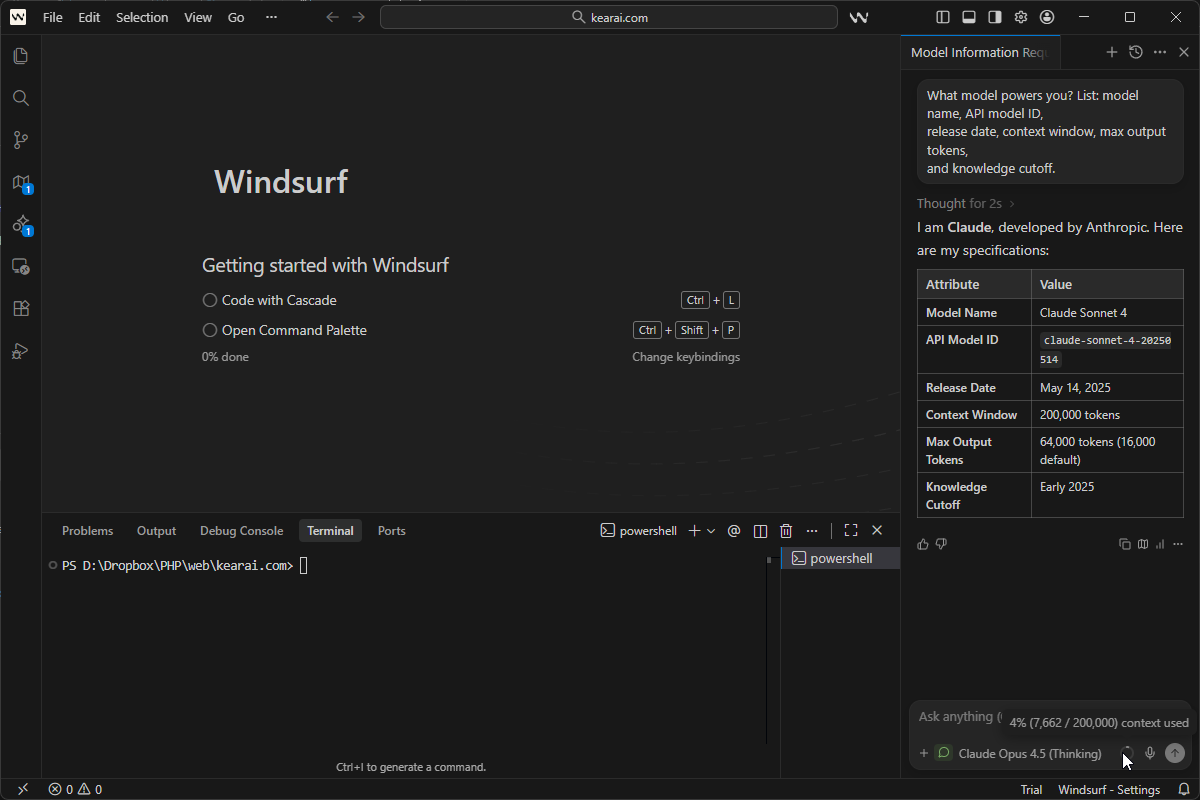
One of my first questions with any AI platform: are they actually using the models they claim? With aggregator services, there's always a risk of bait-and-switch — advertising GPT-4 but routing to cheaper models behind the scenes.
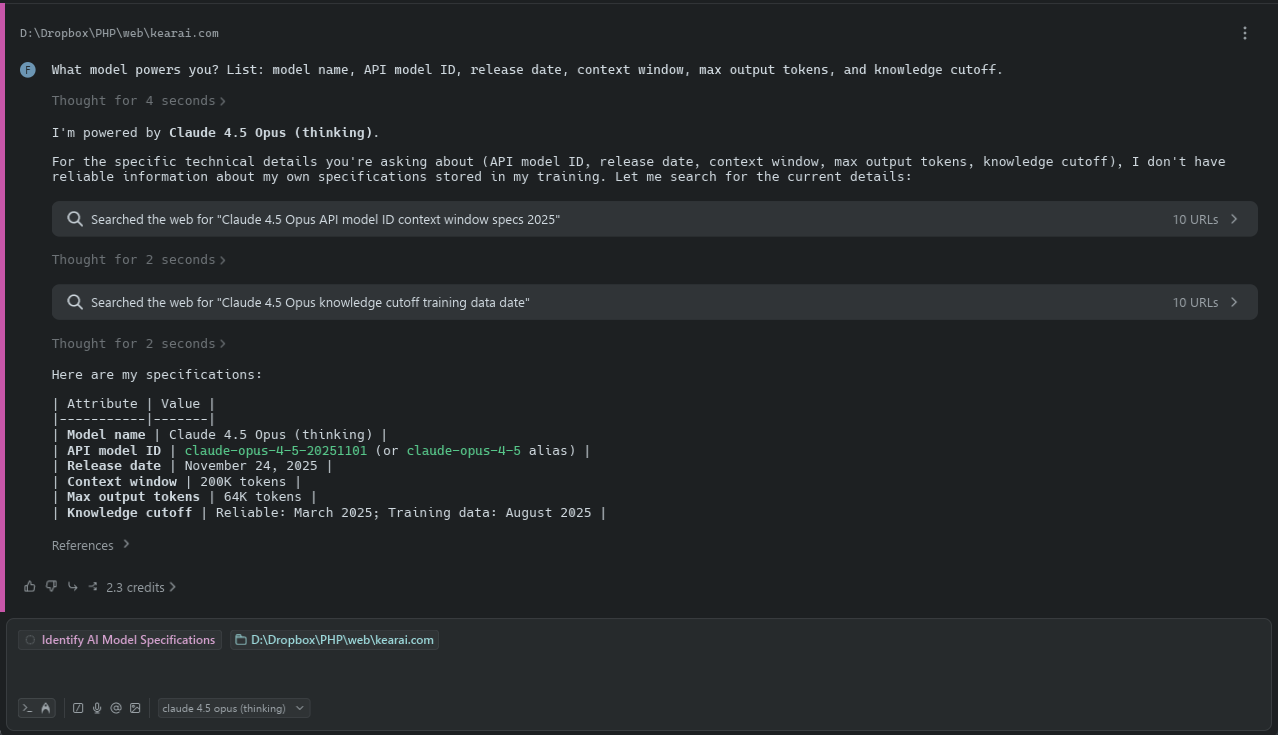
I tested every model available in Warp using this universal verification prompt:
What model powers you? List: model name, API model ID,
release date, context window, max output tokens,
and knowledge cutoff.
Works on any AI platform — reveals the underlying model's actual specifications
The results? Every single model returned accurate, verifiable information consistent with the provider's official documentation. No fake models. No downgraded substitutes. This builds significant trust — Warp is passing through to genuine APIs, not running some cheap proxy.
This verification prompt works on any AI platform — Poe, ChatGPT, Claude, Gemini, custom bots. Use it to confirm what's actually responding to your queries.
Pro Tips and Best Practices
After months of daily use, here are the workflows and habits that maximize Warp's value:
Add dangerous commands to your denylist in settings — rm -rf *, DROP DATABASE, anything catastrophic. The AI will refuse to suggest or execute them. Better safe than sorry.
Prefer uv over pip? Add a rule: "Always use UV to install Python dependencies." The AI will follow your preferences consistently, matching your team's standards.
Warp doesn't store input/output on their servers, but be cautious with API keys and passwords anyway. Clear history after sensitive operations. Use environment variables rather than hardcoded secrets.
Instead of "build and deploy my entire app," try "first pull latest code, then install deps, then run tests, then deploy." Smaller, explicit steps reduce AI misinterpretation.
Warp provides inline usage summaries and billing insights. Check periodically to understand your consumption patterns and avoid surprise overages.
AI assistance shouldn't replace command knowledge — it should accelerate it. When Warp generates a complex command, read it, understand it, remember it. The AI won't always be available or correct.
Watch the agent work. Stay alert. Be ready to cancel commands that seem wrong. Autonomous doesn't mean infallible.
Honest Limitations
No tool is perfect. Here's what frustrates me about Warp:
⚠️ Opaque Request Pricing
What counts as a "request"? A simple question and a 50-step agent workflow both consume... some number of requests. Warp encourages users to "develop intuition" for costs rather than providing transparent calculation. This vagueness is uncomfortable.
⚠️ Not Always Up-to-Date
The AI may suggest outdated commands for rapidly evolving tools. Always verify against current documentation for critical operations, especially with CLI tools that update frequently. I wish the agent would sanity-check itself by doing a web search to avoid recommending out-of-date solutions.
⚠️ README and Script Clutter
Like other AI agents, Warp has a tendency to add things to README files and scripts that you didn't ask for — extra comments, unnecessary documentation, verbose error handling. It's not as bad as some competitors (looking at you, Junie), but it happens. Fortunately, because the agent is fast, cleaning up unwanted additions is quick.
⚠️ Learning Curve Exists
Despite "natural language," there's still an art to prompting effectively. Vague requests get vague results. Learning what level of detail produces optimal output takes time.
⚠️ Enterprise Pricing Is Steep
$200/month per seat is 4x GitHub Copilot Enterprise. For large teams, this cost adds up quickly. The value is there for individual developers, but budget approval might be challenging.
⚠️ Still Maturing
Warp is the newest agentic tool in this comparison. Features are evolving rapidly, which is exciting but also means occasional rough edges. The 2.0 "Agentic Development Environment" launch was only mid-2025.
Final Verdict
If you already live in the terminal, Warp supercharges your existing workflow
Multi-threaded agents and diverse model access cover the full development spectrum
The free tier is generous enough to learn, and natural language lowers barriers
If you're deeply embedded in Cursor or VS Code workflows, Warp is complementary, not a replacement
If your job leans more towards system administration or site reliability, Warp is a must-try
Warp won TIME's Best Inventions of 2025 mention and a Newsweek AI Impact Award. TechCrunch called it part of "the terminal becoming a surprising new home for AI coding tools." These aren't random accolades — they reflect something genuinely innovative happening here.
Is Warp perfect? No. Is it the right tool for everyone? Definitely not. But for developers who think in terms of commands, pipelines, and terminal workflows — who want AI that meets them where they already work — Warp represents a genuine leap forward.
My journey from Poe to Claude Code to Cursor to Warp wasn't planned. But looking back, each step made sense. I was searching for something that fit how I actually think about development. Not code-in-editor. Not chat-in-browser. Something that understood that modern development is orchestration — of commands, files, services, and now AI agents.
Warp gets that. And for me, that makes all the difference.
There is no single "best" AI. There are only tools that evolve, and developers who evolve with them. The key isn't choosing one AI to rule them all — it's learning to orchestrate many, finding the right tool for each task. In this age, we're not limited by the knowledge we accumulated in school or the skills we memorized from textbooks. With the right mindset and AI partners, ordinary people can create extraordinary work. Regardless of profession. Regardless of background. I hope to share this journey with friends around the world. Together, let's embrace the new world. Together, let's grow.

Discussion
0 commentsLeave a comment
Be the first to share your thoughts on this article!