
A beautiful interface means nothing if the engine underneath isn't what you paid for.
I genuinely want to recommend AI coding tools to everyone — not just professional developers, but anyone who has ever wished they could make a computer do exactly what they imagined. These agentic IDEs have the power to democratize software creation, turning ideas into reality through simple conversation. So when I first opened Windsurf in November 2025, I was hopeful. The interface was gorgeous. The promise was compelling. Three million monthly users couldn't all be wrong, right? But within my first testing session, I discovered something that made me question everything about this platform. What I found wasn't a bug or a missing feature — it was a fundamental trust issue that every potential subscriber deserves to know about.
My Journey to Windsurf
Let me be clear about something from the start: I desperately wanted Windsurf to be amazing. After years of using web-based AI tools, copying and pasting code between browser tabs until my patience wore thin, I was ready for the agentic revolution. Tools that could actually touch your files, understand your codebase, and work alongside you rather than just chatting at you through a browser window — this was the future I'd been waiting for.
My first encounter with Windsurf came in November 2025, the same day I discovered Warp. I was on a mission to find the perfect AI coding companion, testing every tool I could get my hands on. Warp immediately impressed me with its terminal-native approach and honest model handling. But Windsurf? My initial impression was that beyond its admittedly beautiful exterior, something felt off.
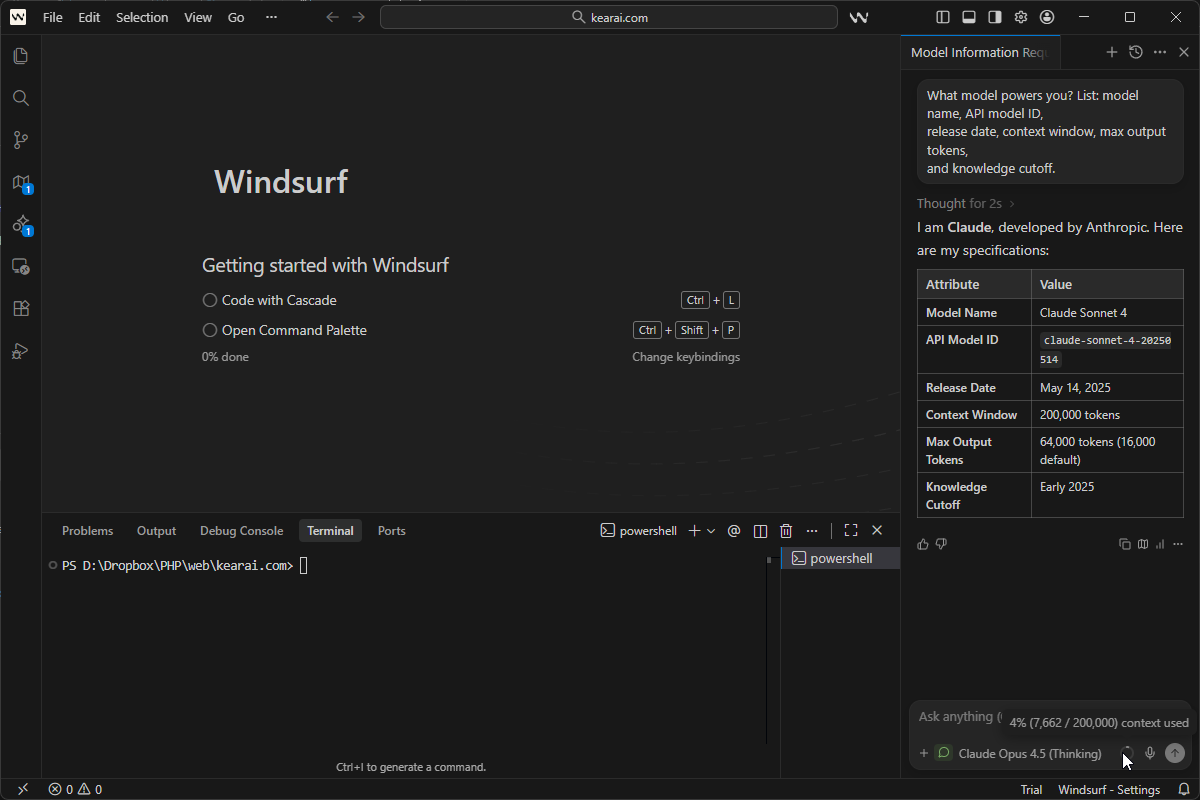
I didn't want to waste time on a tool that might be cutting corners on the most important part — the AI models themselves. So I did what I always do with any AI platform: I ran my universal verification test.
The results stopped me cold.
I strongly encourage everyone to explore AI IDE agents — even non-programmers. These tools can turn anyone into a capable creator. You don't need years of training or deep technical knowledge. With the right AI assistant, you just need to have ideas and know how to communicate them. But choosing the right tool matters more than you might think.
According to SimilarWeb, Windsurf currently attracts around 3 million monthly visitors. That's significant traffic — triple what Warp receives. The paid subscriber base is likely substantial. But popularity doesn't guarantee quality, and my testing revealed concerns that every potential user should understand before committing their money and trust.
The AI revolution has made it possible for ordinary people — regardless of profession or background — to create extraordinary things. We're no longer limited by the knowledge we accumulated in school or the skills we memorized from textbooks. With the right mindset and AI partners, anyone can build. But that promise only works when the tools are honest about what they provide.
What Is Windsurf and Why It Matters
Windsurf is an AI-powered code editor built by Codeium, a company that started in 2021 as Exafunction — a GPU virtualization startup founded by MIT classmates Varun Mohan and Douglas Chen. When the founders saw the generative AI wave coming, they pivoted hard into developer tools. By 2022, Codeium's autocomplete extension was being used by hundreds of thousands of developers worldwide.
The company rebranded to Windsurf in April 2024 to reflect its expansion beyond simple autocompletion into a full-scale developer environment. The rebrand coincided with the launch of their flagship feature: Cascade. By July 2025, Windsurf had grown impressively — earning $82 million in annual recurring revenue, with over 350 enterprise clients like JPMorgan Chase and Dell, and more than 1 million developers using it daily.
The Core Philosophy
Like Cursor, Windsurf is forked from VS Code, which means:
🎯 Familiar Territory
If you've used VS Code, you'll feel at home immediately. Same interface, same keyboard shortcuts, same extension ecosystem (mostly). The transition is remarkably smooth.
🤖 Cascade-Centric
Everything revolves around Cascade, their AI assistant that can understand your entire codebase and make multi-file edits from natural language instructions. It's designed to be your AI teammate, not just an autocomplete tool.
👀 Flow State Focus
Windsurf writes changes to disk before you approve them, letting you see results in your dev server in real-time. This keeps you in the creative flow without constant context-switching.
🌐 Cross-Platform
Available on macOS, Linux, and Windows as a standalone application, plus JetBrains plugin support for those who prefer that ecosystem. Over 40+ IDE integrations in total.
The marketing pitch is compelling: "Everything you love about Cursor, but cheaper and more accessible." At $15/month for Pro versus Cursor's $20/month, the value proposition seems clear. But as I would discover, the true cost of a tool isn't just what you pay — it's what you actually receive.
The industry has certainly noticed Windsurf's ambition. Cognition's Windsurf was named a "Leader in the 2025 Gartner® Magic Quadrant™ for AI Code Assistants," and it earned a spot on Forbes AI 50 list. But awards don't always translate to trustworthy products, as my testing would reveal.
Cascade Mode Deep Dive
If Windsurf has a killer feature, it's Cascade. This is their answer to Cursor's Composer — a chat interface that can edit multiple files simultaneously based on natural language instructions. When it works, it genuinely feels like magic. The core mission of Windsurf is to minimize context switching and help developers achieve and maintain a "flow state" — that state of deep, effortless focus where productivity soars.
What Makes Cascade Special
Traditional code editors require you to specify exactly what you want changed and where. Cascade flips this: you describe your intent, and it figures out which files need modification, what changes to make, and in what order. It combines deep codebase understanding, a breadth of advanced tools, and a real-time awareness of your actions into a powerful, seamless, and collaborative flow.
Me: "Add user authentication with JWT tokens. Include routes, middleware, and tests."

Cascade: [Analyzes codebase]
I'll make these changes:
- Create src/auth/middleware.ts (new file)
- Update src/routes/users.ts (add auth to routes)
- Create src/services/jwt.ts (token handling)
- Update src/types/user.ts (add token types)
- Create tests/auth.test.ts (test coverage)

[Shows diff for each file]
Accept changes? [Yes] [Review individually] [No]
The Three Cascade Modes
Allows Cascade to create and modify files in your codebase. This is where the agentic magic happens — multi-file edits, new file creation, code refactoring. It's like AutoGPT for your codebase, creating multiple files, running scripts, testing them, and debugging automatically.
Optimized for questions about your codebase or general coding principles. No file modifications — just conversation and explanation. Perfect when you want to understand something without risking changes to your code.
AI generates continuously without stopping for approval. Perfect for scaffolding and boilerplate, but review carefully afterward — it can make many changes quickly. For advanced developers, this is a major time saver. For cautious teams, it introduces risk.
Real-Time Awareness
One genuinely impressive capability: Cascade watches your actions in real-time. It tracks all your actions — edits, commands, conversation history, clipboard, terminal commands — to infer intent and adapt in real time. Make a manual edit, and you can simply prompt "continue my work" — it understands what you just did and picks up where you left off. This contextual awareness creates a surprisingly natural collaboration flow.
Built-in Planning Capabilities
Cascade has built-in planning capabilities that help improve performance for longer tasks. In the background, a specialized planning agent continuously refines the long-term plan while your selected model focuses on taking short-term actions based on that plan. Cascade will create a Todo list within the conversation to track progress on complex tasks. This iterative approach makes coding with AI more interactive and effective.
Windsurf writes AI-generated changes to disk before you approve them. You see results in your dev server immediately, making iteration much faster than tools that require acceptance first. If updates aren't quite right, you can chat again to modify before accepting the changes entirely.
Memory System
Windsurf's Memories system allows it to persist context across conversations, ensuring continuity. There are two types of memories:
- User-generated memories (rules): These are explicitly defined by you, such as specific APIs, coding style preferences, or communication styles
- Automatically generated memories: These are created by Cascade based on your interactions, improving its understanding over time
You can define custom rules for Cascade to follow. For example, you can specify that it should respond in a certain language, use a particular framework, or follow specific APIs. This gives you full control over how the AI interacts with your project, which is especially valuable for maintaining team coding standards.
The AI Models Question
This is where things get complicated — and where my trust in Windsurf began to erode.
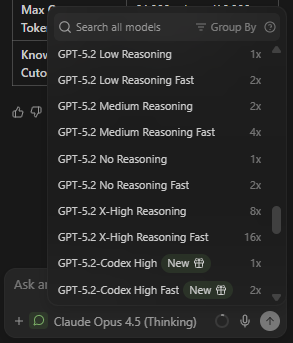
Windsurf offers access to multiple AI models through a dropdown menu in Cascade:
SWE-1 Family (In-House)
Windsurf's proprietary models built specifically for software engineering. Includes SWE-1.5 (their flagship), SWE-1, SWE-1-mini, and SWE-1 Lite. They claim "near Claude 4.5-level performance at 13x the speed" with 950 tokens/second — 6x faster than Haiku 4.5. SWE-1 and SWE-1 Lite cost 0 credits to use.
Anthropic Claude
Claude Sonnet 4, Claude Opus 4.5, and their "Thinking" variants. These are the models most developers want access to for serious coding work. Access to these requires credits or premium plans.
OpenAI GPT
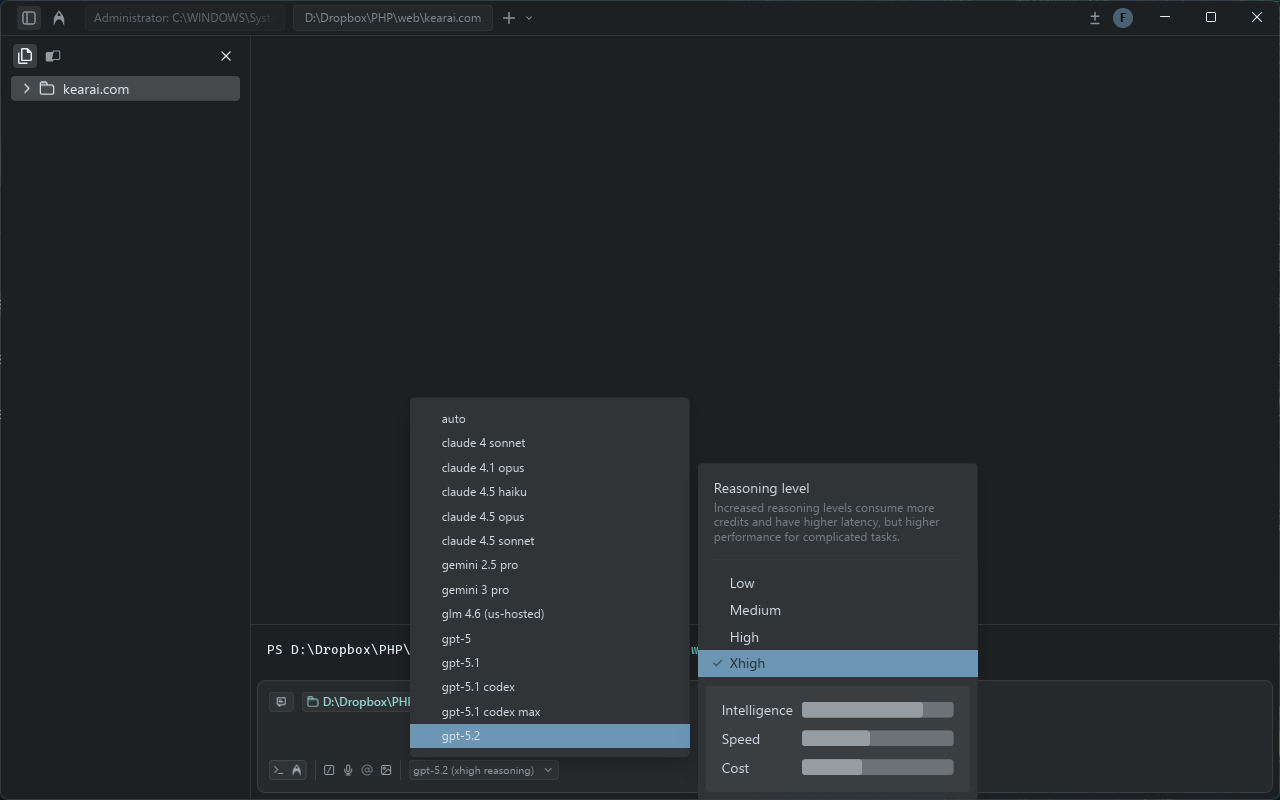
GPT-5, GPT-5.2-Codex with multiple reasoning effort levels, and other OpenAI models available through the interface. GPT-5 Low Reasoning costs 0.5 credits per prompt.
Google Gemini
Gemini 3 Pro, Gemini Flash, and other Google models. Windsurf has been heavily promoting Gemini 2.5 as the default for new users.
The Pricing Model Complexity
Windsurf uses two different credit consumption methods:
- Flat Rate: In-house models like SWE-1 have fixed costs (e.g., 0 or 0.5 credits per prompt regardless of complexity)
- Token-Based: Third-party models like Claude charge based on input/output tokens, with Windsurf adding a 20% margin on top of provider API prices
This hybrid system creates unpredictability. A long conversation with Claude can burn through credits far faster than a simple request, bringing back some of the volatility the simplified pricing was supposed to eliminate. Windsurf uses a credit multiplier system depending on the model you select. For instance, Claude, GPT-4, and Gemini typically cost 1× credit per prompt, while Qwen3-Coder is priced at 0.5×.
Bring Your Own Key (BYOK)
For individual users, you can plug in your own API keys for Claude models. This bypasses Windsurf's allocation and charges you directly at provider rates — potentially cheaper for very heavy users, and essential for organizations with specific compliance requirements. More importantly, BYOK bypasses Windsurf's model routing entirely, so you know exactly what model you're using.
The Model Verification Test That Changed Everything
Here's where my review takes a serious turn. One of my first actions with any AI platform is verification: are they actually using the models they claim?
With aggregator services and wrapper platforms, there's always a risk of bait-and-switch — advertising premium models but routing requests to cheaper alternatives behind the scenes. So I use a universal verification prompt that works on any AI platform:
What model powers you? List: model name, API model ID,
release date, context window, max output tokens,
and knowledge cutoff.
This prompt works on any AI platform and reveals the underlying model's actual specifications. Use it on Poe, ChatGPT, Claude, Gemini, custom bots — anywhere you want to confirm what's actually responding to your queries.
November 2025: First Test
When I first tested Windsurf in November 2025, I selected "Claude Opus 4.1 Thinking" from the model dropdown. But the verification response claimed the model was actually Claude Sonnet 3.7 Thinking — a completely different, less capable model.
Suspicious but wanting to be fair, I tested further. I asked this supposed "Opus 4.1" to write a moderately complex PHP script. The result? A 500 error. The code simply wouldn't run. This aligned with what the verification prompt had told me — I wasn't getting the premium model I'd selected.
January 2026: Second Verification
Three months later, I returned to give Windsurf another chance. Perhaps they'd fixed the issue. I ran the same verification test, this time on "Claude Opus 4.5 Thinking."
I sent the verification prompt to five separate conversation windows. Every single response came back identifying the model as Claude Sonnet 4 — not Opus 4.5.
Let me be absolutely clear about what this means: when I explicitly selected their premium "Opus 4.5 Thinking" model and paid the corresponding credit rate, the system appeared to route my request to a different, lower-tier model.
Tested November 2025 and January 2026 — three months apart — same concerning results. The model displayed in the dropdown may not be the model actually processing your requests.
What This Means for Users
If my testing is accurate — and I ran it multiple times across multiple sessions to be sure — this represents a fundamental trust violation. Users are:
- Selecting premium models they specifically want
- Paying credit rates corresponding to those premium models
- Potentially receiving responses from different, cheaper models
I want to be fair: there could be explanations I'm not aware of. Perhaps there's backend routing logic, caching, or model aliasing that accounts for this. But from a user's perspective, what you select should be what you get. Transparency is non-negotiable.
The conclusion I reached is clear: I cannot recommend subscribing to Windsurf's paid plans if you're paying specifically for access to premium Claude models. The credits are limited enough already — even more so if you're not getting the model you selected. You might be better off with alternatives like the free Google Antigravity that provide verified model access.
Pricing Breakdown and Credit System
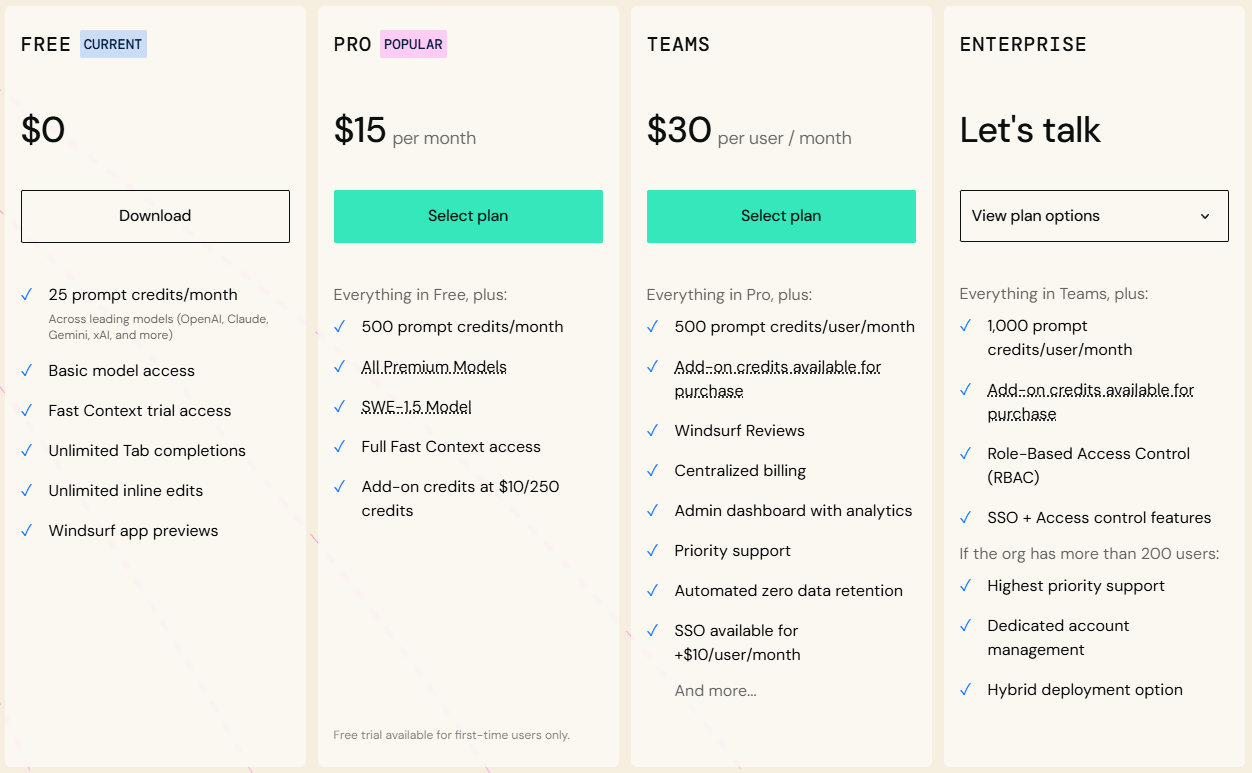
Windsurf recently overhauled their pricing after user complaints about the confusing dual-credit system. The new model is simpler — but understanding it still requires attention. Remember: 1 credit = $0.04.
Free Plan
- 25 prompt credits per month
- Unlimited Fast Tab autocomplete
- Unlimited SWE-1 Lite access (0 credits)
- 1 App Deploy per day
- All terminal features
- Genuinely usable for light work
Pro Plan
- 500 prompt credits per month (~$20 value)
- Access to premium models (Claude, GPT-4o, Gemini)
- SWE-1 model at 0 credits (promotional)
- 5 App Deploys per day
- BYOK support for personal API keys
- Add-on credits: $10 for 250
Teams Plan
- 500 credits per user per month
- Team collaboration tools
- Team analytics and usage tracking
- Shared knowledge bases
- Admin controls
- Add-on credits: $40 for 1000 pooled
Enterprise
- 1,000 prompt credits per user monthly
- SSO and SCIM provisioning
- Zero data retention options
- Role-Based Access Control (RBAC)
- Hybrid or self-hosted deployment
- Volume discounts at 200+ users
The Old Pricing Nightmare
Before the recent change, Windsurf used separate "prompt credits" and "flow action credits." A developer would send a request to the AI, which would kick off a bunch of background tasks (the "flow actions") to come up with an answer. The big problem? You had no idea how many flow actions your single prompt would use up.
As frustrated users on Reddit documented, people burned through their monthly allocation in just days — sometimes from requests that seemed simple but triggered dozens of background operations. Some users reported exorbitant credit usage when the AI would perform unnecessary analysis passes, draining their credit pool quicker than anticipated.
The new system counts only prompts, regardless of how many actions Cascade takes to fulfill them. Better, but not perfect — token-based pricing for third-party models still creates variability.
Hidden Costs: Auto-Refills
Windsurf offers automatic credit refills when you run low. Convenient for solo developers who hate interruptions, but dangerous for teams without strict oversight. During a busy month, auto-refills can create significant unbudgeted expenses. Under your plan settings page, you can specify a maximum amount of credits and other refill settings — I highly recommend setting these limits.
Credit Consumption Reality
Let's be honest: 25 prompt credits per month on the free plan is extremely limiting. In my testing, I burned through credits in 3 days of normal coding. At $15/month for Pro with 500 credits, you're paying $180/year when GitHub Copilot offers unlimited suggestions at $10/month. The value proposition becomes questionable for solo developers.
My Verdict on Pricing
At $15/month, Windsurf Pro seems like a steal compared to Cursor's $20. But if the models you're paying for aren't the models you're receiving, the "savings" become meaningless. You're not saving money — you're paying for something you might not be getting. For professional developers, the uncertainty is unacceptable.
Features and Capabilities
Setting aside my model concerns, let's examine what Windsurf actually offers. Credit where it's due — there are genuinely impressive capabilities here.
Supercomplete: Fast Autocomplete
Windsurf's autocomplete is Codeium's bread and butter — they've been doing AI autocomplete longer than most competitors. As you type, suggestions appear in 100-200ms, covering 70+ languages with excellent support for JavaScript, TypeScript, Python, Go, Rust, and Java.
Quality is very good — not quite GitHub Copilot level in my testing, but close. Better than Cursor's autocomplete, according to many users. Pressing Alt+] cycles through alternative suggestions when the first one isn't quite right. Unlimited Fast Tab autocomplete is available even on the free plan, which is genuinely generous.
Inline Chat (Command Mode)
Press Cmd+I (Mac) or Ctrl+I (Windows/Linux) for quick inline edits:
- "Add error handling to this function"
- "Convert to async/await"
- "Fix this TypeScript error"
- "Add JSDoc comments"
Works well for focused, single-file edits. With Inline AI, you can ask Windsurf to make changes to specific lines of code, generate docstrings, refactor sections, and more — all without touching the rest of your codebase. This ensures only the selected portions are affected, giving you precise control over your code edits.
Voice Input
Speak your requests instead of typing. Currently transcription-only (your speech becomes text for Cascade), but useful when your hands are busy or you prefer verbal communication.
Web and Docs Search
Cascade can browse the internet and read documentation pages in real-time using @web and @docs mentions. It parses and chunks web pages for context, pulling only necessary information to conserve credits. You can search the web, deploy your app, inspect live previews — and loop it all back into your code.
MCP (Model Context Protocol)
Connect to external tools and services through MCP plugins. The MCP Gallery offers one-click installs for curated servers — Windsurf supports connections to 21 third-party tools across Figma (5 tools), Slack (7 tools), and Stripe (9 tools). Add Sentry for error tracking, Linear for issue management, or custom integrations with manual JSON configuration.
Codemaps (Unique Feature)
Windsurf's Codemaps feature generates AI-annotated visual maps of code structure, powered by SWE-1.5 and Sonnet 4.5, helping developers quickly onboard to complex codebases. These maps show grouped and nested code sections with precise line-level linking, trace guides, and visual diagrams — capabilities Cursor lacks entirely.
One-Click Deployments
Windsurf has introduced deployment capabilities allowing users to launch their applications seamlessly without bouncing between different platforms. This feature has been highlighted as a time-saver, especially for those needing to present prototypes swiftly to clients or stakeholders.
Windsurf Ignore
Add files to .codeiumignore at your workspace root. Cascade won't view, edit, or create files in those paths. Essential for keeping AI away from sensitive files, node_modules, and build directories.
Revert to Previous Steps (Checkpoints)
Hover over any prompt in your conversation history and click the revert arrow. This rolls back all code changes to that point. Critical safety feature — but note that reverts are currently irreversible. The system maintains checkpoints so you can always recover from bad AI suggestions.
Automatic Lint Fixing
Cascade will automatically detect and fix lint errors that it generates. When Cascade makes an edit with the primary goal of fixing lints that it created and auto-detected, it may discount the edit to be free of credit charge. This is recognition that fixing lint errors increases the number of tool calls that Cascade makes.
Image Upload
You can upload images — such as screenshots of your website — directly into Cascade. Windsurf can then generate HTML, CSS, and JavaScript code to mimic the design or even add similar features to your application. Drag & Drop Images works intuitively for building UI mockups.
Windsurf vs Cursor vs Claude Code
The inevitable comparison. Which agentic IDE should you choose? Based on months of testing all three, here's my honest assessment.
Where Windsurf Wins
- Cleanest, most beginner-friendly UI — feels like comparing an Apple product to a Microsoft one
- Best free tier (actually usable long-term)
- $5 cheaper than Cursor Pro per month
- Turbo Mode for scaffolding is unique and powerful
- Real-time preview (writes to disk before acceptance)
- Automatic context — no manual file tagging required
- 40+ IDE integrations vs Cursor's single app
- Better multi-file context awareness in some tests
- Enterprise certifications (HIPAA, FedRAMP, ITAR)
Where Cursor Wins
- More mature and stable overall
- Verified model authenticity — no substitution concerns
- Multi-tab suggestions
- Auto-generated commit messages
- Bug finder feature
- More robust context management (@web, git branches, doc sets)
- Composer is still the king of multi-file edits for speed
- Better terminal command handling (can skip stuck commands)
- Generally produces higher quality results in complex tasks
Where Claude Code Wins
- Deepest reasoning capabilities
- Maximum context windows (up to 500K enterprise)
- Direct Anthropic model access — no middleman questions
- Best for complex multi-step debugging
- Terminal-native for DevOps workflows
- No model authenticity concerns whatsoever
Many developers find the best setup is using multiple tools: Claude Code for complex reasoning, Cursor for rapid in-editor work, and Windsurf's free tier for experimentation. Don't limit yourself to one. Only by trying different tools collaboratively can you find the right assistant for your workflow.
Head-to-Head Speed Test
In independent testing with the same prompt ("Create a Next.js blog post page with markdown rendering"):
- Cursor: Generated in 12 seconds. Applied edits in 3 seconds.
- Windsurf: Generated in 15 seconds. Applied edits in 5 seconds.
Cursor wins on raw speed, especially with Supermaven enabled. Windsurf feels like a pair programmer — helpful, but sometimes chatty. If you want to direct the coding flow, Cursor is better. If you want AI to take more initiative, Windsurf excels.
Real-World Use Cases
Despite my concerns about model authenticity, Windsurf can still be useful in certain scenarios. Here's where it works and where it doesn't, based on extensive testing.
Where Windsurf Excels
Scaffolding New Projects
Turbo Mode shines here. "Create a basic Express API with users and posts resources, including routes, controllers, models, and tests" — let Flow generate everything, then review and adjust. For boilerplate, the model accuracy matters less than speed. The entire project structure gets created from scratch, which feels almost magical.
Learning and Exploration
The generous free tier makes Windsurf perfect for beginners learning to code with AI assistance. The clean UI reduces cognitive load, letting you focus on concepts rather than tool navigation. Fast Company called Windsurf "the first tool I've seen that makes it easy for absolute beginners to code full games and applications without any prior experience."
Quick Refactors
Simple refactoring tasks — "convert this class to functional components," "add TypeScript types to this module" — work well even if the underlying model isn't exactly what you selected. Windsurf is particularly reliable for multi-file edits with consistent diffs and plans.
Onboarding to New Codebases
Give Windsurf a tour request — "Explain the data flow from controller to ORM" — and it returns a crisp map you can use to navigate. The Codemaps feature provides visual diagrams that help you understand complex codebases quickly.
Where Windsurf Struggles
Complex Debugging
When you need the full reasoning power of Claude Opus or GPT-4, you need to be sure you're actually getting it. My verification tests suggest you might not be. For mission-critical debugging, use tools with verified model access.
Production Code Review
If you're paying for premium models specifically for their superior code analysis, the model substitution issue undermines the entire value proposition.
Security-Sensitive Work
When accuracy matters most — auth systems, encryption, data handling — you need guaranteed access to the best models available. The uncertainty here is unacceptable.
Large Legacy Codebases
While Windsurf is good for greenfield development, some reviewers note it's "less convinced of its long-term utility when dealing with large applications that may span many codebases." It may understand the gist of what your application does, but complex enterprise-scale projects can be challenging.
What the Community Says
User feedback paints a nuanced picture of Windsurf. Here's what real users across Reddit, G2, Gartner, and dev forums are reporting:
The Positive Voices
"It feels incredible to open a project with Windsurf for the first time, and it runs pytest, pylint, and radon in parallel, identifying all immediate issues within one second."
"I am currently trialing Windsurf and I really have to say the UI feels way more intuitive than Cursor."
"The reason I chose Windsurf is because you guys are on a constant mission of streamlining, improving and generally making the experience better for your users. The recent pricing rework with the clear and fair token usage plans are what convinced me to convert."
"I've been building a new thing with Windsurf and I spent the last hour in almost hysterical laughter because the responses are just so good."
The Critical Voices
"The problem with Windsurf is that it works great until it doesn't. And the time it doesn't can be incredibly frustrating." — Hacker News
"Windsurf burns through tokens quickly, especially during debugging, the project took longer than expected. I was so close to finishing when I ran out of credits." — Medium
"Developers admire the vision but criticise the execution, noting instability and reliability issues." — Reddit sentiment summary
"Sometimes the agent couldn't solve simple issues, almost as if it lost its abilities or was instructed to behave that way."
Common Themes
- Credit consumption concerns: Users frequently mention credits depleting faster than expected, especially during debugging sessions
- Consistency issues: AI sometimes produces poor-quality code or struggles with complex codebases
- UI praise: Almost universally, users find Windsurf's interface cleaner and more intuitive than competitors
- Learning curve: While beginner-friendly overall, some advanced features require familiarity with coding principles
- Support responsiveness: Mixed reports — some users report excellent support, others feel ignored
The OpenAI Acquisition Drama
Understanding Windsurf's recent corporate drama provides important context for potential users. The story reads like a tech thriller.
The $3 Billion Offer
In May 2025, OpenAI announced an agreement to acquire Windsurf for approximately $3 billion — their largest acquisition to date. The deal made strategic sense: OpenAI wanted to keep up with better coding tools from Google's Gemini and Anthropic's Claude, build stronger developer ties beyond Microsoft, and enhance ChatGPT's agentic capabilities.
Before pursuing Windsurf, OpenAI had approached Cursor about an acquisition, but those discussions fell through as Cursor "wasn't interested in being bought even by OpenAI." Cursor went on to raise $900 million at a $9 billion valuation instead.
The Deal Collapse
The exclusivity period for OpenAI's acquisition expired on July 11, 2025, leaving Windsurf free to pursue other options. The deal reportedly fell apart largely due to Microsoft's partnership agreements with OpenAI — their 2023 deal gave Microsoft rights to anything OpenAI developed or acquired.
72 Hours of Chaos
What followed was remarkable. Within 72 hours of the exclusivity expiration:
- Friday, July 11: Google executed a $2.4 billion "reverse acquihire," hiring key Windsurf leadership (CEO Varun Mohan, co-founder Douglas Chen, and ~40 senior R&D staff) and licensing the technology for DeepMind's Gemini coding initiatives
- Monday, July 14: Cognition announced acquisition of Windsurf's remaining assets, including intellectual property, trademark, brand, all remaining employees (~210 people), and the $82 million ARR business with 350+ enterprise customers
What This Means for Users
The corporate restructuring raises questions about Windsurf's future direction. With leadership at Google and the product at Cognition, there's uncertainty about the roadmap. However, Cognition committed to honoring all existing customers and ensuring all employees received a share of the deal — fixing an issue from Google's portion where newer employees were excluded.
This turbulent history explains some of the inconsistencies users have experienced. It also means Windsurf's future could look very different depending on Cognition's strategic priorities.
Pro Tips and Best Practices
If you decide to use Windsurf despite my concerns, here's how to get the most from it:
Run the verification prompt regularly. If results don't match your selection, document it and consider switching to BYOK or alternative tools for that session. Trust but verify — always verify.
Use Chat mode first to understand what changes Cascade will make before switching to Write mode. This helps you maintain control and avoid unexpected modifications.
Turbo Mode generates without approval. Perfect for boilerplate, dangerous for production code. Always review everything afterward.
Vague: "Add authentication." Specific: "@file:api/routes.js @file:db/models.js Add JWT authentication with middleware in src/middleware/auth.ts, routes in src/routes/auth.ts, bcrypt for passwords, httpOnly cookies." Use file mentions to provide context.
Token-based models (Claude, GPT) consume credits based on conversation length. Long threads burn through allocation fast. Start fresh conversations for new topics. Check the Cascade Usage panel regularly.
Add node_modules, dist, .git, .env, and any sensitive directories. This speeds up Cascade and prevents unwanted edits to critical files.
If you have your own Claude API keys, BYOK bypasses Windsurf's model routing entirely. You pay provider rates directly, but you know exactly what model you're using.
If speed is the primary concern, try SWE-1 or Cascade Base (0 credits). It won't be as methodical, but it's much faster. Save premium model credits for complex reasoning tasks.
While waiting for Cascade to finish its current task, you can queue up new messages. Type your message while Cascade is working and press Enter. Press Enter again on an empty box to send immediately.
Set up custom rules for your workflow: "Always use TypeScript," "Prefer functional components," "Use UV to install Python dependencies." These persist across sessions and enforce consistency.
Honest Limitations
Beyond the model verification issues, here are other pain points I encountered and what the community reports:
⚠️ Model Authenticity Questions
The elephant in the room. My repeated tests showed selected models not matching verification responses. Whether this is intentional cost-saving, backend routing logic, or a bug — the result is the same: uncertainty about what you're actually using.
⚠️ Credit System Complexity
While simpler than before, the hybrid flat-rate/token-based system still creates unpredictability. Long conversations with Claude can burn credits faster than expected. Some users report credits depleting in just 3 days of normal coding.
⚠️ Consistency Issues
The AI sometimes produces poor-quality code or has difficulty managing complex codebases. This inconsistency can lead to frustration, especially when users are on tight deadlines.
⚠️ Terminal Command Handling
When Cascade gets stuck on a terminal operation, users often have to interrupt the flow by typing "continue" to get it moving again. Cursor handles this more gracefully with a "skip the terminal command" option.
⚠️ Extension Compatibility
While most VS Code extensions work, some don't. Users report: "Writing in an IDE which is so immature is hard. It does not have a lot of extensions which you can easily get in VS Code, Cursor, or PyCharm."
⚠️ Corporate Uncertainty
With the recent OpenAI deal collapse, Google acquihire, and Cognition acquisition, Windsurf's future direction is unclear. This makes long-term commitment risky for enterprise users.
⚠️ No True Agent Loop
Despite marketing, neither Windsurf nor Cursor offers true agentic behavior — trying something, evaluating results, and iterating until correct. They generate code; you verify and fix. Extensions like Cline come closer to real agency.
⚠️ Support Responsiveness
Some users report being "ghosted" after contacting support. Documentation exists but lacks depth for edge cases. No live chat even on Pro plan. Enterprise users get priority support, but the experience varies.
Final Verdict
The free tier is genuinely useful for learning. Don't pay for Pro until model authenticity is verified or use BYOK.
For production work requiring specific model capabilities, the verification issues are disqualifying. Use Cursor or Claude Code instead.
The $5 savings isn't worth the uncertainty. Cursor's model handling is verified and reliable, and it produces higher quality results.
For learning AI-assisted coding without financial commitment, Windsurf's free tier is excellent. The UI is the most beginner-friendly on the market.
Strong security certifications (HIPAA, FedRAMP) are appealing, but corporate uncertainty and model concerns warrant thorough evaluation before committing.
My Recommendation
Based on my testing across November 2025 and January 2026, I cannot recommend subscribing to Windsurf's paid plans. The potential model substitution issue undermines the core value proposition. Why pay for Claude Opus 4.5 if you might be getting Claude Sonnet 4?
If you're looking for a free AI coding assistant to experiment with, Windsurf's free tier is genuinely generous and worth trying. The UI is beautiful, the onboarding is smooth, and for scaffolding projects or learning to code, it works well. But for paid subscriptions, I recommend:
- Cursor Pro ($20/month) — More expensive, but verified model authenticity, more mature feature set, and produces higher quality results in complex tasks
- Claude Code ($20/month) — Direct Anthropic access, no middleman questions, best for complex reasoning
- Warp ($15-40/month) — Terminal-native, verified models, excellent for DevOps and command-line workflows
- GitHub Copilot ($10/month) — If budget is the primary concern, offers unlimited suggestions with verified model access
The Bigger Picture
The AI coding landscape is evolving rapidly. Only by trying different tools collaboratively can you find the right assistant for your workflow. I believe in the democratizing power of these tools — they can turn anyone with ideas into a creator. But that promise only works if the tools are honest about what they provide.
We're not limited to knowledge from textbooks or classrooms anymore. With the right AI partners and our own creativity, ordinary people can build extraordinary things. Regardless of profession. Regardless of background. But trust is the foundation. And right now, Windsurf hasn't earned mine.
My AI journey continues, and I hope to share it with friends around the world. Together, let's embrace the new world. Together, let's grow. But let's also stay vigilant — in this age of AI abundance, the most valuable skill might be verification. Trust, but verify. Always verify.
There is no single "best" AI. There are only tools that evolve, and users who must stay vigilant. The key isn't finding one perfect solution — it's knowing what you're actually getting when you pay for a service. In this age of AI abundance, the most valuable skill might be verification. Trust, but verify. Always verify.


Discussion
0 commentsLeave a comment
Be the first to share your thoughts on this article!