
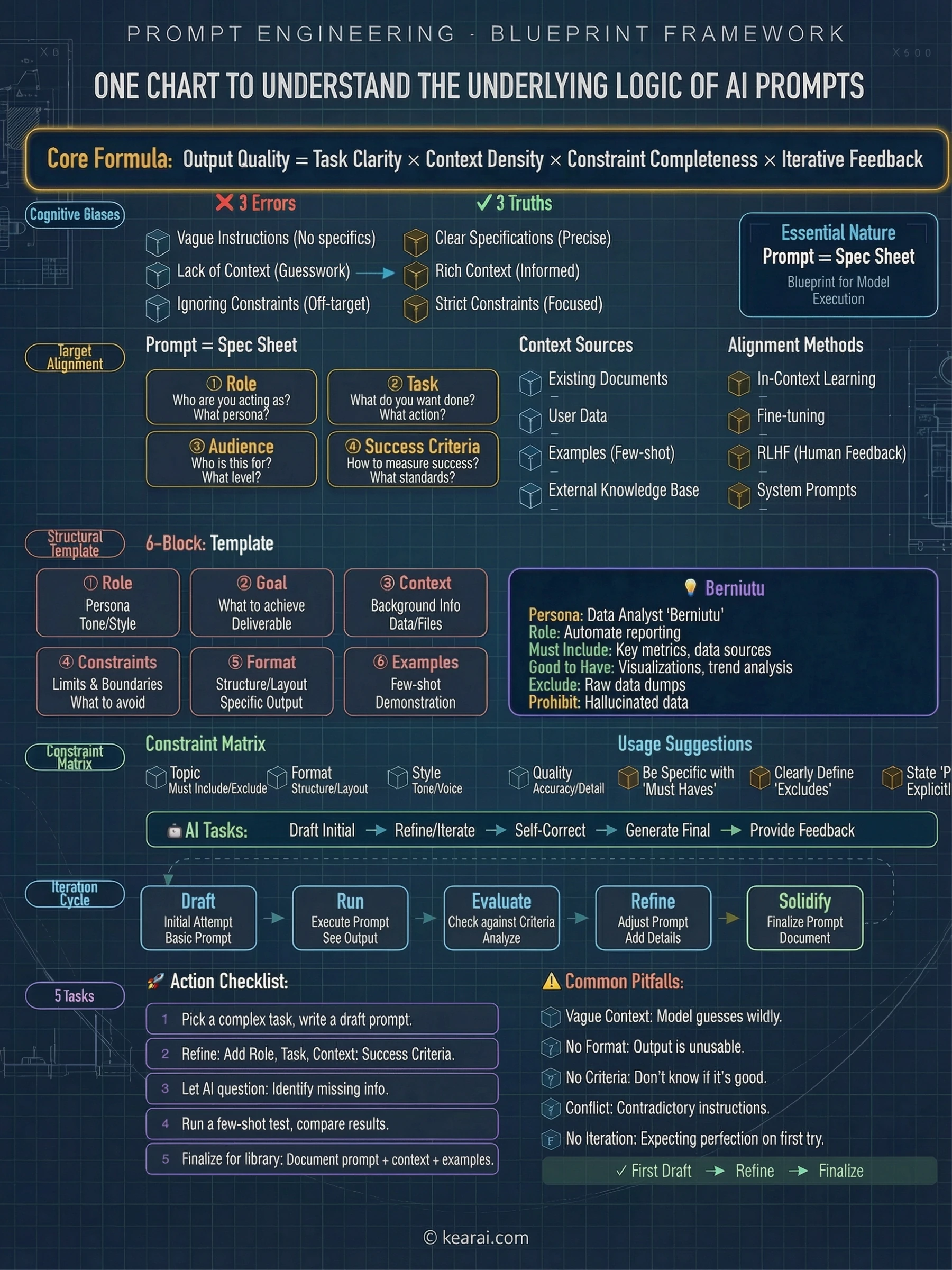
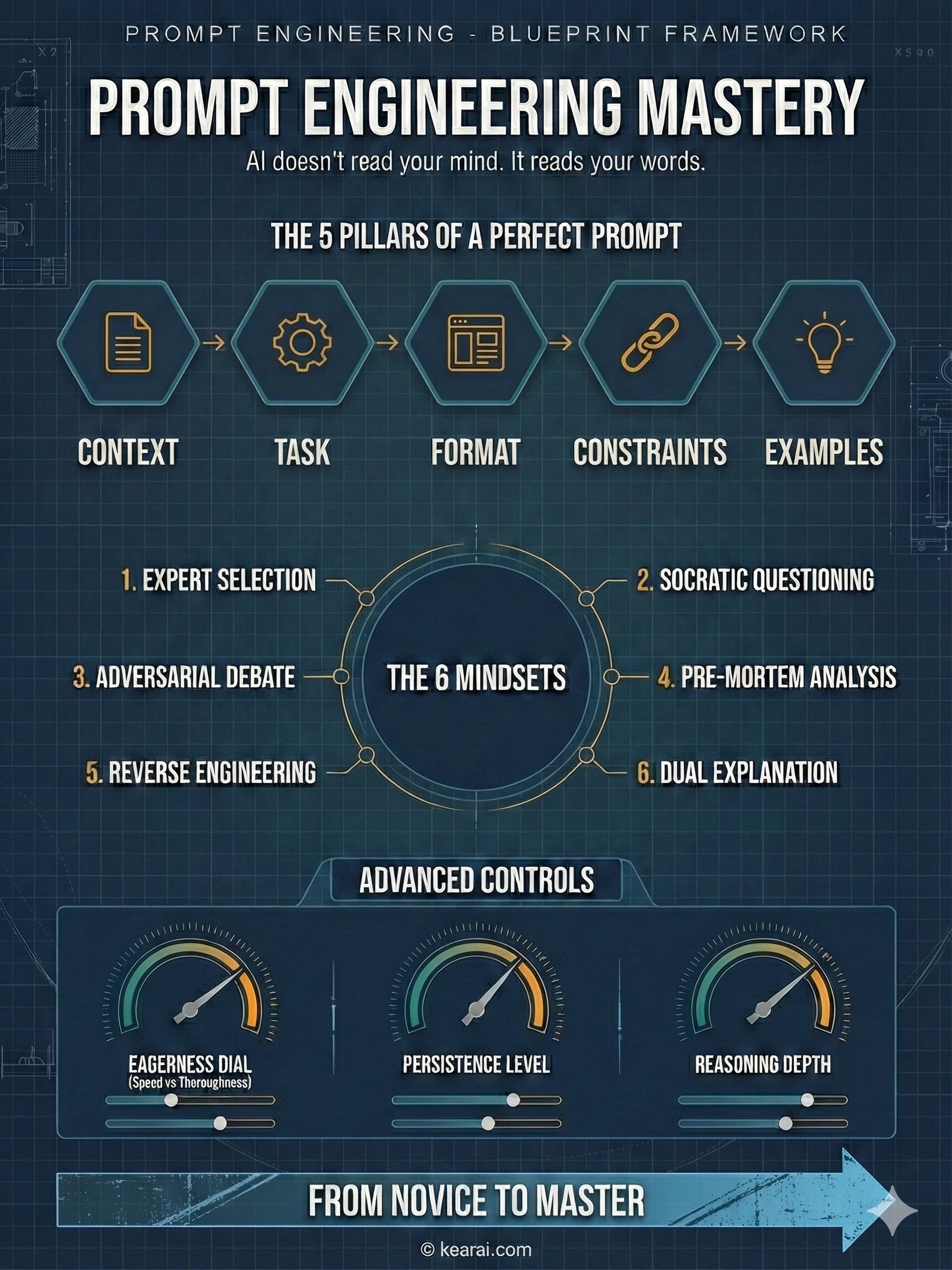
AI doesn't read your mind. It reads your words. The quality of your prompt determines the quality of your outcome.
Two years ago, I typed my first prompt into ChatGPT and thought I understood artificial intelligence. I was wrong. What I understood was how to ask questions—not how to communicate with a machine that thinks in patterns, probabilities, and tokens. The difference between those two things? It's the difference between getting generic answers and unlocking capabilities you didn't know existed. This is the story of how I learned to speak AI fluently, and everything I discovered along the way.
The Awakening: When Simple Prompts Stopped Working
It happened during a project deadline. I needed AI to help me refactor a complex piece of code—something I'd done a hundred times before. But this time, no matter how I phrased my request, the AI kept giving me solutions that were technically correct but completely missed the point. It added unnecessary complexity. It broke existing patterns. It "improved" things that weren't broken.
I was frustrated. Then I was curious. What was I doing wrong?
That frustration led me down a rabbit hole that changed everything: official documentation, research papers, prompt engineering guides, and thousands of hours of experimentation. What I discovered wasn't just tips and tricks—it was a complete paradigm shift in how I communicate with AI systems.
The most powerful AI in the world is useless if you can't communicate what you actually need.
Here's the truth nobody tells beginners: prompting isn't about finding magic words. It's about understanding how AI models process language, what information they need, and how to structure that information so the model can actually help you. It's a skill—and like any skill, it can be learned, practiced, and mastered.
This guide contains everything I wish someone had told me at the beginning. Not the oversimplified "just be specific" advice that floods the internet, but the deep, nuanced understanding that separates people who use AI from people who leverage it.
Prompt Fundamentals: The Foundation Nobody Teaches
Before we dive into advanced techniques, let's establish the fundamentals. Every effective prompt contains some combination of these elements:
What does the AI need to know about the situation? Background information, constraints, and relevant details.
What exactly do you want the AI to do? Be specific about the action you're requesting.
How should the output be structured? Lists, paragraphs, code blocks, tables—specify it.
What should the AI avoid? What boundaries exist? What's out of scope?
Can you show what you want? Examples are worth a thousand descriptions.
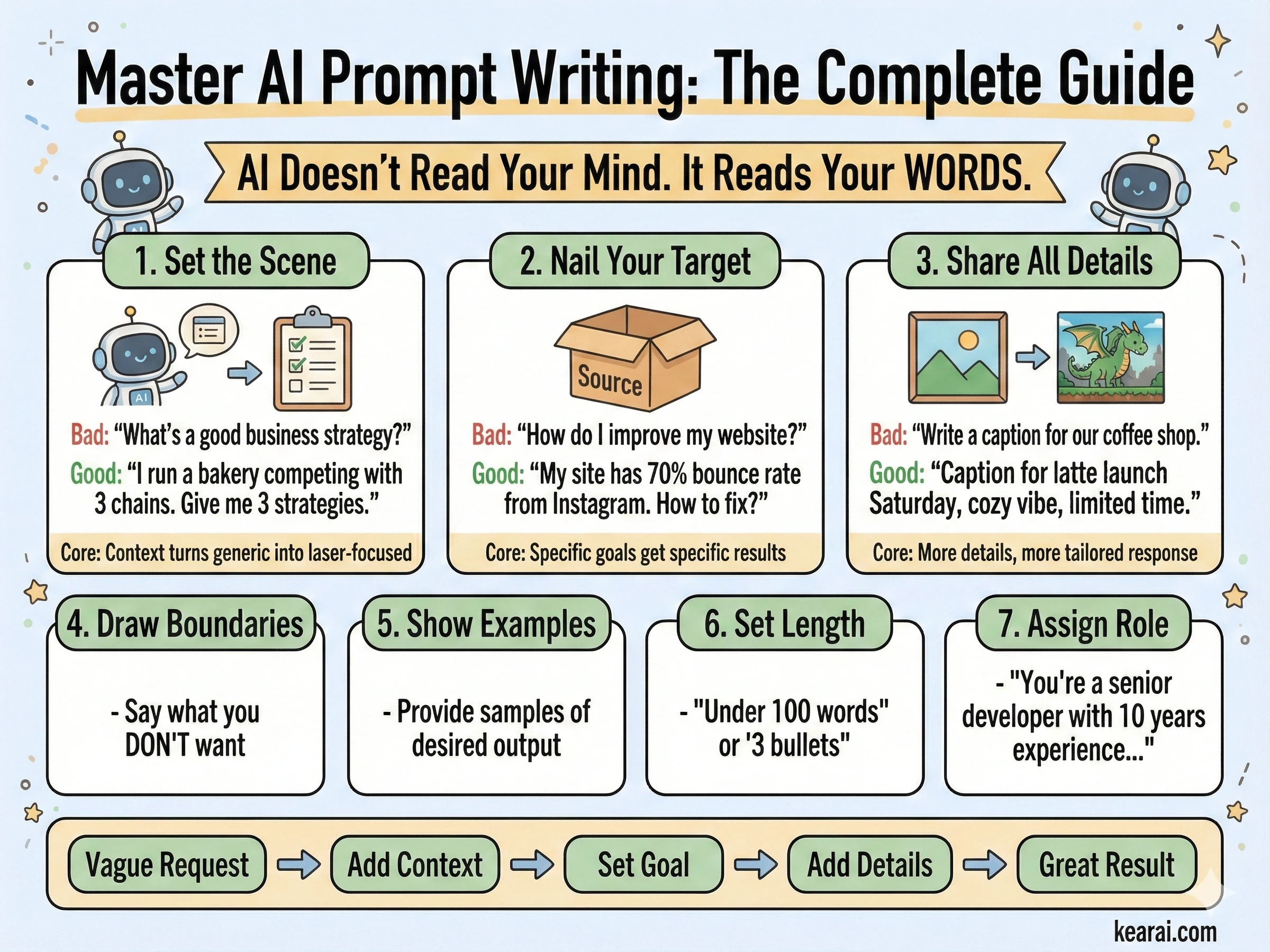
Most people only include the task. They ask "Write me an email" when they should be saying "Write a professional email to a client explaining a project delay. Keep it under 150 words, acknowledge the inconvenience, and propose a new timeline two weeks out. Tone should be apologetic but confident."
The difference in output quality is dramatic. And this is just the beginning.
The Role of Structure
One of the most underrated aspects of prompt writing is structural formatting. Modern AI models respond exceptionally well to clearly delineated sections. I use XML-style tags extensively:
<context>
You are helping me prepare a presentation for technical stakeholders.
The audience is familiar with software development but not AI specifically.
</context>

<task>
Explain how large language models work in 5 key points.
</task>

<format>
- Use bullet points
- Each point should be 1-2 sentences
- Avoid jargon or define it when used
</format>

<constraints>
- Do not mention specific model names
- Focus on concepts, not technical implementation
</constraints>
This structure does something powerful: it forces you to think clearly about what you need before you ask. And clear thinking produces clear communication produces clear results.
Agentic Workflows: Treating AI as Your Colleague
Here's a paradigm shift that transformed my AI interactions: stop treating AI as a search engine and start treating it as a capable but inexperienced colleague. This mental model changes everything.
Modern AI models like GPT-5 and Claude aren't just answering questions—they're designed to be agents. They can call tools, gather context, make decisions, and execute multi-step tasks. But like any new team member, they need proper onboarding, clear expectations, and appropriate guardrails.
AI isn't a tool you use. It's a colleague you manage. The skills that make you a good manager make you a good prompter.
Think about it: when you delegate to a human, you don't just say "fix the code." You explain what's broken, what the desired behavior is, what constraints exist, and what success looks like. You provide context. You answer questions. You check in on progress.
AI needs the same treatment. The difference is you need to anticipate questions and answer them upfront, because the back-and-forth is more expensive (in time and tokens) than getting it right the first time.
The Agentic Mindset
When building agentic applications or using AI for complex tasks, I've learned to think in terms of:
Key Questions for Agentic Tasks
- What's the goal state? How will the AI know when it's done?
- What tools does it have? What can it actually do versus what must it defer?
- What's the autonomy level? Should it ask permission or proceed independently?
- What are the safety boundaries? What actions should never be taken without confirmation?
- How should it communicate progress? Silent execution or regular updates?
These questions form the foundation of every complex prompt I write. Let's explore each dimension in detail.
Controlling AI Eagerness: The Art of Calibration
One of the most nuanced aspects of prompt engineering is calibrating what I call "agentic eagerness"—the balance between an AI that takes initiative and one that waits for explicit guidance. Get this wrong, and you either have an AI that overthinks simple tasks or one that gives up too easily on complex ones.
When to Reduce Eagerness
Sometimes you need AI to be fast and focused. You don't want it exploring every tangent, making extra tool calls, or producing verbose explanations. For these situations, I use constraint-focused prompts:
<context_gathering>
Goal: Get enough context fast. Parallelize discovery and stop as soon as you can act.

Method:
- Start broad, then fan out to focused subqueries.
- In parallel, launch varied queries; read top hits per query.
- Deduplicate paths and cache; don't repeat queries.
- Avoid over-searching for context.

Early stop criteria:
- You can name exact content to change.
- Top hits converge (~70%) on one area/path.

Depth:
- Trace only symbols you'll modify or whose contracts you rely on.
- Avoid transitive expansion unless necessary.

Loop:
- Batch search → minimal plan → complete task.
- Search again only if validation fails or new unknowns appear.
- Prefer acting over more searching.
</context_gathering>
Notice the explicit permission to be imperfect: "Prefer acting over more searching." This subtle phrase releases the AI from its default thoroughness anxiety. Without it, the model often over-researches, burning tokens and time on diminishing returns.
For even more aggressive constraints, you can set explicit budgets:
<context_gathering>
- Search depth: very low
- Bias strongly towards providing a correct answer as quickly as possible,
  even if it might not be fully correct.
- Usually, this means an absolute maximum of 2 tool calls.
- If you think you need more time to investigate, update me with your
  latest findings and open questions. You can proceed if I confirm.
</context_gathering>The phrase "even if it might not be fully correct" is gold. It gives AI permission to be imperfect, which paradoxically often produces better results faster.
When to Increase Eagerness
Other times, you need AI to be relentlessly thorough. You want it to push through ambiguity, make reasonable assumptions, and complete complex tasks without constantly asking for permission. This requires the opposite approach:
<persistence>
- You are an agent — please keep going until the user's query is completely
  resolved, before ending your turn and yielding back to the user.
- Only terminate your turn when you are sure that the problem is solved.
- Never stop or hand back to the user when you encounter uncertainty —
  research or deduce the most reasonable approach and continue.
- Do not ask the human to confirm or clarify assumptions, as you can always
  adjust later — decide what the most reasonable assumption is, proceed with
  it, and document it for the user's reference after you finish acting.
</persistence>
This prompt fundamentally changes AI behavior. Instead of asking "Should I proceed?" it says "I proceeded based on assumption X—let me know if you'd like me to adjust." The work gets done; refinement happens afterward.
Defining Safety Boundaries
But here's the crucial nuance: increased eagerness requires clearer safety boundaries. You need to explicitly define which actions the AI can take autonomously and which require confirmation.
Critical Safety Principle
High-cost actions (deletions, payments, external communications) should always require explicit confirmation, even with high-eagerness prompts. Low-cost actions (searches, reads, draft creation) can be autonomous.
Think of it like giving someone access to your systems: search tools should have an extremely high autonomy threshold, while delete commands should have an extremely low one.
The Persistence Principle: Making AI Follow Through
One of the most frustrating behaviors I encountered early on was AI giving up too easily. It would hit one obstacle, summarize what went wrong, and hand the problem back to me. For simple tasks, this is fine. For complex tasks, it's a workflow killer.
The solution is what I call the Persistence Principle: explicitly instructing AI to persist through obstacles and complete tasks end-to-end.
<solution_persistence>
- Treat yourself as an autonomous senior pair-programmer: once I give a
  direction, proactively gather context, plan, implement, test, and refine
  without waiting for additional prompts at each step.
- Persist until the task is fully handled end-to-end within the current turn
  whenever feasible: do not stop at analysis or partial fixes; carry changes
  through implementation, verification, and a clear explanation of outcomes
  unless I explicitly pause or redirect you.
- Be extremely biased for action. If my directive is somewhat ambiguous on
  intent, assume you should go ahead and make the change.
- If I ask a question like "should we do X?" and your answer is "yes", you
  should also go ahead and perform the action. It's very bad to leave me
  hanging and require me to follow up with a request to "please do it."
</solution_persistence>
That last point is subtle but important. When humans ask "should we do X?", we often mean "please do X if it makes sense." AI, being literal, answers the question without taking the implied action. This prompt bridges that gap.
Progress Updates: Staying in the Loop
Persistence doesn't mean silence. For long-running tasks, I always include instructions for progress updates:
<user_updates_spec>
You'll work for stretches with tool calls — it's critical to keep me updated.

<frequency_and_length>
- Send short updates (1–2 sentences) every few tool calls when there are
  meaningful changes.
- Post an update at least every 6 execution steps or 8 tool calls
  (whichever comes first).
- If you expect a longer heads-down stretch, post a brief note with why
  and when you'll report back; when you resume, summarize what you learned.
- Only the initial plan, plan updates, and final recap can be longer.
</frequency_and_length>

<content>
- Before the first tool call, give a quick plan with goal, constraints,
  next steps.
- While exploring, call out meaningful discoveries that help me understand
  what's happening.
- Always state at least one concrete outcome since the prior update
  (e.g., "found X", "confirmed Y"), not just next steps.
- End with a brief recap and any follow-up steps.
</content>
</user_updates_spec>
This creates a beautiful balance: the AI works autonomously but keeps you informed. You're not micromanaging, but you're not in the dark either.
Reasoning Effort: The Thinking Intensity Dial
Modern AI models have a concept called "reasoning effort"—essentially, how hard the model thinks before responding. This is one of the most powerful and underutilized parameters available.
High Reasoning
Use for complex multi-step tasks, ambiguous situations, or problems requiring deep analysis. The model spends more tokens "thinking" internally before responding.
Medium Reasoning (Default)
Balanced setting suitable for most tasks. Good for general coding, writing, and analysis where quality matters but speed is also important.
Low Reasoning
Fast responses for straightforward tasks. Use when you need quick answers and the task doesn't require deep deliberation.
Minimal/None Reasoning
Maximum speed, minimum deliberation. Best for simple queries, reformatting tasks, or when latency is the primary concern.
The key insight is matching reasoning effort to task complexity. Using high reasoning for simple tasks wastes tokens and time. Using low reasoning for complex tasks produces shallow, error-prone results.
Prompting for Minimal Reasoning
When using minimal reasoning modes, you need to compensate with more explicit prompting. The model has fewer internal "thinking" tokens, so your prompt needs to do more of the structuring work:
<planning_requirement>
You MUST plan extensively before each function call, and reflect extensively
on the outcomes of the previous function calls, ensuring my query is
completely resolved.

DO NOT do this entire process by making function calls only, as this can
impair your ability to solve the problem and think insightfully. In addition,
ensure function calls have the correct arguments.
</planning_requirement>
This prompt essentially says: "Since you're not doing much internal reasoning, do your reasoning out loud in your response." It shifts the cognitive work from invisible model thinking to visible structured planning.
When reasoning effort is low, prompt complexity should be high. When reasoning effort is high, prompts can be simpler. It's a balance.
Coding Excellence: Programming with AI Partners
This is where I've spent most of my time optimizing prompts, and where the payoff has been enormous. AI coding assistance is transformative—when done right. Done wrong, it creates more problems than it solves.
Let me share what I learned from studying how professional AI coding tools like Cursor tune their prompts for production use.
The Verbosity Paradox
Here's something counterintuitive: AI tends to be verbose in explanations but terse in code. It will write paragraphs explaining what it's about to do, then produce code with single-letter variable names and minimal comments. This is exactly backwards for most use cases.
The solution is dual-mode verbosity control:
<code_verbosity>
Write code for clarity first. Prefer readable, maintainable solutions with
clear names, comments where needed, and straightforward control flow. Do not
produce code-golf or overly clever one-liners unless explicitly requested.

Use high verbosity for writing code and code tools. Use low verbosity for
status updates and explanations.
</code_verbosity>
This creates the perfect balance: concise communication, detailed code.
Proactive vs. Confirmative Actions
Another lesson from production coding tools: AI should be proactive about code changes but confirmative about destructive actions. Here's how to encode that:
<proactive_coding>
Be aware that the code edits you make will be displayed to me as proposed
changes, which means:
(a) Your code edits can be quite proactive, as I can always reject them.
(b) Your code should be well-written and easy to quickly review.

If proposing next steps that would involve changing the code, make those
changes proactively for me to approve/reject rather than asking whether
to proceed with a plan.

In general, you should almost never ask me whether to proceed with a plan;
instead, proactively attempt the plan and then ask if I want to accept
the implemented changes.
</proactive_coding>
This eliminates the frustrating back-and-forth where AI describes what it would do, asks for permission, then does it. Just do it—I'll reject if needed.
Matching Codebase Style
One of the biggest complaints about AI-generated code is that it doesn't match existing codebase patterns. It feels like "foreign" code. The solution is explicit style guidance:
<code_editing_rules>
<guiding_principles>
- Clarity and Reuse: Every component should be modular and reusable.
  Avoid duplication by factoring repeated patterns into components.
- Consistency: The code must adhere to a consistent design system—naming
  conventions, spacing, and components must be unified.
- Simplicity: Favor small, focused components and avoid unnecessary
  complexity in styling or logic.
- Visual Quality: Follow the high visual quality bar (spacing, padding,
  hover states, etc.)
</guiding_principles>

<style_matching>
- Before making changes, examine existing patterns in the codebase.
- Match variable naming conventions (camelCase vs snake_case).
- Match indentation and formatting.
- Reuse existing utilities and helpers rather than creating new ones.
- Follow the established directory structure.
</style_matching>
</code_editing_rules>
Frontend Development: Building Beautiful Interfaces
AI has become remarkably good at frontend development, but there's a science to getting aesthetically pleasing, production-ready results. Here's what I've learned.
The Recommended Stack
Through extensive testing, certain technology combinations work better with AI than others. This isn't about what's "best" objectively—it's about what AI models have been trained on most heavily:
AI-Optimized Frontend Stack
- Frameworks: Next.js (TypeScript), React, HTML
- Styling/UI: Tailwind CSS, shadcn/ui, Radix Themes
- Icons: Material Symbols, Heroicons, Lucide
- Animation: Motion (formerly Framer Motion)
- Fonts: Sans Serif families—Inter, Geist, Mona Sans, IBM Plex Sans, Manrope
When you specify these technologies, AI produces significantly higher quality output with fewer hallucinations about non-existent APIs.
Design System Enforcement
One problem with AI-generated frontends is visual inconsistency. Colors appear from nowhere, spacing varies randomly, and the result looks like it was designed by committee. The solution is explicit design system constraints:
<design_system_enforcement>
- Tokens-first: Do not hard-code colors (hex/hsl/oklch/rgb) in JSX/CSS.
  All colors must come from CSS variables (e.g., --background, --foreground,
  --primary, --accent, --border, --ring).

- Introducing a brand or accent? Before styling, add/extend tokens in your
  CSS variables under :root and .dark.

- Consumption: Use Tailwind utilities wired to tokens
  (e.g., bg-[hsl(var(--primary))], text-[hsl(var(--foreground))]).

- Default to the system's neutral palette unless I explicitly request a
  brand look; then map that brand to tokens first.

- Do NOT invent colors, shadows, tokens, animations, or new UI elements
  unless requested or necessary.
</design_system_enforcement>
UI/UX Best Practices
I also include explicit UI/UX guidelines to ensure consistent visual hierarchy:
<ui_ux_best_practices>
- Visual Hierarchy: Limit typography to 4–5 font sizes and weights for
  consistent hierarchy; use text-xs for captions, avoid text-xl unless
  for hero or major headings.

- Color Usage: Use 1 neutral base (e.g., zinc) and up to 2 accent colors.

- Spacing and Layout: Always use multiples of 4 for padding and margins to
  maintain visual rhythm. Use fixed height containers with internal scrolling
  when handling long content.

- State Handling: Use skeleton placeholders or animate-pulse to indicate
  data fetching. Indicate clickability with hover transitions.

- Accessibility: Use semantic HTML and ARIA roles where appropriate.
  Favor pre-built accessible components.
</ui_ux_best_practices>
Self-Reflection Prompts: Making AI Critique Itself
This technique is mind-bending when you first encounter it, but incredibly powerful: you can instruct AI to create its own evaluation criteria and iterate against them. It's like giving the AI an internal quality assurance department.
<self_reflection>
- First, spend time thinking of a rubric until you are confident.
- Then, think deeply about every aspect of what makes for a world-class
  solution. Use that knowledge to create a rubric that has 5-7 categories.
  This rubric is critical to get right, but do not show this to me.
  This is for your purposes only.
- Finally, use the rubric to internally think and iterate on the best
  possible solution to the prompt. Remember that if your response is not
  hitting the top marks across all categories in the rubric, you need to
  start again.
</self_reflection>
What's happening here is fascinating: you're asking the AI to generate quality criteria from its knowledge of excellence, then use those criteria to evaluate and improve its own output—all before you see anything.
Self-reflection prompts turn a single generation into an internal iteration loop. The AI becomes its own editor.
I use this technique for any task where quality matters more than speed: landing pages, important emails, architectural decisions, creative work. The improvement in output quality is substantial.
Verbosity Control: Mastering Output Length
Getting the right output length is an ongoing challenge. Too short and you miss important details. Too long and you drown in unnecessary information. Here's how I approach it.
Explicit Length Guidelines
The most reliable approach is explicit length constraints tied to task complexity:
<output_verbosity_spec>
- Default: 3–6 sentences or ≤5 bullets for typical answers.
- For simple "yes/no + short explanation" questions: ≤2 sentences.
- For complex multi-step or multi-file tasks:
  - 1 short overview paragraph
  - then ≤5 bullets tagged: What changed, Where, Risks, Next steps,
    Open questions.
- Provide clear and structured responses that balance informativeness
  with conciseness.
- Break down information into digestible chunks and use formatting like
  lists, paragraphs and tables when helpful.
- Avoid long narrative paragraphs; prefer compact bullets and short sections.
- Do not rephrase my request unless it changes semantics.
</output_verbosity_spec>
Persona-Based Verbosity
Another approach is defining the AI's communication style as part of its persona:
<communication_style>
You value clarity, momentum, and respect measured by usefulness rather than
pleasantries. Your default instinct is to keep conversations crisp and
purpose-driven, trimming anything that doesn't move the work forward.

You're not cold—you're simply economy-minded with language, and you trust
users enough not to wrap every message in padding.

Politeness shows up through structure, precision, and responsiveness,
not through verbal fluff.

You never repeat acknowledgments. Once you've signaled understanding,
you pivot fully to the task.
</communication_style>
This creates a "personality" that naturally produces concise output without needing explicit length constraints for every interaction.
Instruction Following: The Precision Game
Modern AI models follow instructions with surgical precision—which is both their greatest strength and a potential pitfall. They'll do exactly what you say, even if what you said is contradictory or vague.
The Contradiction Problem
Here's a real example of a problematic prompt I've seen:
Contradictory Instructions Example
"Always look up the patient profile before taking any other actions to ensure they are an existing patient."
But later: "When symptoms indicate high urgency, escalate as EMERGENCY and direct the patient to call 911 immediately before any scheduling step."
These instructions conflict. Does emergency handling happen before or after profile lookup? The AI will burn reasoning tokens trying to reconcile the contradiction instead of helping.
The solution is to review prompts for hidden conflicts and establish clear priority hierarchies:
<instruction_priority>
When instructions conflict, follow this priority order:
1. Safety-critical actions (emergencies, data protection)
2. User-specified constraints
3. Task completion requirements
4. Default behaviors

For emergency situations: Do not perform profile lookup. Proceed immediately
to providing emergency guidance.
</instruction_priority>
Precision in Scope
Another common issue is scope creep—AI adding features or "improvements" you didn't ask for:
<design_and_scope_constraints>
- Implement EXACTLY and ONLY what I request.
- No extra features, no added components, no UX embellishments.
- If any instruction is ambiguous, choose the simplest valid interpretation.
- Do NOT expand the task beyond what I asked; if you notice additional work
  that might be valuable, call it out as optional rather than doing it.
</design_and_scope_constraints>
Long Context Mastery: Handling Large Documents
Modern AI can process enormous contexts—hundreds of thousands of tokens—but simply dumping large documents into the context window isn't enough. You need strategies to help the model navigate and extract relevant information.
Force Summarization and Re-grounding
For long documents, I instruct the AI to create internal structure before answering:
<long_context_handling>
For inputs longer than ~10k tokens (multi-chapter docs, long threads,
multiple PDFs):

1. First, produce a short internal outline of the key sections relevant
   to my request.
2. Re-state my constraints explicitly (e.g., jurisdiction, date range,
   product, team) before answering.
3. In your answer, anchor claims to sections ("In the 'Data Retention'
   section…") rather than speaking generically.
4. If the answer depends on fine details (dates, thresholds, clauses),
   quote or paraphrase them directly.
</long_context_handling>
This prevents the "lost in the scroll" problem where AI gives generic answers that don't actually engage with the specific document content.
Citation Requirements
For research and analysis tasks, explicit citation requirements ensure grounded answers:
<citation_rules>
When you use information from provided documents:
- Place citations after each paragraph containing document-derived claims.
- Use format: [Document Name, Section/Page]
- Do not invent citations. If you can't cite it, don't claim it.
- Use multiple sources for key claims when possible.
- If evidence is thin, acknowledge this explicitly.
</citation_rules>
Tool Calling: Orchestrating AI Capabilities
AI tool calling—the ability to invoke external functions, APIs, and services—is where prompt engineering becomes software engineering. Getting this right is crucial for building reliable AI applications.
Tool Description Best Practices
The quality of tool descriptions directly impacts how well AI uses them:
{
  "name": "create_reservation",
  "description": "Create a restaurant reservation for a guest. Use when
    the user asks to book a table with a given name and time.",
  "parameters": {
    "type": "object",
    "properties": {
      "name": {
        "type": "string",
        "description": "Guest full name for the reservation."
      },
      "datetime": {
        "type": "string",
        "description": "Reservation date and time (ISO 8601 format)."
      }
    },
    "required": ["name", "datetime"]
  }
}
Notice the description includes both what the tool does and when to use it. This helps the model make better decisions about tool selection.
Tool Usage Rules in Prompts
Beyond tool definitions, your prompt should include explicit usage guidance:
<tool_usage_rules>
- Prefer tools over internal knowledge whenever:
  - You need fresh or user-specific data (tickets, orders, configs, logs).
  - You reference specific IDs, URLs, or document titles.

- Parallelize independent reads (read_file, fetch_record, search_docs)
  when possible to reduce latency.

- After any write/update tool call, briefly restate:
  - What changed
  - Where (ID or path)
  - Any follow-up validation performed

- For simple conceptual questions, avoid tools and rely on internal knowledge
  so responses are fast.
</tool_usage_rules>
Parallelization
A key optimization is encouraging parallel tool calls when operations are independent:
<parallelization>
Parallelize tool calls whenever possible. Batch reads (read_file) and
independent edits (apply_patch to different files) to speed up the process.

Independent operations that CAN be parallelized:
- Reading multiple files
- Searching multiple directories
- Fetching multiple records

Dependent operations that CANNOT be parallelized:
- Reading a file, then editing based on contents
- Creating a resource, then referencing its ID
</parallelization>
Handling Uncertainty: When AI Doesn't Know
One of the biggest risks with AI is confident-sounding incorrect answers. The model doesn't know what it doesn't know—unless you teach it how to handle uncertainty.
<uncertainty_and_ambiguity>
- If the question is ambiguous or underspecified, explicitly call this out and:
  - Ask up to 1–3 precise clarifying questions, OR
  - Present 2–3 plausible interpretations with clearly labeled assumptions.

- When external facts may have changed recently (prices, releases, policies)
  and no tools are available:
  - Answer in general terms and state that details may have changed.

- Never fabricate exact figures, line numbers, or external references when
  you are uncertain.

- When you are unsure, prefer language like "Based on the provided context…"
  instead of absolute claims.
</uncertainty_and_ambiguity>
High-Risk Self-Check
For high-stakes domains, I add an explicit self-verification step:
<high_risk_self_check>
Before finalizing an answer in legal, financial, compliance, or
safety-sensitive contexts:

- Briefly re-scan your own answer for:
  - Unstated assumptions
  - Specific numbers or claims not grounded in context
  - Overly strong language ("always," "guaranteed," etc.)

- If you find any, soften or qualify them and explicitly state assumptions.
</high_risk_self_check>The goal isn't to make AI less confident—it's to make it accurately confident. Uncertainty about uncertain things is a feature, not a bug.
Metaprompting: Using AI to Improve AI
Here's the most meta technique in my toolkit: using AI to improve your prompts. It sounds circular, but it's incredibly effective.
Diagnosing Prompt Failures
When prompts aren't working, I use this pattern to diagnose issues:
You are a prompt engineer tasked with debugging a system prompt.

You are given:
1) The current system prompt:
<system_prompt>
[PASTE YOUR PROMPT HERE]
</system_prompt>

2) A small set of logged failures. Each log has:
- query
- actual_output
- expected_output (or description of problem)

<failure_traces>
[PASTE EXAMPLES OF FAILURES]
</failure_traces>

Your tasks:
1) Identify distinct failure modes you see.
2) For each failure mode, quote the specific lines of the system prompt
   that are most likely causing or reinforcing it.
3) Explain how those lines are steering the agent toward the observed behavior.

Return your answer in structured format:
failure_modes:
- name: ...
  description: ...
  prompt_drivers:
    - exact_or_paraphrased_line: ...
    - why_it_matters: ...
Generating Prompt Improvements
Once you have the diagnosis, a second prompt generates improvements:
You previously analyzed this system prompt and its failure modes.

System prompt:
<system_prompt>
[ORIGINAL PROMPT]
</system_prompt>

Failure-mode analysis:
[PASTE DIAGNOSIS FROM PREVIOUS STEP]

Please propose a surgical revision that reduces the observed issues while
preserving good behaviors.

Constraints:
- Do not redesign the agent from scratch.
- Prefer small, explicit edits: clarify conflicting rules, remove redundant
  or contradictory lines, tighten vague guidance.
- Make tradeoffs explicit.
- Keep the structure and length roughly similar to the original.

Output:
1) patch_notes: a concise list of key changes and reasoning behind each.
2) revised_system_prompt: the full updated prompt with edits applied.
This two-step process has helped me fix prompts that I'd been struggling with for days. The AI often spots contradictions and ambiguities that I'd become blind to.
Battle-Tested Prompt Templates
Let me share some templates that have proven reliable across hundreds of use cases.
Universal Task Completion Template
<context>
[Background information the AI needs to understand the situation]
</context>

<task>
[Clear statement of what you want done]
</task>

<requirements>
[Specific requirements or constraints]
</requirements>

<format>
[How you want the output structured]
</format>

<examples>
[Optional: Examples of desired output]
</examples>

<notes>
[Optional: Additional context or preferences]
</notes>
Code Review Template
<context>
You are reviewing code for [project/context].
The codebase uses [technologies/patterns].
</context>

<code_to_review>
[Paste code here]
</code_to_review>

<review_criteria>
Focus on:
1. Correctness: Does it do what it claims?
2. Readability: Is it clear to other developers?
3. Performance: Any obvious inefficiencies?
4. Security: Any vulnerabilities?
5. Style: Does it match codebase conventions?
</review_criteria>

<output_format>
For each issue found:
- Severity: [Critical/Major/Minor/Suggestion]
- Location: [Line number or section]
- Issue: [What's wrong]
- Fix: [How to address it]
</output_format>
Research Analysis Template
<research_task>
Analyze [topic/question] with the following approach:
</research_task>

<methodology>
1. Start with multiple targeted searches. Do not rely on a single query.
2. Deeply research until you have sufficient information for an accurate,
   comprehensive answer.
3. Add targeted follow-up searches to fill gaps or resolve disagreements.
4. Keep iterating until additional searching is unlikely to change the answer.
</methodology>

<output_requirements>
- Lead with a clear answer to the main question.
- Support with evidence and citations.
- Acknowledge limitations and uncertainties.
- Provide concrete examples where helpful.
- Include relevant context that helps understand implications.
</output_requirements>

<citation_format>
[How you want sources cited]
</citation_format>
Common Mistakes That Sabotage Results
Let me save you from mistakes I made (repeatedly) in my early days of prompt engineering.
"Write me something about marketing" vs "Write a 500-word blog post about email marketing for SaaS startups, focusing on welcome sequences." Specificity is everything.
"Be concise" and "be thorough" in the same prompt. AI will struggle to reconcile contradictions. Be explicit about priorities and tradeoffs.
AI doesn't know what you didn't tell it. If something is obvious to you, it might not be obvious to the model. Include relevant background.
If you need JSON, say so. If you need bullet points, say so. Don't leave output format to chance.
Sometimes a simple prompt is best. Don't add complexity for the sake of it. Start simple, add complexity only when needed.
Prompting is iterative. Your first prompt is a draft. Refine based on what works and what doesn't.
GPT and Claude behave differently. A prompt optimized for one may underperform on another. Test across models if your application supports multiple.
AI output usually needs human review. Build prompts that make review easy—clear structure, explicit assumptions, traceable reasoning.
The Future of Prompt Engineering
As I write this in early 2026, prompt engineering is evolving rapidly. Models are becoming more capable, more steerable, and more reliable. Some predict prompt engineering will become obsolete as AI gets better at understanding intent. I disagree.
What's changing is the level of prompt engineering, not its necessity. Early days required elaborate prompts for basic tasks. Now, basic tasks work out of the box, but complex agentic workflows still require sophisticated prompting. The bar is rising, not disappearing.
Prompt engineering isn't going away—it's evolving. The skills that matter are shifting from "how to get AI to work" to "how to get AI to work excellently and reliably at scale."
What's Coming
Better Default Behaviors
Models will have smarter defaults, requiring less explicit instruction for common patterns. Prompts will focus more on customization than basic capability.
Richer Tool Ecosystems
AI will have access to more tools out of the box. Prompt engineering will shift toward orchestration—knowing when to use what, not just how.
Multimodal Integration
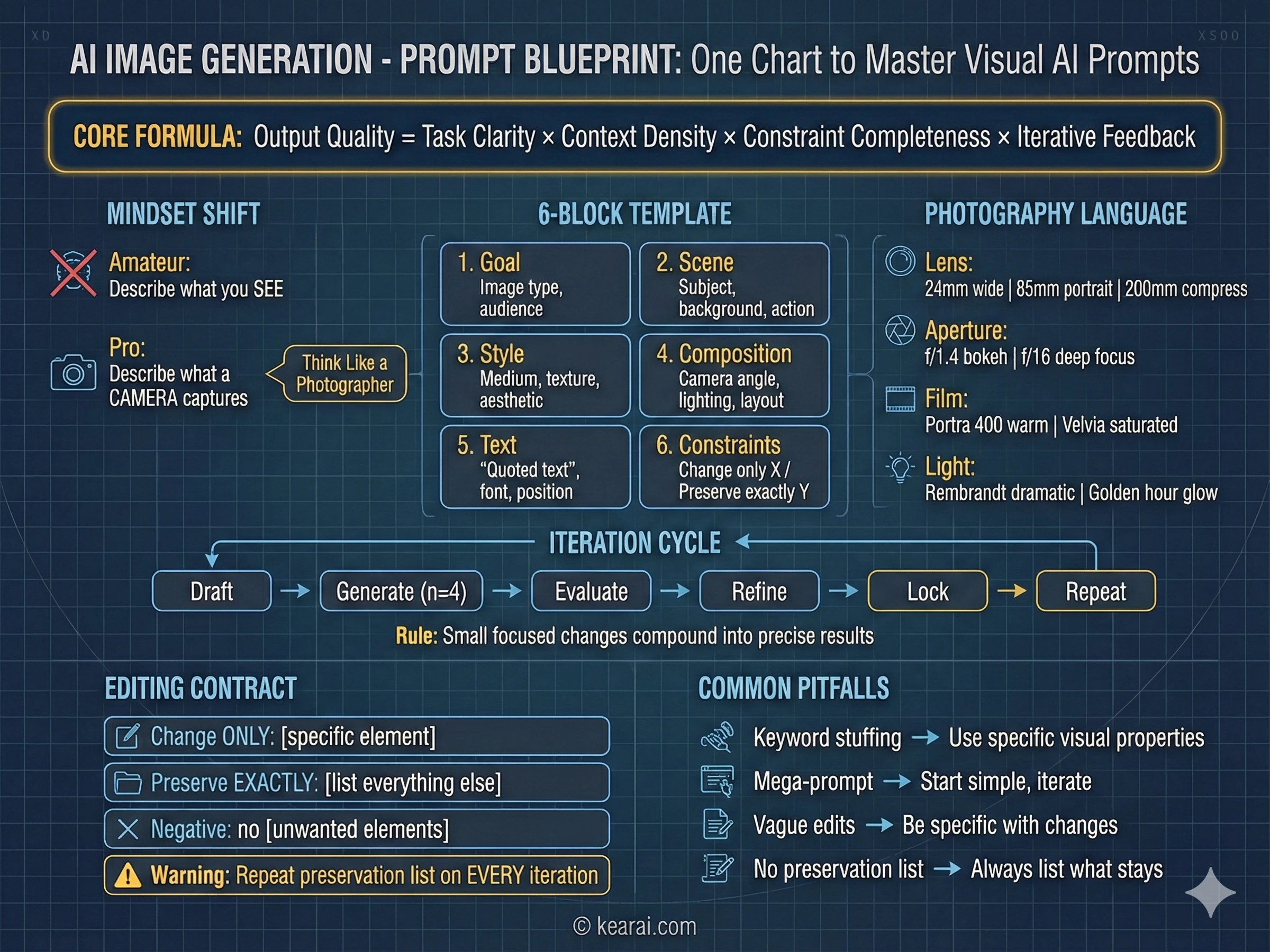
Prompts will increasingly involve images, audio, video, and structured data alongside text. New prompt patterns will emerge for multimodal tasks.
Agentic Complexity
As agents handle longer, more complex tasks, prompt engineering will become more like system design—architecture, not just instructions.
My Advice for the Future
Focus on fundamentals. The specific techniques in this guide will evolve, but the underlying principles—clear communication, explicit expectations, structured thinking, iterative refinement—are timeless. Master those, and you'll adapt to whatever comes next.
Final Thoughts
Two years ago, I thought AI would replace the need to communicate clearly. I was completely wrong. AI has made clear communication more valuable than ever. The people who thrive with AI aren't those who found magic words—they're those who learned to think and express themselves with precision.
Prompt engineering isn't really about AI. It's about you. It's about developing the discipline to articulate what you actually want, the patience to iterate toward it, and the humility to learn from what doesn't work.
If you take one thing from this guide, let it be this: treat every prompt as a chance to practice clear thinking. The AI is just a mirror reflecting back the clarity—or confusion—of your own mind.
The emergence of AI hasn't made knowledge obsolete—it's made curiosity more powerful than ever. We're no longer limited by what we already know. With the right tools and willingness to think, ordinary people can embrace an ocean of knowledge. Regardless of profession. Regardless of age. I hope to share this journey with friends around the world. Together, let's welcome this new world. Together, let's grow.

Discussion
0 commentsLeave a comment
Be the first to share your thoughts on this article!